Category: Editor Tips

  • How to Make Sure Your iPhone Photos Work On Family Cookbook Project

    How to Make Sure Your iPhone Photos Work On Family Cookbook Project

    If you have an iPhone, Apple has changed the format the camera uses to save photos on the iPhone. while this has many benefits, like taking less space for storage, it does have drawbacks, like not being compatible with non-Apple systems – like FamilyCookbookProject.com.

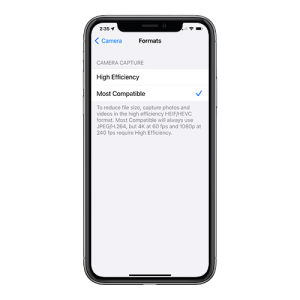
    To switch from HEIC to JPG, you must configure the camera capture format using the iPhone’s Settings app. There are two camera capture settings that you can opt for — High Efficiency and Most Compatible. The former will shoot photos in HEIC, while the latter will shoot photos in JPG.

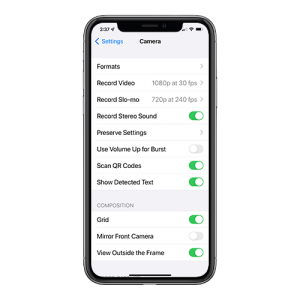
    Here is how to change the settings in your iPhone to save image as Jpegs.

    Step 1: Open the Settings app on your iPhone. Scroll down and tap on Camera. Then, tap Formats from the list of Camera settings.


    Step 2: Under Camera Capture, tap Most Compatible.

    That’s it. Your iPhone will now shoot photos in the JPG format directly.

    If you have images already saved in HEIC, there are several free websites that will convert the images for you.


    Bill Rice is founder and Co-Publisher of the Great Family Cookbook Project, a website that helps families and individuals collect and share food memories through customized printed cookbooks filled with treasured recipes. Follow us on Facebook and Pinterest!

  • Planning To Print Your Cookbook For Thanksgiving?

    Planning To Print Your Cookbook For Thanksgiving?

    Everyone who has ever cooked a Thanksgiving dinner knows it takes planning and time to have everything come out perfect at the right time.

    If you are planning on having your printed cookbooks ready for Thanksgiving, the deadline is Monday, November 1st. Plenty of time left, but you’d better get cooking!

  • Having your Cookbook Ready for the Holidays

    Having your Cookbook Ready for the Holidays

    Okay, the important question of the month: “When is the deadline to ensure Christmas delivery of My Family’s Favorite Recipes?”

    Answer: Tuesday, November 30th! There will be an extended deadline, but upgraded shipping will probably be required.

    Since personal family cookbooks make a great Christmas gift for both friends and family members, a great many people are working hard to get their cookbooks completed and ordered. That means the sooner your done and have placed your order, the sooner you will receive them!

  • Understanding Recipe Privacy

    Understanding Recipe Privacy

    When you or a contributor adds a recipe to your online cookbook, there is an option to make your recipe private. If you check this box just above the save button, your recipe will only be available to those individuals who are logged into your online cookbook. Some people choose this option when a recipe is not yet ready to be shared publicly or they simply want to limit the people who have access to it.
    However, there are many benefits to sharing your recipe publicly. Public recipes are indexed by Google and other search engines. You can access your recipes simply by entering your name and the recipe name into Google. Online access from any computer without having to remember your log in information is very convenient.
    Family Cookbook Project also searches the public recipes to look for the best recipes to be included one of the Family Cookbook Project’s “Best of” cookbooks we publish. We also promote public recipes on our Facebook pages and on Pinterest. This allows us to highlight your recipes to the other Cookbook Editors, which is truly an honor.
    We believe recipes are made to be shared, just like the dishes that are made from them. So next time you enter your favorite recipe into your Family Cookbook Project online recipe box, be sure to mark it public so it can be shared.
  • Understanding your Editor account

    Understanding your Editor account

    If you are new to Family Cookbook Project, this is a great place to start to get to know your editor account.

    Editor’s Homepage

    For most people, your homepage is set to the “Quick Start” version which features a section for Alerts and Notices, Recipes, Layout and Design, Cookbook and Account Info, Contributors, Our Blog, and Cookbook Publishing.

    Each section has a number of “quick links” on the homepage to highly used pages, but more importantly, a green button that will take you to the full set of links for that section.

    The other option for homepage is the “Full Page”. This was our original homepage and shows your contributor welcome message and photo, a table of contents of recipes, a list of contributors, and a list of newest recipes.

    In the upper right corner of your editor’s homepage is a drop down menu to select either of these pages.

    Along the top of both Editor home page’s is a black navigation bar that contains important links that will follow you on all pages of the site:

    • Cookbook Home – Takes you back to your homepage.
    • Editor Activities – Links to take you directly to a section without having to go to the homepage.
    • Add Recipe – Here is where you add your own recipes.
    • View Recipes – Several choices to see the recipes in your cookbook
    • Edit Your Info – Here is where you can change your email and password. (usernames can not be changed once the account is set up).
    • Preview Book – Here you can create a PDF proof of your cookbook to view online or download.
    • Logout – This logs you out of your account.


    Bill Rice is founder and Co-Publisher of the Great Family Cookbook Project, a website that helps families and individuals collect and share food memories through customized printed cookbooks filled with treasured recipes. Follow us on Facebook and Pinterest!

     

  • Family Cookbook Project Now Offers Hard Cover Option

    Family Cookbook Project Now Offers Hard Cover Option

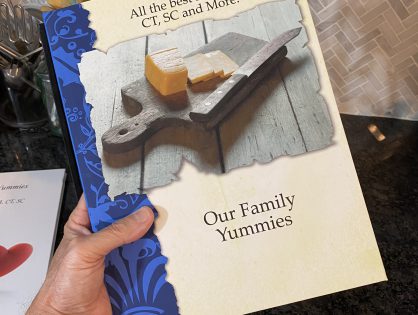
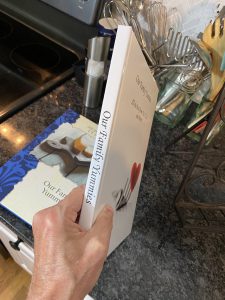
    They say you can’t judge a book by its cover, however most people do. Family Cookbook Project announces a new, upgraded cookbook cover.  You can now select a hardcover binding that includes the name of the cookbook on the spine.

    A hardcover option has been a popular request from many of our editors and you can now select that option for your cookbook under Layout & Design, Binder & Lamination Options.

    A hardcover can be applied to either an 8 1/2 x 11 cookbook or our standard 8 ½ x 5 ½ cookbook. All of our existing covers are available for hardcovers as well as custom covers that the editors design.

    The addition of a hardcover will impact the price of your cookbook by about six dollars per cookbook.  Shipping may be a bit higher with the added weight, too.

    The hardcover binding has a page limit of 250 pages. This is usually more than enough for most cookbooks to print all of your best recipes.  Let us know what you think!


  • When To Use A Multi-Part Recipe

    When To Use A Multi-Part Recipe

    Have you ever had a cake recipe that really needed a specific frosting? Or a meat recipe that required a special sauce? Wouldn’t it be great if a a recipe could have sub recipes attached to keep them together?

    Many of our editors have asked for the ability to have multiple sections or steps in recipes. We like to listen and have added it! Now you can have up to 5 “sub” recipes or steps within a recipe, each with its own set of ingredients and directions. Example? You have Carrot Cake and you want a section for the “Cake” with its ingredients and directions, then “Cream Cheese Frosting” with another set of ingredients and directions.

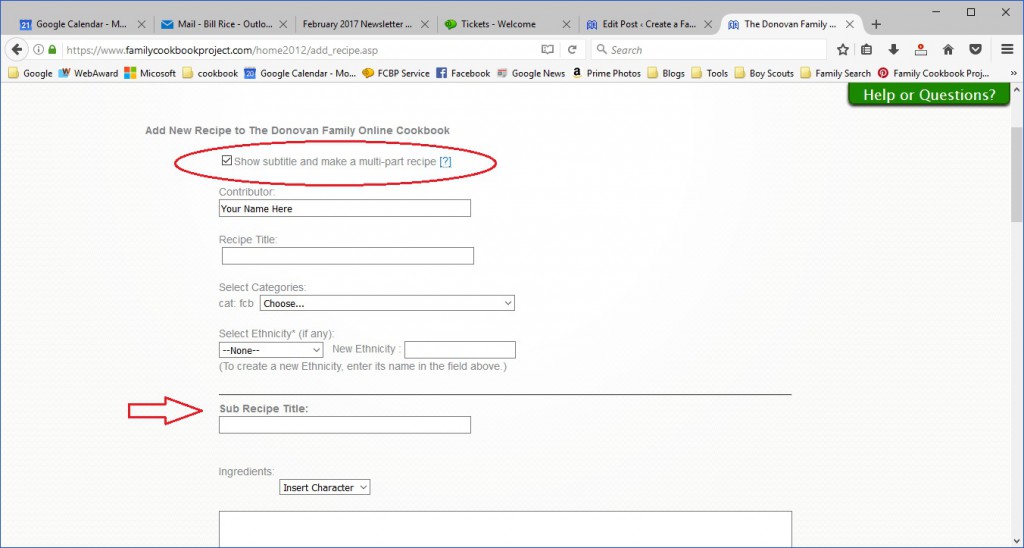
    To use this feature, simply go to Add Recipe or Edit an existing recipe. First check the box for “Show subtitle and make a multi-part recipe” right under the contributor field. This will add a field for sub-recipe title.

    Using our example above, here is where you would add your carrot cake ingredients and directions.

    Next, click on the green button to “Add new sub recipe”. This will add fields for a second set of sub recipe title, ingredients and directions for your Cream Cheese Frosting.

    You can add up to five sub recipes for your overall recipe.

    When you are done, make sure to click on the green button on the bottom of the page to save your recipe before moving on to your next recipe.


    Bill Rice is founder and Co-Publisher of the Great Family Cookbook Project, a website that helps families and individuals collect and share food memories through customized printed cookbooks filled with treasured recipes. Follow us on Facebook and Pinterest!
  • It’s Time To Start Thinking About Christmas

    It’s Time To Start Thinking About Christmas

    There is a reason why 90% of the cookbooks we print are submitted in late November and early December. Everyone knows that family cookbooks make great Christmas gifts! Everyone wants something personal and special to give to loved ones at the holidays and a family cookbook is makes the perfect gift.

    Why is Family Cookbook Project telling you this in August? Well cookbooks don’t just happen by themselves, they need to be have recipes entered, professionally design covers selected and everything proofread before they are submitted for printing.

    The time it takes to have your cookbook printed and shipped also more than doubles just before the holidays because of the sheer volume. So now is the time to put your efforts into your cookbook and have it completed and submitted for printing by the time September rolls around.


    Bill Rice is founder and Co-Publisher of the Great Family Cookbook Project, a website that helps families and individuals collect and share food memories through customized printed cookbooks filled with treasured recipes. Follow us on Facebook and Pinterest!

  • A New Take On Recipe Categories

    A New Take On Recipe Categories

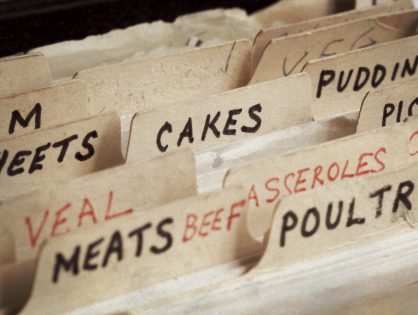
    Recipe categories help us organize our recipes in an easy to browse format within your family cookbook.

    By default, we offer eight standard recipe categories that are perfect for the majority of cookbook editors.

    List default recipe categories

    We also give you the ability to create your own categories and add them to the existing categories or to create subcategories which helps to refine the Recipes even further.

    But do you have to organize by food type? Absolutely not!

    We have seen our editors organize their recipes by many different formats other than food types.

    People – One popular way is to organize by person. When recipes are tribute to great past cooks in the family, you can have each category named for a specific person or even family. You then can use subcategories to further organize the recipes.

    Meal – Another way people organize recipes is by meal. When organizing buy breakfast, lunch, dinner you often will get editors who use multi part recipes to list the entrées and the side dishes that go with it.

    Holidays – Another popular way is to have categories for each holiday. We all have certain recipes that tend to come out only at specific holidays. By putting together a cookbook that lists all of the Thanksgiving, Christmas, family reunion, Valentine’s Day and other holiday recipes in one place, you know exactly where to go to prepare for that holiday.

    Season – another way to organize your recipe is by seasons. Some recipes are too heavy to be eaten during the summer and others have fresh ingredients that are not available in the winter.

    No matter how you organize your cookbook, family cookbook project makes it easy. We also offer the ability to create multiple cookbooks and transfer existing recipes into new cookbooks to help you make your cookbook publishing experience outstanding.


    Bill Rice is founder and Co-Publisher of the Great Family Cookbook Project, a website that helps families and individuals collect and share food memories through customized printed cookbooks filled with treasured recipes. Follow us on Facebook and Pinterest!

  • How To Create A Multi-Part Recipe

    How To Create A Multi-Part Recipe

    Have you ever had a cake recipe that really needed a specific frosting? Or a meat recipe that required a special sauce? Wouldn’t it be great if a a recipe could have sub recipes attached to keep them together?

    Many of our editors have asked for the ability to have multiple sections or steps in recipes. We like to listen and have added it! Now you can have up to 5 “sub” recipes or steps within a recipe, each with its own set of ingredients and directions. Example? You have Carrot Cake and you want a section for the “Cake” with its ingredients and directions, then “Cream Cheese Frosting” with another set of ingredients and directions.

    To use this feature, simply go to Add Recipe or Edit an existing recipe. First check the box for “Show subtitle and make a multi-part recipe” right under the contributor field. This will add a field for sub-recipe title.

    Using our example above, here is where you would add your carrot cake ingredients and directions.

    Next, click on the green button to “Add new sub recipe”. This will add fields for a second set of sub recipe title, ingredients and directions for your Cream Cheese Frosting.

    You can add up to five sub recipes for your overall recipe.

    When you are done, make sure to click on the green button on the bottom of the page to save your recipe before moving on to your next recipe.


    Bill Rice is founder and Co-Publisher of the Great Family Cookbook Project, a website that helps families and individuals collect and share food memories through customized printed cookbooks filled with treasured recipes. Follow us on Facebook and Pinterest!