Category: Editor Tips

  • 7 Steps to Create a Perfect Family Cookbook

    7 Steps to Create a Perfect Family Cookbook

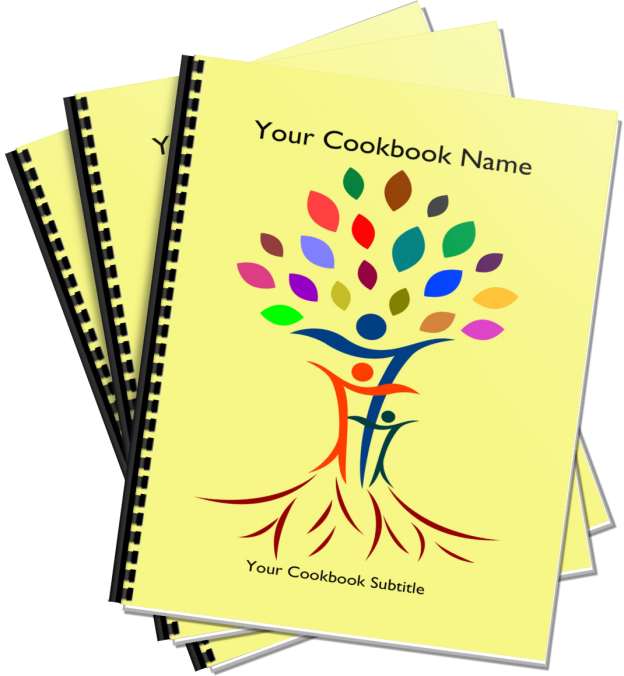
    Creating a treasured family cookbook has never been easier. The Great Family Cookbook Project was developed to make the process easy to understand and accomplish.

    Here is an overview on the simple steps required to create a personalize family cookbook.

    Step 1: Complete account set up – Here you will complete your contact information and set up some basic information like your cookbook submission deadlines for your a cookbook account.

    Step 2: Invite contributors – Here you can invite friends and family members to contribute Recipes to your cookbook. If this is a personal cookbook you can skip this step.

    Step 3: Start adding recipes – UN your contributors add as many recipes as you want in your cookbook.

    Step 4: Send reminders to your contributors. Regular emails will help remind people to submit their recipes by the deadline.

    Step 5: Design your cookbook – Here you pick a color pick a layout format and determine what will appear in your cookbook.

    Step 6:  Add photos to your cookbook – Using our photo editor you can upload photos to your cookbook to specific recipes or sections.

    Step 7: Get your cookbook ready to print – Once all of your recipes are entered now it is time to lock your cookbook edit the recipes and order your cookbooks.

    Remember, you may be able to work on more than one step at a time. For example you can design your cookbook (step 5) while you are still adding recipes (Step 3). You can also skip Step 2 if you are working on your cookbook alone.


    Bill Rice is Co-Publisher of the Great Family Cookbook Project, a website that helps families and individuals collect, preserve and share food memories by creating their own printed personal cookbooks. He is the author of The Wellfleet Oyster Cookbook (Available on Amazon) and the Cape Cod Cocktail Cookbook, both created using FamilyCookbookProject.com. He is also editor of the Donovan Family Cookbook, now it’s third printing.

    Follow Family Cookbook Project on Facebook, Instagram and Pinterest!


  • How To Share Your Family Cookbook Recipes

    How To Share Your Family Cookbook Recipes

    One of the real benefits of collecting all of your recipes in your online cookbook on FamilyCookbookProject.com is to be able to share them very easily with friends and family.

    Say you have friends over and they really like your split pea soup and want the recipe. All you need to do is go to your cookbook account either on your desktop computer or even on your mobile Mobile phone or tablet and pull up the recipe.  Now all you have to do is choose how you want to give it to him.

    Email – In the upper right hand corner, you’ll see a box marked email a recipe. Enter your friends email here and send them your recipe. It’s that easy!

    Posted on Facebook – Wow your friend might like your recipe, so will other friends. You can select the Facebook icon and post your recipe to your Facebook page to be seen by call your friends. Especially if you’ve been adding photos to your recipes, your posts will really stand out and be appreciated by lots of your friends and family.

    Posted on Pinterest – Here’s another way to share your recipes if they have photos attached. Pinterest was built around sharing photos and when you share one of your recipes on this social media platform, the photo becomes the pin and people who click on it will see your recipe.

    Print your recipe – If your friend simply wants a printed copy of your recipe, it is easy to select the print icon and simply print them a copy and give it to them.

    Give them a cookbook – Printing your family cookbook allows you to share all of your recipes with friends and family and is a great gift from the heart.

    You also might want to suggest to your friends that they create their own family cookbook account so they can share their recipes as well!


    Bill Rice is Co-Publisher of the Great Family Cookbook Project, a website that helps families and individuals collect, preserve and share food memories by creating their own printed personal cookbooks. He is the author of The Wellfleet Oyster Cookbook (Available on Amazon) and the Cape Cod Cocktail Cookbook, both created using FamilyCookbookProject.com. He is also editor of the Donovan Family Cookbook, now it’s third printing.

    Follow Family Cookbook Project on Facebook, Instagram and Pinterest!

  • Understanding Recipe Privacy

    Understanding Recipe Privacy

    We at FamilyCookbookProject.com believe recipes are meant to be shared. Sure we all have our “secret recipes”, but if they are not written down and shared, they will not be enjoyed when we are gone.

    However we give you the control to determine when and where you share your recipes.

    When you or a contributor adds a recipe to your online cookbook, there is an option to make your recipe private. If you check this box just above the save button, your recipe will only be available to those individuals who are logged into your online cookbook. Some people choose this option when a recipe is not yet ready to be shared publicly or they simply want to limit the people who have access to it.

    However, there are many benefits to sharing your recipe publicly. Public recipes are indexed by Google and other search engines. You can access your recipes simply by entering your name and the recipe name into Google. Online access from any computer without having to remember your log in information is very convenient.

    Family Cookbook Project also searches the public recipes to look for the best recipes to be included one of the Family Cookbook Project’s “Best of” cookbooks we publish. We also promote public recipes on our Facebook pages and on Pinterest. This allows us to highlight your recipes to the other Cookbook Editors, which is truly an honor.

    We believe recipes are made to be shared, just like the dishes that are made from them. So next time you enter your favorite recipe into your Family Cookbook Project online recipe box, be sure to mark it public so it can be shared.


    Bill Rice is Co-Publisher of the Great Family Cookbook Project, a website that helps families and individuals collect, preserve and share food memories by creating their own printed personal cookbooks. He is the author of The Wellfleet Oyster Cookbook (Available on Amazon) and the Cape Cod Cocktail Cookbook, both created using FamilyCookbookProject.com. He is also editor of the Donovan Family Cookbook, now it’s third printing.

    Follow Family Cookbook Project on Facebook, Instagram and Pinterest!


  • Customizing Your Family Cookbook Recipe Categories

    Customizing Your Family Cookbook Recipe Categories

    One of the things that we are most proud of at FamilyCookbookProject.com is the ability to give complete control of every aspect of making a cookbook to the project’s editor. We provide professionally designed options that are perfect for most people, but some have visions of something different.

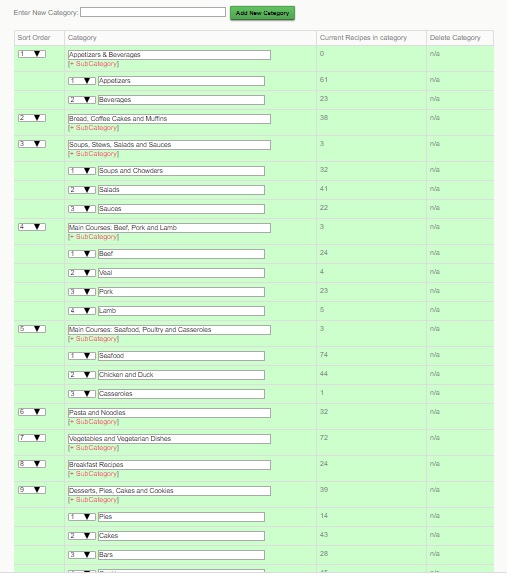
    One of the things that you can customize went creating your family cookbook project is your recipe categories.  We provide 8 basic recipe categories that organize your recipes into types of meal.

    • Appetizers & Beverages
    • Bread and Muffins
    • Soups, Stews, Salads and Sauces
    • Main Courses: Beef, Pork and Lamb
    • Main Courses: Seafood, Poultry, Pasta and Casseroles
    • Vegetables and Vegetarian Dishes
    • Desserts, Pies, Cakes and Cookies
    • Miscellaneous

    By using our custom category tool, you can add different categories or change them altogether. For example, if you wanted to create a dessert cookbook, the categories would all be dessert related. We’ve also seen people organize their recipe sections by family member.

    You can also create sub-categories or categories within categories. In my personal cookbook I have a category for Seafood and then I have added subcategories for Clams, Fish, Oysters, Crab and Shrimp. This way, if I need a shrimp recipe, they are all grouped together.

    You can create your own Custom Categories and sub-Categories by going to the Recipe Center on your Editor’s Homepage.  Then click on Category Add/edit.   Once you add your new categories, you’ll see a sort field – simply number them as you’d like them arranged and Save.

    One note, if you use both our default categories and your own custom categories, ours will come first, then yours in the order you set.  If you want full control, create all your own categories and set the selection to “Use ONLY your own custom categories” .

    If you need to move recipes, there is a bulk move tool at the bottom of the Category Section Editor.


    Bill Rice is Co-Publisher of the Great Family Cookbook Project, a website that helps families and individuals collect, preserve and share food memories by creating their own printed personal cookbooks. He is the author of The Wellfleet Oyster Cookbook (Available on Amazon) and the Cape Cod Cocktail Cookbook, both created using FamilyCookbookProject.com. He is also editor of the Donovan Family Cookbook, now it’s third printing.

    Follow Family Cookbook Project on Facebook, Instagram and Pinterest!


  • “How To” Center Has The Answers

    “How To” Center Has The Answers

    Family Cookbook Project answers hundreds of emails a week with basic questions on how to do various aspects of creating a family cookbook. So we came up with the idea to put all of those answers in one place.

    Welcome to the Family Cookbook Project Editor Education Center. Here you will find the answer that age-old question “How do I…”.

    When you don’t know how to do something, start here and get specific instructions on how to accomplish most aspects of creating the perfect family cookbook.

    You will find a link to the How To Center in the black navigation bar on every page of FamilyCookbookProject.com.


    Bill Rice is Co-Publisher of the Great Family Cookbook Project, a website that helps families and individuals collect, preserve and share food memories by creating their own printed personal cookbooks. He is the author of The Wellfleet Oyster Cookbook (Available on Amazon) and the Cape Cod Cocktail Cookbook, both created using FamilyCookbookProject.com. He is also editor of the Donovan Family Cookbook, now it’s third printing.

    Follow Family Cookbook Project on Facebook, Instagram and Pinterest!

  • How To Create a Single Topic Cookbook

    How To Create a Single Topic Cookbook

    Do you have a lot of recipes of a specific type? Maybe you love to make cookies or pies or cakes. You can create a “mini cookbook” to organize your recipes and even share with family and friends using FamilyCookbookProject.com.

    With a few as 10 recipes, you can create a single category cookbook or multiple categories within a theme.

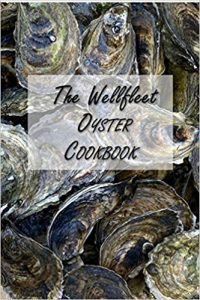
    For example, were I live, oysters plentiful and are some of the best in the world. My family eats a lot of oysters each summer and I thought it would be great to create a cookbook with just oyster recipes. It was so well received, it is now available on Amazon!

    You can buy a copy of The Wellfleet Oyster Cookbook by clicking on this link.

    Next, I plan on creating a BBQ mini cookbook and giving it out as gifts for Christmas to my friends and family.

    To create you own mini cookbook, go to the Production Center on your editor page and select “more cookbooks”. Here you can create your own mini cookbook and even import your recipes from your main cookbook using our recipe transfer tool.


    Bill Rice is Co-Publisher of the Great Family Cookbook Project, a website that helps families and individuals collect, preserve and share food memories by creating their own printed personal cookbooks. He is the author of The Wellfleet Oyster Cookbook (Available on Amazon) and the Cape Cod Cocktail Cookbook, both created using FamilyCookbookProject.com. He is also editor of the Donovan Family Cookbook, now it’s third printing.

    Follow Family Cookbook Project on Facebook, Instagram and Pinterest!

  • Allow Contributors to Order Printed Cookbooks Directly

    Allow Contributors to Order Printed Cookbooks Directly

    You can allow your contributors to order printed cookbooks on their own instead of having you as editor order bulk and distribute to others.  One note:  as with all printing, the more copies ordered at one time, the better price per book.  If your contributors order 1 or 2, the per book price could be much higher than if you order 10 or 20.

    To enable contributor cookbook ordering, go to Editor Activities>Printing & Publishing.  Click the “Contributor Ordering Settings” shortcut.  Then select the options you want available to your contributors:

    • 1. None – cannot order. Select this if you do not wish anyone other than you as editor to order printed cookbooks
    • 2. Selected versions below only. Select this to allow contributors to print any prior version of your cookbook that has been printed. They cannot order a “current version” of the cookbook.
    • 3. Current cookbook only. Select this to allow contributors to print out the current cookbooks “as is” in its current state and settings any time. They will be required to run a cookbook preview first to update the system.
    • 4. Current cookbook or selected versions below. Select this to allow contributors to print the current book “as is” as well as any of the selected versions below

    Update Settings to save.

  • Adding New Recipes Once Your Cookbook Is Printed

    Adding New Recipes Once Your Cookbook Is Printed

    FamilyCookbookProject.com Editor Marsha P writes:

    “I published our family cookbook back in November.  We are very happy with the books, but I have a question: If new recipes are added and/or photos, if/when more copies are ordered will they reflect the cookbook with any new saved changes/additions?  It seems, once it was published, so many wished they had added this or that recipe and/or had photos added to recipes that didn’t have them, etc.”


    Your story is not uncommon. Often once a family cookbook is printed, some of the contributors (and many of those who did not take the time to contribute) see how cool the project is and want to add additional photos and/or recipes.

    Here you have three options:

    1) Allow the new content to be in the online cookbook only. Even after our cookbook is printed, you can still add new recipes to your account and view them online and using the Family Cookbook Project App on your phone or tablet.

    2) Create a second edition of your printed cookbook. In a second edition expanded you include all of the content from the first edition, rewrite the intro to explain that it is the second edition and add the new recipes and photos. This way all of the recipes are still in a single printed cookbook.

    3) Create a second volume of your cookbook. When you have a lot of new recipes you might consider a second volume of you cookbook. This would have all new recipes and work as a companion to the first volume. It can have a different title than the first but the subtitle should link back to the first title and include the volume number. This way will generally cost less to print than the second edition since you are not reprinting all of the recipes from the first cookbook.

    When you view recipe by category in your editor account, you will see a check box to include/exclude recipes from the next printed version. If you want a second edition, simply leave everything checked. If you want a second volume, click on the uncheck everything button and only the new recipes will be included in the second volume.

    Another fun idea is to just take one category of recipes, like desserts or appetizers, and create a single category cookbook for your family.


    Bill Rice is Co-Publisher of the Great Family Cookbook Project, a website that helps families and individuals collect, preserve and share food memories by creating their own printed personal cookbooks. He is the author of The Wellfleet Oyster Cookbook (Available on Amazon) and the Cape Cod Cocktail Cookbook, both created using FamilyCookbookProject.com. He is also editor of the Donovan Family Cookbook, now it’s third printing.

    Follow Family Cookbook Project on Facebook, Instagram and Pinterest!

  • 5 Ways to Finish Your Cookbook Faster

    5 Ways to Finish Your Cookbook Faster

    A common question we get us “How long should it take to complete my family cookbook? It is different for everyone. It depends on the size of cookbook you want, how many contributors you have and how much time you have to devote to the project in a given week. It can be done in as little as a week and as long as several years. Most people generally take 2-3 months on average to go from start to completed finished cookbook.

    Here are some simple ideas for finishing your cookbook faster from Family Cookbook Project:

    1. Invite Friends and Family to Help
    Gathering recipes is more fun when everyone gets involved. Adding a contributor is very easy. Simply go to Editor Activities>Communication Center or find the “Invitation Tool” shortcut on your Quick Start. On this page you can enter a person’s name and email and even personalize the email they will receive. That email will automatically create a user account for them and include their login information in the email they receive.

    2. Set A Deadline and Schedule

    Family Cookbook Project has the ability to set a deadline for contributors to submit recipes. As editor, you have complete control over the deadline to contribute recipes to your cookbook. This helps keep your contributors motivated. Go to the Cookbook Info Center in your editors account and in the center box you will see a link to change it to any date that suits you.

    Also personally schedule a few hours a week to add your own recipes and work on the design of the cookbook. You don’t want to wait until the end to accomplish this.

    3. Add a Co-Editor
    Sometimes a fresh set of eyes can find typos that you can miss. To make someone a “Co-Editor”, go to Communication Center and click on their name in the list.  Check the box next to their user name and update.  The next time they login they will have access to: Editor Activities Menu with all tools, Add/Edit any recipe to help with cookbook editing and sending messages through the Communication Center.

    4. Send Reminders to Contributors
    Did you know you can send an email reminders to some or all of your contributors at the same time. Use the remainder tool to every few weeks to keep the cookbook on everyone’s mind until it is finished.

    5. Style Made Simple
    Family Cookbook Project is a dynamic online publishing tool that have been developed over more than a decade and a half based on the needs of our editors. The options can sometimes feel overwhelming. However the default options are the most used settings in a significant number of cookbooks we publish. Don’t get bogged down trying to use all of the features the software offers. Just pick the ones that makes your cookbook perfect!


    Bill Rice is Co-Publisher of the Great Family Cookbook Project, a website that helps families and individuals collect, preserve and share food memories by creating their own printed personal cookbooks. He is the author of The Wellfleet Oyster Cookbook (Available on Amazon) and the Cape Cod Cocktail Cookbook, both created using FamilyCookbookProject.com. He is also editor of the Donovan Family Cookbook, now it’s third printing.

    Follow Family Cookbook Project on Facebook, Instagram and Pinterest!

  • Ordering Deadline for Christmas Delivery in 3 Weeks

    Ordering Deadline for Christmas Delivery in 3 Weeks

    If you plan to have your cookbooks printed by us and received by Christmas, the deadline to order and make payment is Tuesday, November 30th. There will be an extended deadline, but expedited shipping will be required.

    Cookbooks will be printed in the order they are received, so the sooner you submit your cookbook order, the sooner you will receive your cookbooks.

    Remember that family cookbooks make a great Christmas gift, so be sure to order extra for those last minute gifts!