Category: cookbook software

  • How To Create A Multi-Part Recipe

    How To Create A Multi-Part Recipe

    Have you ever had a cake recipe that really needed a specific frosting? Or a meat recipe that required a special sauce? Wouldn’t it be great if a a recipe could have sub recipes attached to keep them together?

    Many of our FamilyCookbookProject.com editors have asked for the ability to have multiple sections or steps in recipes. We like to listen and have added it! Now you can have up to 5 “sub” recipes or steps within a recipe, each with its own set of ingredients and directions. Example? You have Carrot Cake and you want a section for the “Cake” with its ingredients and directions, then “Cream Cheese Frosting” with another set of ingredients and directions.
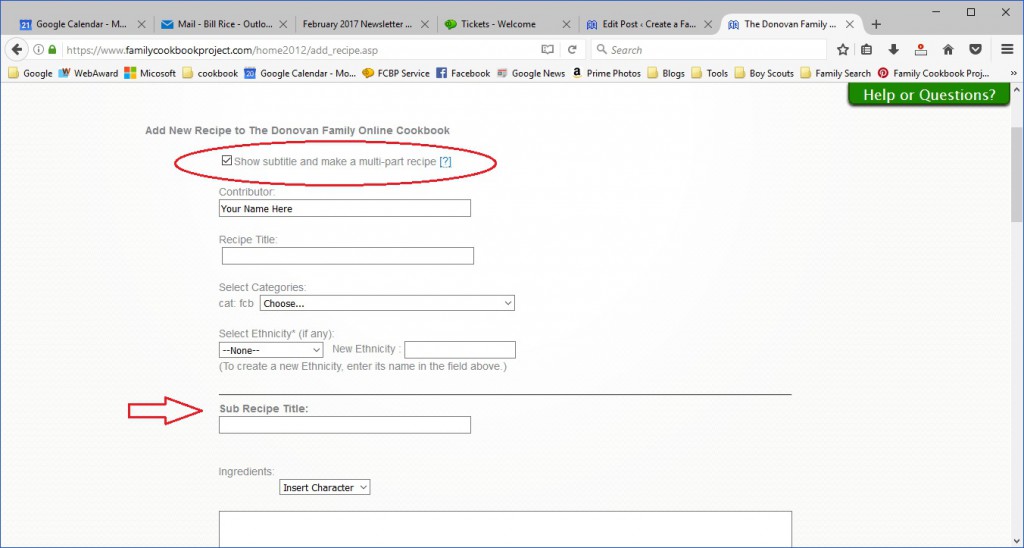
    To use this feature, simply go to Add Recipe or Edit an existing recipe. First check the box for “Show subtitle and make a multi-part recipe” right under the contributor field. This will add a field for sub-recipe title.

    Using our example above, here is where you would add your carrot cake ingredients and directions.

    Next, click on the green button to “Add new sub recipe”. This will add fields for a second set of sub recipe title, ingredients and directions for your Cream Cheese Frosting.

    You can add up to five sub recipes for your overall recipe.

    When you are done, make sure to click on the green button on the bottom of the page to save your recipe before moving on to your next recipe.


    Bill Rice is Co-Publisher of the Great Family Cookbook Project, a website that helps families and individuals collect, preserve and share food memories by creating their own printed personal cookbooks. He is the author of The Wellfleet Oyster Cookbook (Available on Amazon) and the Cape Cod Cocktail Cookbook, both created using FamilyCookbookProject.com. He is also editor of the Donovan Family Cookbook, now it’s third printing.

    Follow Family Cookbook Project on Facebook, Instagram and Pinterest!
  • How to Make Sure Your iPhone Photos Work On Family Cookbook Project

    How to Make Sure Your iPhone Photos Work On Family Cookbook Project

    If you have an iPhone, Apple has changed the format the camera uses to save photos on the iPhone. while this has many benefits, like taking less space for storage, it does have drawbacks, like not being compatible with non-Apple systems – like FamilyCookbookProject.com.

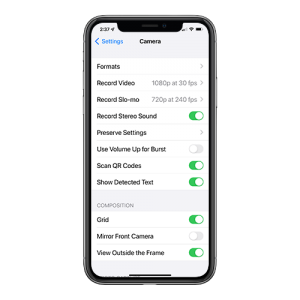
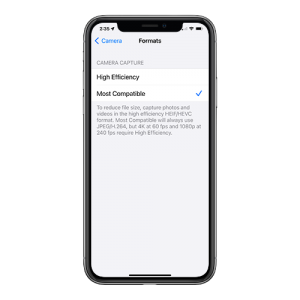
    To switch from HEIC to JPG, you must configure the camera capture format using the iPhone’s Settings app. There are two camera capture settings that you can opt for — High Efficiency and Most Compatible. The former will shoot photos in HEIC, while the latter will shoot photos in JPG.

    Here is how to change the settings in your iPhone to save image as Jpegs.

    Step 1: Open the Settings app on your iPhone. Scroll down and tap on Camera. Then, tap Formats from the list of Camera settings.


    Step 2: Under Camera Capture, tap Most Compatible.

    That’s it. Your iPhone will now shoot photos in the JPG format directly.

    If you have images already saved in HEIC, there are several free websites that will convert the images for you.


    Bill Rice is founder and Co-Publisher of the Great Family Cookbook Project, a website that helps families and individuals collect and share food memories through customized printed cookbooks filled with treasured recipes. Follow us on Facebook and Pinterest!
  • Introducing New BBQ Cookbook Covers

    Introducing New BBQ Cookbook Covers

    Both Chip and I, the two founders of Family CookbookProject.com, love to grill, smoke and BBQ. Cooking meat, seafood and veggies outside is kind of a guy thing (even though I know women that are excellent pitmasters!).

    I was working on a new cookbook for my family featuring my favorite BBQ recipes and I did not find a cover that I really liked ever though we have a great library of cookbook covers to choose from.

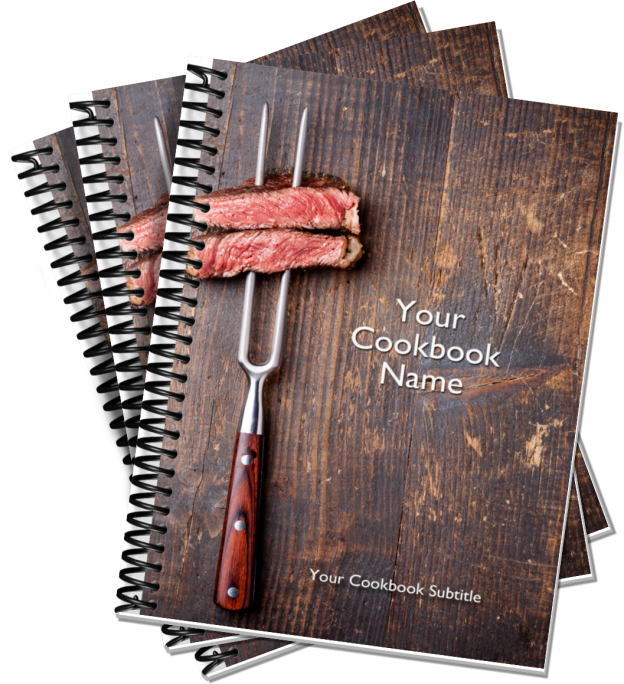
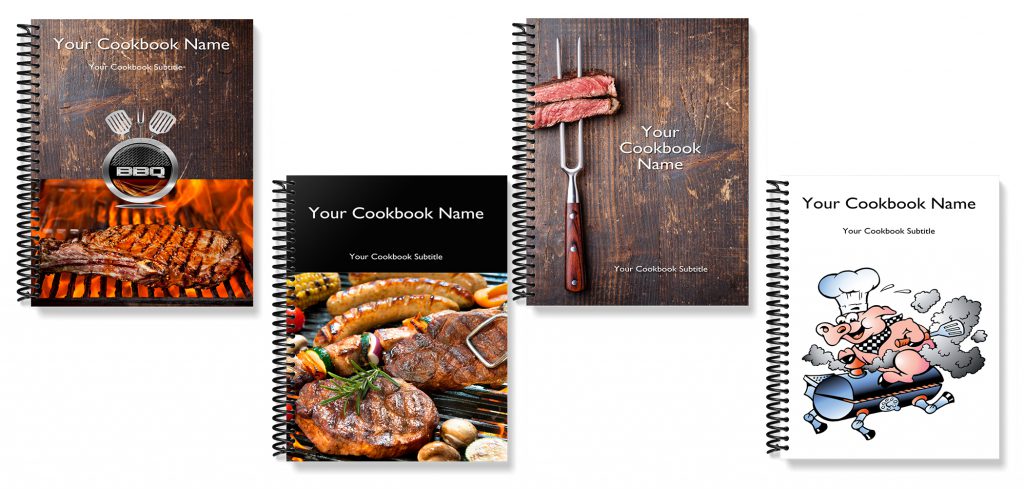
    So I had our professional designer come up with a series of cookbook covers that I loved so much that we are making them available to all of our cookbook editors to use.

    Here are the new BBQ Cookbook covers:

    If you are interested in BBQ and great BBQ recipes, be sure to join our Facebook BBQ Recipe group.

    On Pinterest, we have two boards Food Guys Love and Family BBQ and Grilling Recipes to check out and follow.

    Finally, here is a fun video we created for the BBQ community.


    Bill Rice is founder and Co-Publisher of the Great Family Cookbook Project, a website that helps families and individuals collect and share food memories through customized printed cookbooks filled with treasured recipes. Follow us on Facebook and Pinterest!


  • Customizing Your Family Cookbook Recipe Categories

    One of the things that we are most proud of at FamilyCookbookProject.com is the ability to give complete control of every aspect of making a cookbook to the project’s editor. We provide professionally designed options that are perfect for most people, but some have visions of something different.

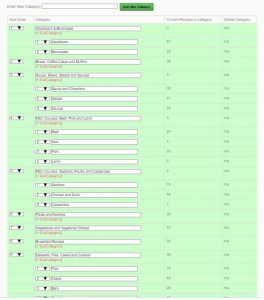
    One of the things that you can customize went creating your family cookbook project is your recipe categories.  We provide 8 basic recipe categories that organize your recipes into types of meal.

    • Appetizers & Beverages
    • Bread and Muffins
    • Soups, Stews, Salads and Sauces
    • Main Courses: Beef, Pork and Lamb
    • Main Courses: Seafood, Poultry, Pasta and Casseroles
    • Vegetables and Vegetarian Dishes
    • Desserts, Pies, Cakes and Cookies
    • Miscellaneous

    By using our custom category tool, you can add different categories or change them altogether. For example, if you wanted to create a dessert cookbook, the categories would all be dessert related. We’ve also seen people organize their recipe sections by family member.

    You can also create sub-categories or categories within categories. In my personal cookbook I have a category for Seafood and then I have added subcategories for Clams, Fish, Oysters, Crab and Shrimp. This way, if I need a shrimp recipe, they are all grouped together.

    You can create your own Custom Categories and sub-Categories by going to the Recipe Center on your Editor’s Homepage.  Then click on Category Add/edit.   Once you add your new categories, you’ll see a sort field – simply number them as you’d like them arranged and Save.

    One note, if you use both our default categories and your own custom categories, ours will come first, then yours in the order you set.  If you want full control, create all your own categories and set the selection to “Use ONLY your own custom categories” .

    If you need to move recipes, there is a bulk move tool at the bottom of the Category Section Editor.


    Bill Rice is founder and Co-Publisher of the Great Family Cookbook Project, a website that helps families and individuals collect and share food memories through customized printed cookbooks filled with treasured recipes. Follow us on Facebook and Pinterest!l

  • 8 New Recipe Card Themed Covers Added to Family Cookbook Project Design Center

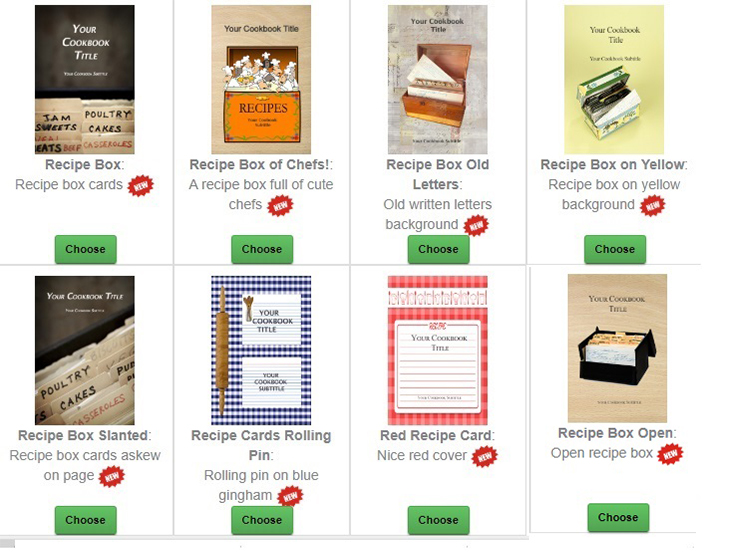
    At Family Cookbook Project, we are always trying to improve our offerings to our members. We have a lot of requests about using recipe cards in cookbooks and that got us thinking about recipe card themed cookbook covers. So we are please to announce eight new pre-designed cookbook covers that you can choose when designing your own personal cookbook.


    All of these new cookbook covers options are now available and can be found in the new Recipe Card Covers section of the Cookbook Cover Design Center.


    Bill Rice is founder and Co-Publisher of the Great Family Cookbook Project, a website that helps families and individuals collect and share food memories through customized printed cookbooks filled with treasured recipes. Follow us on Facebook and Pinterest!

  • Family Cookbook Project Expands to the UK

    Family Cookbook Project is pleased to announce that our personal cookbook making software is now available to individuals living in the United Kingdom at FamilyCookbookProject.co.uk

    Since 2004, our ever-expanding website has helped more than 90,000 individuals and families in the USA and Canada create beautiful lasting personal cookbooks. Now individuals in the UK have the ability to enter their best recipes into their online recipe box and create a beautiful printed customized cookbook that they can share with family and friends.

    The website has been modified specifically for the needs of our new UK customers. It has the same functionality that will allow them to collect and enter their favorite recipes into the online program. The communication tools that allow them to Invite others to contribute online are available as well.

    The cookbooks will be printed in Oxfordshire, north west of London, using The latest digital print equipment for fast turn-a-round. Our printer uses 100% renewable energy and works to recycle 99% of their waste.

    Design your own cookbook has never been easier than by using Family Cookbook Project’s professionally developed covers, dividers and layouts to design your on personal recipe book.  Add your recipes, write an introduction and add photos if you wish. Our program will automatically create the table of contents and indexes for you and you’re ready to go.

    Order as many cookbooks as you’d like and download our award-winning app to conveniently access your recipes from your mobile device.

    For more information, visit FamilyCookbookProject.co.uk.


    Bill Rice is founder and Co-Publisher of the Great Family Cookbook Project, a website that helps families and individuals collect and share food memories through customized printed cookbooks filled with treasured recipes. Follow us on Facebook and Pinterest!

  • Your Recipes on the Internet

    One of the benefits of having your recipes on Family Cookbook Project is that they become available to you from any computer.

    Google and other search engines regularly crawl our site looking for new recipes. When they find them, they make them available to the entire Internet. That way you can access a recipe simply by typing in The title of a recipe and your cookbook name into any browser.

    This is useful for when your family cookbook is not available, like at a grocery store buying ingredients for recipe, or wanting to share a dish with a friend.

    You also can have access to all your recipes if you download our award-winning mobile app for iPhone and android devices.

    Not only are the recipes made available to you online, but many other people around the world can enjoy them as well.

    Currently the most popular recipe on family cookbook project.com is Saskatoon Berry Crisp, by John and Verna Heinrichs, is from The Heinrichs Family Cookbook . This recipe has had almost 50 people view the recipe in the past month.

    Be all time most viewed recipe on family cookbook project.com is Camp Fire Pizza Roll, by Danyeil Reed, is from 40 Something Cowgirls Restless Riders Cookbook, which has been seen by more than 7,000 people since 2013!

    Of course if you don’t want to share your recipes with the public then simply mark them private when you post them. This keeps them out of the public domain.

    Since our founding 15 years ago, Family Cookbook Project has helped more than 63,000 families and fundraising groups collect more than 1.5 million recipes and that number grows every day.


    Bill Rice is founder and Co-Publisher of the Great Family Cookbook Project, a website that helps families and individuals collect and share food memories through customized printed cookbooks filled with treasured recipes. Follow us on Facebook and Pinterest!

  • The Holidays Are The Best Time To Collect Recipes

    Creating a family cookbook is a very satisfying event. However getting everyone Else in your family to contribute their favorite recipes is always one of the challenges to printing your cookbook in a timely manner.


    However, the holidays are a great time to motivate your contributors and gather lots of incredible recipes.

    The holidays are known for two things: gathering together with friends and family in parties and dinners, and bringing out tried-and-true family favorites that don’t necessarily get made during the rest of the year.

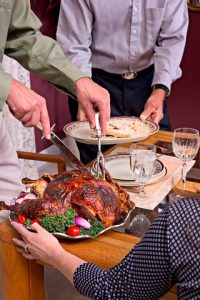
    Look at Christmas cookies for example. How often do you make Christmas cookies in July? Have you ever made a plum Pudding for September? how about a roast turkey with stuffing and all the sides including cranberry sauce for a nice Wednesday evening meal? probably not. These are all safe for the year and holidays.

    The other aspect of holidays are large gatherings, being a holiday party or a dinner with extended family. Often people bring side dishes and appetizers and desserts as they are part of the meal.

    This is a great opportunity to let people know what you like and ask them to contribute that specific recipe to the family cookbook. They will feel proud that everyone loves their dish and will be more likely to contribute it knowing people will enjoy it.

    Asking people face-to-face is always a great way to get recipes, however reminding them via email after the holidays is also an important follow-up. Family Cookbook Project has a reminder tool that will allow you to select the people you had spoken to during the holidays and remind them to submit their recipes. This is a good time to Osco ask them to enter additional recipes that they love.


    Bill Rice is founder and Co-Publisher of the Great Family Cookbook Project, a website that helps families and individuals collect and share food memories through customized printed cookbooks filled with treasured recipes. Follow us on Facebook and Pinterest!

  • Cookbooks for Kids

    One of the reasons we works so hard on a family cookbook is to preserve our favorite recipes for future generations. It is equally important to help that next generation develop a love of good food and cooking at an early age. That is why Family Cookbook Project created a simple cookbook just for the kids in your life.

    Kids Cookbook Project lets you create your own customized cookbook for the special little one in your life. Simply enter your  child’s name and choose boy or girl and immediately preview them in their own special personalized Cookbook! We will then print your full color customized, personalized kids cookbook. It’s just $24.95.

    Keep Kids Interested in Reading …put them in the story! Every child loves a story. A good story helps them to explore their imagination. A great story has them as the main character and holds their interest in reading. That’s what we do! …Kids Cookbook Project makes great stories about children with your child as the main character. And we make it easy and simple to do …as simple as 1-2-3.

    As the holiday’s approach, this would make a great personalized gift for the youngsters in your life. To learn more and to order. visit Kids Cookbook Project.


    Bill Rice is Co-Publisher of the Great Family Cookbook Project, a website that helps families and individuals collect and share food memories. Follow us on Facebook and Pinterest!

  • Family Cookbook Project Now offers WW SmartPoints on recipes

    Family Cookbook Project, an online leader in the creation of personalized printed cookbooks, has added the ability to include WW SmartPoints® on recipes being added to a user’s collection of recipes.

    WW (formerly Weight Watchers) SmartPoints* is a system where every food and drink is assigned a point value, and you receive a certain number of SmartPoints to allocate however you’d like every day and week. SmartPoints is designed to help guide you to a healthier pattern of eating every day.

    “Living a health lifestyle and eating right is what WW SmartPoints are all about,” says Bill Rice, Founder and Co-Publisher of the Family Cookbook Project. “Family Cookbook Project has added a field to It’s easy-to-use Add a Recipe form so that users participating in the Weight Watchers program can have an easy way to include the SmartPoint value when adding a recipe to their online recipe box. These recipes can them be printed into a personalized cookbook including all of their favorite recipes.”

    WW’s science-based SmartPoints system assigns every food a number based on four components: calories, saturated fat, sugar, and protein. The higher the number, the more sugar and saturated fat the food will have. The lower the number, the less it will have. The reason for this is that numerous studies have confirmed the benefits of eating less sugar and saturated fat, and more protein—not just for weight loss, but all sorts of other healthy reasons too.

    Family Cookbook Project editors can turn on WW SmartPoints® by going to the Recipe Center and clicking on the link “WW Smartpoints Use/Show”. There are two settings: one for allowing contributors to add WW SmartPoints® to a recipe and another to include SmartPoints in the printed edition of the cookbook.

    In addition, Family Cookbook Project is developing a simple to use calculator that will calculate the SmartPoint value of a food simply by entering information from a food’s packaging. We expect this to be introduced early next year.

    With over 4.6 million users, WW is the most trusted source of weight loss guidance in the world. Family Cookbook Project believes their success is based on meeting the ever-changing needs of our valued customers. “This is just one more example how Family Cookbook Project is putting our customers first,” added Rice.


    *WW SmartPoints is a trademark of WW International, Inc. and are not associated with Family Cookbook Project, LLC.