Category: General Cookbook

  • Advanced Photo Arranger Tool Announced for FamilyCookbookProject.com

    Advanced Photo Arranger Tool Announced for FamilyCookbookProject.com

    Photos are such an important part of any good personal cookbook. They help to bring the food to life and show family members enjoying time together.

    The vast majority of cookbook publishers today only allow a single image per recipe and it is always in the same position.

    FamilyCookbookProject.com has just announced an industry leading upgrade that allows you to control multiple photos and images on a recipe to get them to look just right for your cookbook.

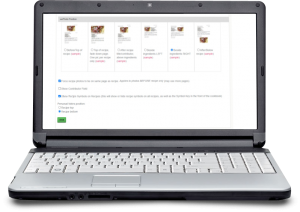
    As part of the Recipe Layout Tool, you can set a global photo position. There are six options:

    • On top/before the recipe
    • On to with a fade
    • After recipe title
    • Right of the ingredients
    • Left of the ingredients
    • After the personal notes/end of recipe

    By default, recipes photos are “stacked” one after another down the page in the order determined in the settings. When you edit a recipe with a photo, you will see seven different standard positions that the photo will be located as part of that recipe layout. If you need even finer control, you can select the Custom Photo Arranger Tool to precisely set the location on the page of that particular recipe.

    If there are multiple photos, you can build a collage and allow the photos to overlap, set the order and change size of each photo.

    The new collage arrangement will be positioned based on your global or unique recipe position.  The exception is Right/Left of Ingredients.  That will always use the “stacked” look down the ingredients column.

    You also have the option to generate a pop-up preview to see exactly how the images and text will look on the printed recipe page with a single click.

    Below is a video tutorial to show you how to use the new photo placement tools.


    Bill Rice is founder and Co-Publisher of the Great Family Cookbook Project, a website that helps families and individuals collect and share food memories through customized printed cookbooks filled with treasured recipes. Follow us on Facebook and Pinterest!
  • A fun Idea For Your Family Reunion Cookbook

    A fun Idea For Your Family Reunion Cookbook


    Family reunions are a great opportunity to create a family cookbook and get lots of people to participate. A family reunion cookbook motivates family members to communicate before the event and helps get everyone excited!

    We have hundred’s of family reunion cookbooks under our belts and we’d love to work on yours. Our site is perfect for communicating with larger groups of family members via email and keeping everyone motivated.

    Here is a fun idea for your Family Reunion Cookbook – a family directory section!

    Here’s how to do it:

    • Start by creating a custom recipe category entitled “Family Members”.
    • Next, add your family member’s names and email addresses into the invitation tool so you can invite them to participate and directly add recipes and bios to your cookbook account.
    • Next ask everyone to use the add a recipe tool and have them enter their name as the title of the recipe, Their photo as the recipe photo and their bio as the personal notes. They can leave everything else blank and all of the bios will be together in one section in the back of the book.

    You might want to also include a family tree so everyone knows how each other is related.

    The other way to create a family directory would be to have everyone email you their info and photo and you create custom pages for each one.

    Family members can even pick up the cookbooks at the reunion!


    Bill Rice is founder and Co-Publisher of the Great Family Cookbook Project, a website that helps families and individuals collect and share food memories through customized printed cookbooks filled with treasured recipes. Follow us on Facebook and Pinterest!

  • Recipe Layout Tool Upgrade on FamilyCookbookProject.com

    Recipe Layout Tool Upgrade on FamilyCookbookProject.com

    Family Cookbook Project is pleased to announce a major upgrade to the Recipe Layout Tool within FamilyCookbookProject.com

    The recipe layout is what formats the design of the recipes within the cookbook. When you add a recipe, you are only adding the data. It is the recipe format tool that takes that data and organizes it into a well-designed recipe consistent throughout the cookbook.

    The recipe layout controls the size and font of the recipe title, ingredients, directions and comments. It can also allow for one or two columns of text in the ingredients to save space.

    Finally, it determines where any photo will be displayed if there is one attached to the recipe.

    Here are some of the major changes:

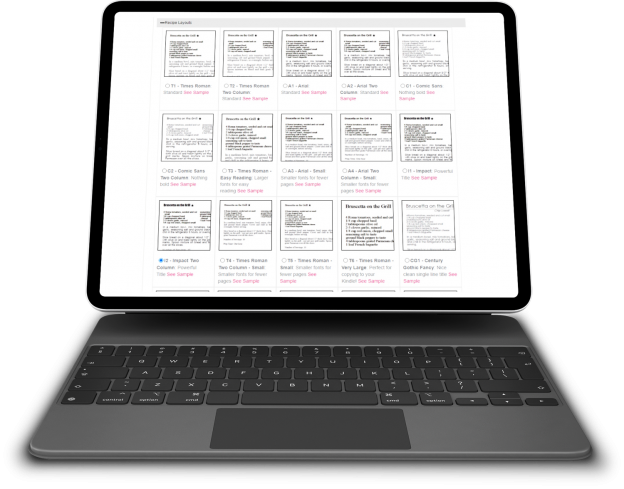
    Side by side viewing – The first thing you will notice when you select the Recipe Layout tool is the ability to see all of the options as thumbnails without having to click a pop-up link for each. The options are now laid out like the covers and dividers allowing you to see them all side by side. You can click on the thumbnail for a pop-up window full-sized view.

    Recipe Level Layout – We have always forced all of the recipes to be in the same layout for consistency within the cookbook. However sometimes you need the text just a little smaller so it will fit on a page. Or a recipe is very special and you want to highlight it. Now you can. Each recipe edit page now contains an option to change the layout for that one recipe. We recommend using this sparingly. We also offer a global reset button to get all of the recipes reset back to the original layout if needed. You can also choose the recipe photo position uniquely for any recipe – which also has a reset option incase things get to “messy”.

    Custom Layout Import – Custom Recipe Layout can import settings from any static layout we offer as a starting point and then you can change as aspect of that layout to fit your needs.

    Photo Positions – We have increased the number of places a photo can appear on a recipe than just above the title and at the end of the recipe. There are four new positions for photos:  After Title/before Ingredients; Top of recipe fade out (1 pic only); Left or Right side of Ingredients. The Recipe Layout Tool also shows you these options side-by-side. You can select your recipe photo position like the layouts above. You’ll see them listed with thumbnail views. Simply click the button to use one and save.


    Bill Rice is founder and Co-Publisher of the Great Family Cookbook Project, a website that helps families and individuals collect and share food memories through customized printed cookbooks filled with treasured recipes. Follow us on Facebook and Pinterest!

  • Introducing New BBQ Cookbook Covers

    Introducing New BBQ Cookbook Covers

    Both Chip and I, the two founders of Family CookbookProject.com, love to grill, smoke and BBQ. Cooking meat, seafood and veggies outside is kind of a guy thing (even though I know women that are excellent pitmasters!).

    I was working on a new cookbook for my family featuring my favorite BBQ recipes and I did not find a cover that I really liked ever though we have a great library of cookbook covers to choose from.

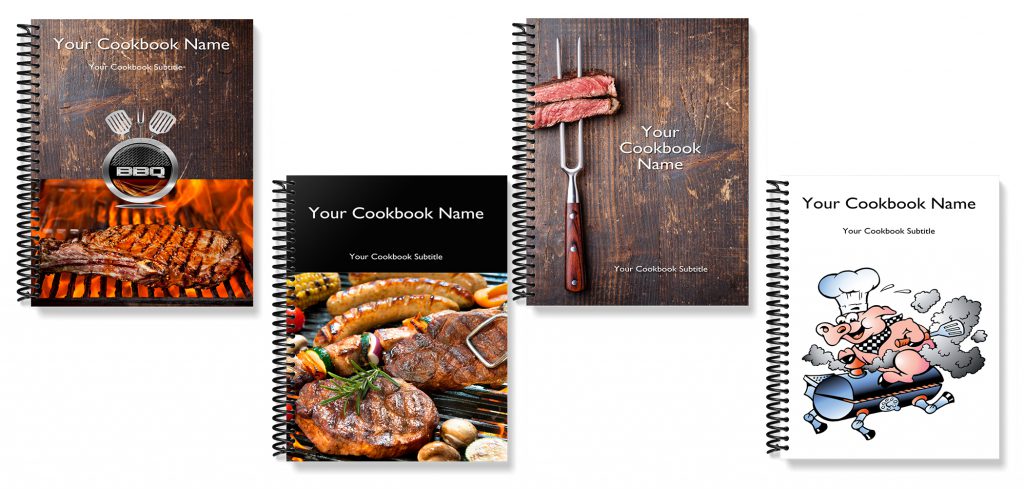
    So I had our professional designer come up with a series of cookbook covers that I loved so much that we are making them available to all of our cookbook editors to use.

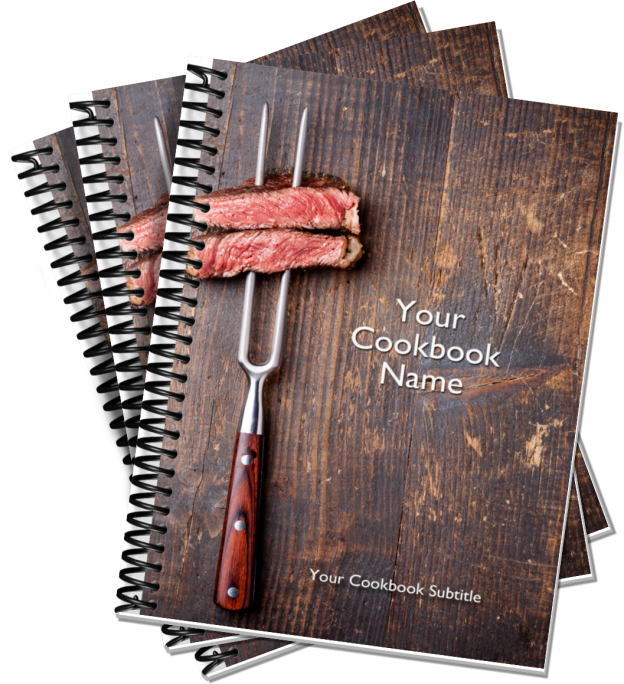
    Here are the new BBQ Cookbook covers:

    If you are interested in BBQ and great BBQ recipes, be sure to join our Facebook BBQ Recipe group.

    On Pinterest, we have two boards Food Guys Love and Family BBQ and Grilling Recipes to check out and follow.

    Finally, here is a fun video we created for the BBQ community.


    Bill Rice is founder and Co-Publisher of the Great Family Cookbook Project, a website that helps families and individuals collect and share food memories through customized printed cookbooks filled with treasured recipes. Follow us on Facebook and Pinterest!


  • How to Convert iPhone Photos for Use In Family Cookbook

    How to Convert iPhone Photos for Use In Family Cookbook

    Apple is always trying to be seen as innovated, such as introducing “live photos” that seem to move when you view them on your phone or iPad. To accomplish this, they created a new image format called HEIC (High Efficiency Image File Format) that was rolled out in 2017.

    Family Cookbook Project (and most web sites) accept JPG photos only.  If you are having issues with photos not uploading correctly, check to see if the file format on your Mac is HEIC.  That is Apple’s compressed format.  The good news is that it’s easy to convert to JPG.

    Here’s how to convert HEIC to JPG on Mac using Preview:

    1. Open any HEIC image in Preview.
    2. Click File ➙ Export in the menu bar.
    3. Select JPG in the format dropdown and adjust other settings as needed.
    4. Choose Save.

    Here’s how to convert HEIC to JPG on PC using Microsoft Paint:

    1. Open the file in Paint
    2. Go to File>Save As>JPEG picture
    3. Click Save.
  • How to Write A Great Recipe Title

    Your recipe title is the single most important element of your recipe. This is because your title is a headline, and the headline in any type of content has one special and powerful property.

    Think about how you read a cookbook looking for a recipe to try.  You don’t start in the front and read every page like a novel then pick the one you want. No, you scan the pages looking for a photo or recipe title that catches your eye and looks interesting!

    Of all the elements in your recipe, the title has the greatest power for grabbing your readers’ attention and the greatest responsibility for enticing them to continue and read your recipe It follows that the better your title, the higher the chance of turning a recipe scanner into a recipe reader (and ultimately a recipe user).

    For a recipe title to be effective it needs to consider several things:

    Grab Attention – Like any headline you need to grab the readers attention.

    Describe the food being prepared – “Gruel” is one of my son’s favorite dishes, however it no one outside the family knows what it is. Including the main ingredient of the dish and even how it us prepared make the title more useful. “Baked Hamburger Gravy” would be a more descriptive title for our gruel.

    Be different and unique – If you have seen the recipe title before, it does not belong on your recipe!

    Include the source – In family cookbooks, certain people are associated with certain recipes. Grandma’s Apple Pie or Lou’s Lemon Bars help the reader image exactly what dish you are referring to. It just does not help anyone who is not at family gatherings!

    Sell the sizzle as well as the steak – This means to highlight the benefit, the reason why this recipe is worth making.

    Recipe titles that address cooking and eating needs are more likely to seduce the reader into the recipe itself. A good title clearly shows the reader which of their cooking and eating needs the recipe addresses. Every readers’ need is different. For example, it could be for something indulgent or something low fat, or something quick and easy or something sophisticated and thus involved, or something refined or something rustic.

    Consider the following recipe titles: ‘Soft and Chewy Chocolate Chip Cookies’, ‘Quick ‘n’ Easy Chocolate Chip Cookies’, ‘Grandma’s Favorite Chocolate Chip Cookies’, ‘Gluten Free Chocolate Chip Cookies’. Notice how each title addresses a different need and even appeals to different audiences. Quite simply, as the chocolate chip cookie examples show, it’s all down to the words you choose for your title.

    With a little thought and imagination, your recipe titles can stand out and make your readers give your recipes the attention they deserve.

    Bill Rice is founder and Co-Publisher of the Great Family Cookbook Project, a website that helps families and individuals collect and share food memories through customized printed cookbooks filled with treasured recipes. Follow us on Facebook and Pinterest!

  • 5 Ways To Improve Your Family Cookbook Over The Holidays

    The holidays are a time when we get all of our family together and celebrate together with food, fun and festivities. It is also a great time to motivate others in the family to contribute to your family cookbook project.

    Here are some ideas to help you work on your cookbook during the holidays:

    • When you see family members, remember to talk about the cookbook and how excited you are as it moves forward. Others will see your enthusiasm and be more willing to help contribute.
    • When someone brings a delicious dish to a family gathering – ask for the recipe. People are often proud of their food creations and love to share recipes. If they don’t have it with them, let them know contributing recipes is easy on the FamilyCookbookProject.com website. Encourage them to give it a try.
    • Take photos of all the great food being shared. Photos of dishes really bring recipes to life. Photos can be easily added to your recipes on FamilyCookbookProject.com and can or do not have to be included in the printed version.
    • Ask for suggestions for the cookbook cover and recipe layout design. FamilyCookbookProject.com currently has more than 50 cookbook covers to choose from including your own custom cover – with more on the way. It also allows you to select from 15 different recipe layout options. Print a hardcopy of several of the designs and ask family members what they think. Not only will the choice be easier to make with feedback, but you will get them more interested in contributing to the cookbook.
    • Use the index to show family members the recipes in the cookbook. If you’re close to having your cookbook completed, bring the cookbook’s index and a cover page printed from your printer to family holiday events. Show it around and let people see who and what has been submitted already. Maybe they will see a recipe that is missing and want to contribute or maybe they will place an advance order for the final edition.

    With so much time spend in the kitchen around the holidays, it’s no wonder that cooking and recipes and cookbooks and food are talked about constantly as everyone pitches in to prepare our holiday get together. Creating your family cookbook will become a valuable resource for generations to come.


    Bill Rice is Co-Publisher of the Great Family Cookbook Project, a website that helps families and individuals collect and share food memories. Follow us on Facebook and Pinterest!

  • Deadline to Print for Christmas Delivery

    If you are planning to use your cookbooks as Christmas gifts this year, you have just about 2 weeks until the Christmas print deadline.
    If you plan to have your cookbooks printed by us and in your hands by Christmas, the deadline to order and make payment is Monday, November 30th. There will be an extended deadline, but expedited shipping will be required. Let us know if we can help!

    With the pandemic quarantine , so many people had extra time on their hands and put it to good use and worked on their cookbooks. We are now seeing historic levels of editors submitting cookbooks for printing already. So don’t wait until the 30th if you can get your cookbook submitted earlier.

    The earlier your cookbook order is in production, the earlier you will receive your cookbooks!

  • Freezing Cookie Dough Saves Time

    In our house, there is nothing like a warm, soft cookie right out of the oven. However since it is not practical to make dough for only a few cookies at a time, the next best thing is to freeze your cookie dough and pull out enough cookies for your immediate needs.


    Freezing cookies also provides time saving opportunities when you want to get ready for a holiday cookie swap in November or getting ready for a school bake sale anytime.

    How you best freeze cookies depends on what type of cookie you are making. The FamilyCookbook Project had collected thousands of cookie recipes if you need a suggestion.

    Cookies like chocolate chip and oatmeal-raisin freeze best if you make the actual cookie beforehand. Scoop out the dough just as if you were about to bake it and place it on a baking sheet lined with parchment or a Silpat (they can be close, but not touching). Instead of putting it into the oven, but them into the freezer for at least 6 hours instead. Once frozen, the dough balls get sealed inside a plastic freezer bag and when it is time to bake, you are ready to go.

    Cookies like shortbread or sandies, or any smooth slice-and-bake cookies can be pressed into logs, wrapped in wax paper and frozen solid. Prepare the dough as usual, then shape it into one or two logs that can be covered with wax paper and placed in a plastic freezer bag. When you’re ready to bake, let them warm on the counter for 10 to 15 minutes before slicing. You might also want to let the logs thaw in the fridge for a few hours before you’re ready to use the dough. Slice the cookies into thick disks and you’re ready to put them in the oven as usual.

    The third type of cookies that can be frozen are cut-out cookies, like sugar cookies and many holiday cookies. The dough for these cookies can be frozen in disks and then stacked together with wax paper between them. When ready to bake, thaw until bendable and continue with the recipe.

    Most frozen cookies will need an extra minute or two in the oven. Otherwise, prepping and baking the cookies is exactly the same as in the recipe.


    Bill Rice is Co-Publisher of the Great Family Cookbook Project, a website that helps families and individuals collect and share food memories. Follow us on Facebook and Pinterest!

  • Great Gift For The Chef In Your Life

    Buying an interesting gift for someone who likes to cook is always a challenge. I mean how many squash peelers or specialized kitchen gadgets does a person really need anyway?

    Whether you were looking for a Christmas gift for a chef, or a birthday gift for someone who loves to cook, one gift that would be truly appreciated is a personalized cookbook from the Family Cookbook Project.

    Your chef can take the collection of recipes collected over many years from different sources and simply enter them into our simple, easy to use software program. When complete, all of those recipes would be contained in a single beautiful personalized cookbook.

    After entering the recipes, the software will help the user create a custom cookbook cover or select one of our templates, create automatic indexes and have printed cookbooks delivered directly to their door in a few short weeks.

    Family Cookbook Project personal cookbook software is available at Amazon.com.

    Here is the link to give as a gift:

    http://www.familycookbookproject.com/fcb-prepay-gift.asp


    Bill Rice is founder and Co-Publisher of the Great Family Cookbook Project, a website that helps families and individuals collect and share food memories through customized printed cookbooks filled with treasured recipes. Follow us on Facebook and Pinterest!