Category: Cookbook Design

  • The Easiest Way to Preserve Family Recipes

    Family members may look unrelated, live in different areas, even have different political views. But even the most diverse family can be united by love of their family’s unique food traditions.

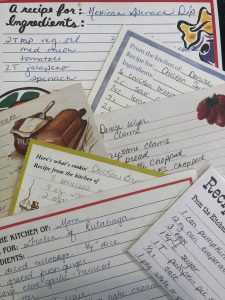
    Until now, the tradition of the family cookbook has often been handwritten on note cards, hastily scribbled on napkins during family gatherings or jotted in lovingly preserved notebooks, yellowed with age. Like everything else it touches, the Internet is revolutionizing family-recipe gathering.

    “Food is an integral part of who we are as individuals, as members of society and as members of groups within that society,” says Bill Rice, founder of the Family Cookbook Project, a Web site that helps thousands of families compile their favorite recipes and publish their own cookbooks. “From Aunt Edna’s pot roast to Grandma’s special pecan pie, family recipes create common ground and wonderful shared memories.”

    The Family Cookbook Project uses proprietary software to help budding cookbook authors compile, edit and organize their family’s recipes online. By creating an account at www.familycookbookproject.com, users can send an invitation e-mail to family members asking them to contribute favorite recipes for the book.

    Family members then sign on to the “editor’s” account and enter their information, eliminating the laborious process of collecting and re-keying recipes. Once all contributions are in, the editor then uses the site’s software to edit and organize the cookbook. Editors can choose from a variety of personalized covers and divider pages for their spiral-bound book.

    The cost of creating a family cookbook is just $19.95 for up to 10 contributors or $29.95 for an unlimited number of family contributors, plus the cost of printing. With a low minimum print quantity of just 50 books, families print and many cookbooks as they need and give others as gifts..

    “Although some of our more enterprising editors sell their family cookbooks on eBay,” Rice points out.

    To get started compiling your family’s recipes and publishing your own family cookbook, visit www.familycookbookproject.com.


    Bill Rice is founder and Co-Publisher of the Great Family Cookbook Project, a website that helps families and individuals collect and share food memories through customized printed cookbooks filled with treasured recipes. Follow us on Facebook and Pinterest!
  • Cookbook Printing in 8.5″ x 11″ now available from Family Cookbook Project

    For many years, Family Cookbook Project has been helping individuals and families create and print wonderful cookbooks in the traditional 5 1/2 by 8 1/2 inch size. However, every once and awhile we get asked “how about an 8 1/2″ x 11″ size printed cookbook?”

    After a lot of programming and work with our printers, we can now offer full sized 8 1/2″ x 11″ printed cookbooks that use all of our available professionally designed covers and layouts.

    From Layout & Design you can click for cookbook size on the main options, and if you click Binders on the additional options, it shows there, as well.  Once a size is set, all previews/downloads show your cookbook in that size.  This is also helpful for those of you that want to print on your own to your home printer on full size paper!

    The cost per cookbook will be higher that the traditional sized cookbook because of the increased paper costs. However the Printing Cost Calculator has been updated to show the pricing for both printed size options.

  • Top Cookbook Covers of 2018


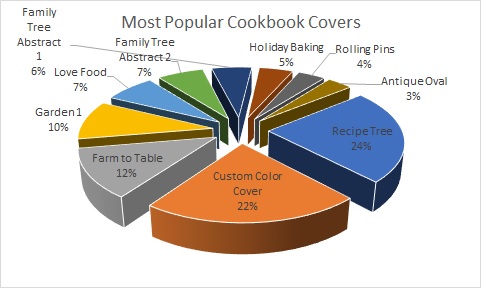
    At FamilyCookbookProject.com, we offer 55 different professionally designed covers to help editors create their perfect cookbook. We thought it might be interesting to see what was the most popular covers printed over the past 12 months. Here are covers chosen on print orders in 2018.  Note, Garden 1 is the default and sometimes people with full custom covers have that and it’s hidden, but they did not actually choose it.

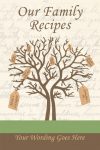
    The most popular cookbook cover last year was Recipe Tree, accounting for almost a quarter of all printed covers. This is followed by Custom Covers when editors use their own design skills to create a personalized cover.

    To see all of our available professionally designed cookbook covers, go to the Layout and Design Center in your editor’s account and select Cookbook Covers.


    Bill Rice is the Co-Publisher at Family Cookbook Project which helps individuals and fundraising groups create cherished personalized cookbooks using the power of the Internet. Follow us on Facebook and Pinterest.

  • Anatomy of a Great Recipe

    One of the keys to a great family cookbook is to have great recipes that your family and friends have come to love. Here are some simple tips to help you capture the magic of the food you make.

    1. Use catchy titles. Using a catchy title will make your recipe sound more interesting. It is more interesting to people when they see the title “Gooey Triple Chocolate Cake” rather than just “Chocolate Cake”. When you are writing a title for a recipe, try to think of not only what the final dish will be, but what makes it special as well. 

    2. Include photos. Using images in your recipes can allow the person reading your cookbook to see what the final dish will look like and give then a guidepost to follow. Next time you make one of your special dishes, snap a quick photo and add it to your recipe the next time you log in.

    3. Be specific with your Ingredients. For many cooks, include a can of crushed tomatoes in your recipe and they know exactly what you mean or maybe not. Tell them to include a 12oz can of crushed tomatoes and everyone will know exactly what your recipe needs.

    4. Use step by step instructions. You might have made this recipe a thousand times, but someone new will need detailed directions for how to do it. Remember to include pan sizes, cooking times, the order that ingredients are added and how to tell when a dish is done. Also adding how many servings a recipe can make will help with meal planning. 

    5. Add personal notes. One of the things that make a family cooks so important is that it helps to capture the family traditions. Include a note with each recipe about how you first were introduced to the recipe and when it is typically served in your household. It makes the recipe more interesting and more meaningful to later generations.


    Chip Lowell is Co-Publisher of the Great Family Cookbook Project, a website that helps families and individuals collect and share food memories. Follow us on Facebook and Pinterest!
  • How Many Recipes Does My Cookbook Need?

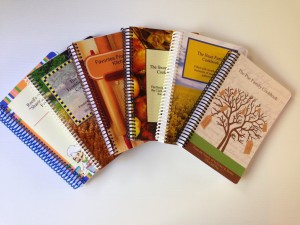
    Cookbook-CoversOne question every cookbook editor wants to know is how many recipes should my cookbook have? Too many and printing costs are higher, not enough and the cookbook is not as valuable. What’s a family cookbook editor to do?
    Looking at the thousands of cookbooks we have printed over the past decade, there is no real number of recipes that make up a good cookbook  – you have what you have.  We have printed cookbooks with just 15 great recipes and as many as 1200!  However, that 1200 recipe book was 750 pages – HUGE!

    The average size seems to be around 150 recipes and that is why we use that number in our cost calculator.

    When a great cookbook has less recipes, often the editor includes other content to augment the food offerings. Photos of each dish, a section of family photos, a family tree or family stories about people remembered can really add value to a smaller cookbook.

    Larger cookbooks can be impressive simply by the number of recipes it contains. However, since printing cost is directly related to the number of pages that need to be printed, it is important to be mindful of your design choices when choosing your layout options.

    At the end of the day, your cookbook is exactly that – your cookbook. You need to balance the number and quality of the recipes included with the needs of your family.

    Bill Rice is the Co-Publisher at Family Cookbook Project which helps individuals and fundraising groups create cherished personalized cookbooks using the power of the Internet. Follow us on Facebook and Pinterest.

  • Lowering the cost of printing your cookbook

    When it comes to printing your family cookbook project, page count is the largest determining factor on what the cost per book will be.

    To lower the number of pages that need to be printed, you don’t always have to just delete recipes. Here are some simple formatting charges you can make to affect your page count.

    Go to Editor Tools>Publishing Tool>Cookbook Options and Design.  Under Recipe Layout, choose any or all of these options to save space:

    • Choose Arial or Times Roman, Two Column Small for the smallest type faces
    • UNcheck Print my recipes in non-continued format
    • UNcheck Force recipe photos to be on same page as recipe
    • CHECK Print Directions and Comments as single paragraphs
    • Under Recipe Sorting, choose Print my recipes in book order – shortest to longest

    Another thing to do is look at your recipes that are more than one page long. We show you multi page recipes in the “recipes by category” index. There is a “*” next to the edit button of long recipes. Consider removing some of these recipes by unchecking the box by the recipe title and see the impact on page count.


    Bill Rice is Co-Publisher of the Great Family Cookbook Project, a website that helps families and individuals collect and share food memories. Follow us on Facebook and Pinterest!

  • Why Blank Pages Are Important In Your Family Cookbook

    One of the questions we get a lot as Cookbook Publishers is “how do I remove the blank pages in my cookbook?”

    It seems that when people preview their family cookbook on FamilyCookbookProject.com, they see the cover, then a blank page, then the title page, then another blank page, and so on. They want those blank pages eliminated to lower the cost of printing.

    In publishing, especially cookbook publishing, a cookbook needs to be laid out in a specific way in order for the most important pages to be on the right side when the book is opened. Think about it, Whenever you open a book, the title page is the first thing you see and it is always on the right page of a two page spread. Same goes for the Introduction, Table of Contents and the section dividers.

    On FamilyCookbookProject.com, if you create a preview cookbook PDF, you want to open it in your Adobe Reader program and select the option to view “Facing Pages” or “Double-up” (look under the View menu), you’ll see how the pages back up to each other.

    Now with that said, there is no reason why those pages have to be blank. The inside front cover can have a family photo photo or bio of the cookbook editor. The same goes for other blank pages as well. If your introduction is one page and after it is a blank page, consider writing more, adding a photo or even making the text larger to fill up that extra space.

    One benefit form using FamilyCookbookProject.com is that we provide a complete set of handy kitchen information that can be used on the back of the recipe category dividers with the touch of a button.

    Bill Rice takes more than 20,000 photos a year and is Co-Publisher of the Great Family Cookbook Project, a website that helps families and individuals collect and share food memories. Follow us on Facebook and Pinterest!

  • Family Cookbook Project adds three new cover choices

    BackToSchool4txtIn an effort to continually build its library of professionally designed covers for its editors to choose from, Family Cookbook Project has added three new cookbook covers.
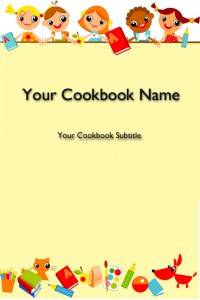
    Back to School – Kids: This cookbook cover is perfect for a daycare, elementary school or other cookbook involving young children. The images are fun whimsical cartoon characters having a good time.


    BackToSchool3txt


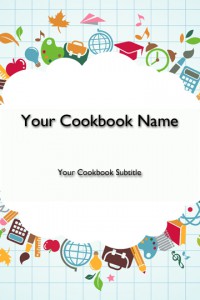
    Back to School – Supplies: Another school related cookbook cover, this cookbook cover features schools supplies such as a globe, artist paint brush, calculator, apple, etc.


    RedWhiteBluetxt


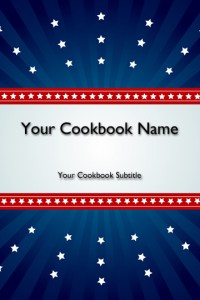
    Red, White and Blue: Looking for a patriotic cookbook, this may be your cover! A blue background with red stripes and white stars provide a colorful cover for any cookbook need.

    Family Cookbook Project is working on additional covers that will be available in the coming months. If you have a cover that you think we should add to our collection, please let us know!

  • 3 Ring Binding Now Available from Family Cookbook Project

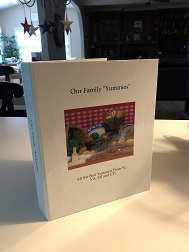
    IMG_8389A family cookbook is a living thing. New recipes are always being tried and added. Many people like to have a three-ring binder for their cookbooks so that adding recipes is quick and easy.
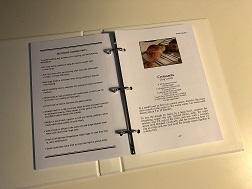
    We are excited to offer 3-ring binders as an option for our Family Cookbook Project members. A 3-ring binder will be the same great size as our traditional cookbooks but also have the name of the cookbook on the spine. The binder itself is quite a bit larger than just the pages – about an inch all around or so. The binding opens to allow you to add additional recipes as you go. The one difference between the two binding styles is you can’t have inside front or back cover content with the new 3-ring binders.

    IMG_8391In the Book Options and Design tool, you can choose from our standard coil binding in black or white or the new 3-ring binder options. The cost for the 3-ring binding is slightly higher than the coil binding because of the cost of printing.
    At Family Cookbook Project we are always looking for new ways to make your cookbooks better for you. We have other exciting announcements coming so stay tuned!


  • Cookbook Cover Selection Tool

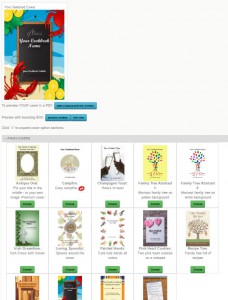
    covertoolHow do you select a great cover for your family cookbook? You use our Cookbook Cover Selection Tool. Part of the cookbook design section, this tool displays images of each professionally designed cookbook cover that users can select with a single click.

    The covers are divided into categories, including: Family, Farm, Food, Fundraising, General, Holiday, Kitchen, Religious, School, Wedding. There is also an option to see all of the covers at the same time. New categories and covers are already in the works and will be announced shortly.

    Users also have the option to create their own custom cookbook cover and upload that to the Family Cookbook Project Website.

    To view the Cookbook Cover Selection Tool, log in to your editor’s account and select “Book Options and Design”. Here you will see the cover categories displayed with a “+” next to it. Click on the category label to expand the section and see the covers associated with that category. It’s that simple.

    In addition to cookbook covers, divider options and recipe layout options have been upgraded to use the same technology to display options in a convenient, easy to use arrangement.