Category: FamilyCookbookProject.com

  • Co-Editors Now Available on Family Cookbook Project

    Co-Editors Now Available on Family Cookbook Project

    Face it, sometimes we all need a little help.

    As a cookbook editor, you always had the ability to invite other family members to contribute recipes, so you did not need to personally enter all those recipes into the system (this is also a great family project). However, contributors could only edit their own recipes and nothing else.

    Until now.

    In the editor’s Communication Center, any contributor can now be upgraded to a co-admin for the cookbook. This gives them the ability to edit all of the recipes within the cookbook, not just their own. This can be a huge time saver when getting a cookbook ready to print. Having co-editors make the first edits to a recipe will allow the editor to focus on the design elements of the cookbook and the overall project.

    It is also important to note that the primary editor still has ultimate responsibility for the design and content of the cookbook so while family members can help, ultimately it is the editor that needs to sign-off that the cookbook is correct and ready for printing.

    One thing to remember, “Too many cooks spoil the soup.”  So be very careful when promoting someone to co-editor.  They can adjust settings and recipes just like the main Editor.  So keep communicating!  And once the editing work is done, you can easily change a co-editor back to normal contributor.


    Bill Rice is founder and Co-Publisher of the Great Family Cookbook Project, a website that helps families and individuals collect and share food memories through customized printed cookbooks filled with treasured recipes. Follow us on Facebook and Pinterest!

  • New Recipe Symbols Available

    New Recipe Symbols Available

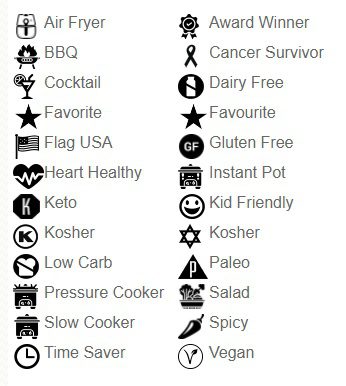
    Back in 2019, Family Cookbook Project introduced add special icons to recipe titles to call special attention to them in a cookbook table of contents. Recipe symbols were a big success and many contributors started using them. Many people also asked us to include additional symbols and that is what we have done. We have added 9 new symbols that are now available:

    • Paleo
    • Vegan
    • Keto
    • Dairy-Free
    • Pressure Cooker
    • Air Fryer
    • Updated Kosher
    • Instant Pot
    • Low Carb

    As the editor you can add these recipe symbols to any recipe right after you have entered the recipe title on the “Add a recipe” page. There is a drop-down menu to select the symbol to be included in that recipe.

    For recipes already added to your cookbook, you can edit that recipe and add a symbol of your choice.

    A key of icons and their meanings used in your cookbook will also appear on the bottom of your table of contents page. If you don’t include a specific symbol, it will not be included in your icon key list.

    This new feature will be available on both the FamilyCookbookProject.com site as well as the CookbookFundraiser.com site.

    Please let us know how you like the new recipe symbols.


    Bill Rice is the Co-Publisher at Family Cookbook Project which helps individuals and fundraising groups create cherished personalized cookbooks using the power of the Internet. Follow us on Facebook and Pinterest.

  • Family Cookbook Project Is “Marvelous For Mother’s Day”

    Family Cookbook Project Is “Marvelous For Mother’s Day”

    FamilyCookbookProject.com was featured on WFLA-TV NBC Tampa in a segment for marvelous Mother’s Day Gifts.

    You can see the full TV Segment here: https://www.wfla.com/daytime/marvelous-for-mothers-day/

    Another TV station in Atlanta also picked up the story. Channel 11 ran this piece:  https://www.11alive.com/video/entertainment/television/programs/atlanta-and-company/mothers-day-gifts-with-the-luxe-list/85-182986e4-8a3b-4002-bbd3-f4ecd00b81a5

    Family Cookbook Project is also offering a limited time Mother’s Day Lifetime Membership Gift Certificate at 60% off our normal price. If you are looking for a Mother’s Day gift that will be remembered forever, give your favorite Mom the gift of a Family Cookbook!

  • How to Take Great Food Photos for Your Recipes

    How to Take Great Food Photos for Your Recipes

    They say a picture is worth a thousand words and with recipes that is especially true.

    It’s wonderful to read a list of ingredients and see the potential in a recipe, but to look at the finished product can make your mouth water!

    Family Cookbook Project highly recommends adding a photo to every recipe you can in your online cookbook. It helps people to see what to expect when they follow your recipe and gives them a standard to meet when comparing their finished dish to the original.

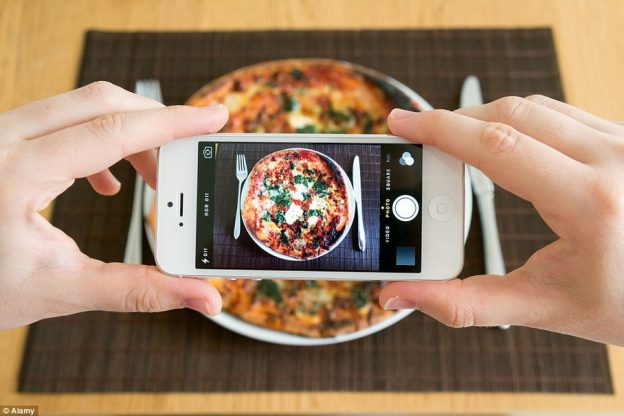
    With the advent of digital camera built into cell phones, you don’t have to be a professional photographer to take good food photos.

    Here are some pointers to help improve your recipe photos:

    Use Natural Light – Make sure that the light is right – shoot the food either next to a bright window or under a pendant light in the restaurant. Don’t use your camera’s flash! Set your dish near a window and turn off any artificial lights that might be on nearby. Try to photograph with the light at your back or to the side of a dish, so that the shadows are to the side or behind it. 

    Hold Still – Taking photos inside, even with ample natural light, often means you have to hold the camera very still to keep it from registering hand shake. If you have a tripod, that’s ideal. If you don’t, you can duplicate the tripod effect by resting your elbows on the table or counter and using them to stabilize the camera. Moving the camera when taking a photo will only lead to blurry unusable photos. 

    Get close to the food! – Don’t stand back three feet and get the food with the stove, the dirty dishes, and all the condiments around it. Move in and get up close and personal, and let the pan…or the plate…or the cutting board fill the frame.  

    Stage the shot – The food isn’t the only thing in the photo. Using plates, silverware and linens in complementary colors can help your dish come alive. Shoot food on a beautiful plate or on a table with texture and character. The more appetizing the ingredients, the better your photo will be. Plates that contain colored vegetables and/or meat, preferably in light-colored sauces, are often the most appealing to the eye in photos. Also Don’t be Afraid of a mess. A few crumbs or a smear of dressing can be beautiful, if you let them. 

    Focus on the food –  If you are using a DSLR, stop down your lens to f/1.8 or f/2.0 that limits your depth of field to one part of the image only, blurring out everything around the subject, simulating a shot taken with a macro lens. If you are using an iPhone, there are apps, such as Camera+ or VSCO Cam, that will create the same effect. Remember, you want the food to be the main focus, not the background. 

    Try different angles –  Get up over the food and shoot straight down on it. When shooting overheads, if appropriate, try filling up the frame with what’s already on the table such as cups, wine glasses, utensils and moving hands. You can also  think in three dimensions, You might not usually serve brownies piled in a vertical column, but stacking any flat food, like pancakes, cookies, or even onion rings, is a great way to show off texture and make the photo more appealing. You can also add dimension to your food photos by showing the dish right after the that first bite is taken, or the second and third. These are little details that make a viewer feel like they’ve sat down and are enjoying the meal. 

    Get Close to Ugly Foods  – Some foods, no matter how good they taste, just don’t make good photos. But the closer you get to your subject, the more the visual story becomes about texture and color, rather than pure mouth-watering beauty.Avoid foods that are white and gloppy, such as congealed gravy on white pasty mashed potatoes. 

    Size Matters –  Make sure your camera settings are set for a good sized photo. Small photos look blurry when they are enlarged on line. A photo viewed online only has to be 72 dpi (dots per inch, the measure for quality), but if you are going to print your photo, you want it to be at least 300 dpi. 600 pixels wide (a measurement for size) is a good target for minimum photo size.

    Using other’s photos – It is important to note that the Internet makes it easy to find photos of recipes already taken. While this might be much easier, the photo still is the property of whomever holds the rights. Don’t always assume that because a photo is on the Internet you can simply use it for your recipe. Make sure you ask permission from the owner before you use it.


    Bill Rice takes more than 20,000 photos a year and is Co-Publisher of the Great Family Cookbook Project Project, a website that helps families and individuals collect and share food memories. Follow us on Facebook and Pinterest!

  • Family Cookbook Project Upgrading Servers

    Family Cookbook Project Upgrading Servers

    We wanted to give our Cookbook Editors a heads up that for a few hours on April 8 and/or 9th the FamilyCookbookProject.com site will be taken down so that we can move the operating software to new larger, faster, more robust and secure servers that will allow our ability to access their online recipes boxes and design beautiful printed cookbooks to be shared with family and friends.

    Once offline, we will disable login to the editor accounts. We expect the service will be back up and running better than ever within a few hours of being taken offline.

  • We Did It! A Cookbook Editor’s Story

    We Did It! A Cookbook Editor’s Story

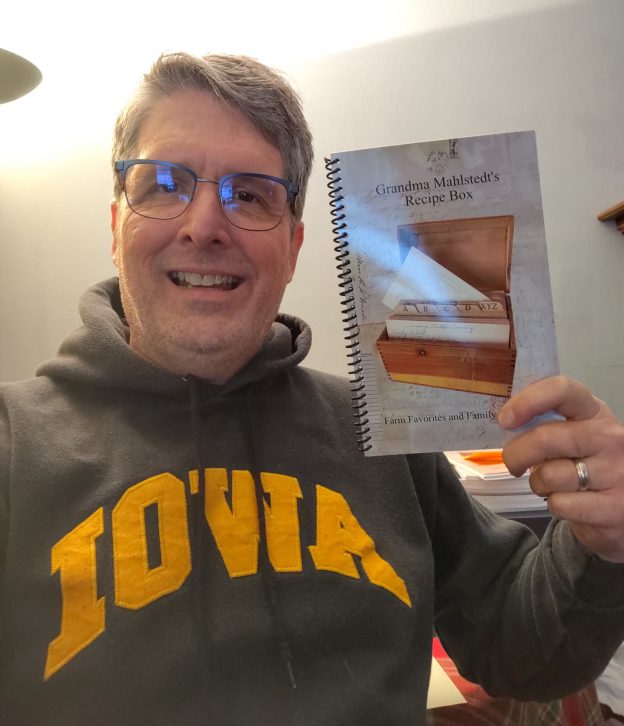
    We did it. Started this project the end of August 2020. Took a break over Dec, then finalized things in Jan. Placed our order and received them by mid Feb.

    This was so easy and fun to do. I put together another family cookbook in 2004 and all I had was Microsoft Word. Then I was at the mercy of some guy at the Xerox store to copy and bind a book for me, not knowing what it would look like till it was done.

    Using FamilyCookbookProject.com made this a breeze. Being able to see what the book would look like while we were creating it really helped to visualize the final product. Being able to add our own pictures as well as genealogy family charts help to make this a family heirloom that generations will enjoy.

    If I had a suggestion it would be to have more editing abilities with photos. What I mean is, being able to add multiple individual pictures on a single page. I was only able to accomplish this by putting multiple pictures on a blank Microsoft word document, and then creating a JPEG file from that document. While it did work, it wasn’t very convenient.

    We are all very pleased with the final product that was created. Now it’s just a matter of handing them out to family members and sharing the memories. thank you

    Cheers!

    Kevin
    Grandma Mahlstedt’s Recipe Box


    Thanks for sharing Kevin! And by the way, we are working on creating a more flexible photo layout tool that should be announced in the near future.


    Bill Rice is founder and Co-Publisher of the Great Family Cookbook Project, a website that helps families and individuals collect and share food memories through customized printed cookbooks filled with treasured recipes. Follow us on Facebook and Pinterest!


  • FamilyCookbookProject.com In the News

    FamilyCookbookProject.com In the News

    Increasingly, more websites are finding out about FamilyCookbookProject.com and writing about their experiences with creating their own family cookbook using our website. Here are some recent articles you might enjoy.

    Preserving Cherished Food Memories with a Family Cookbook – This is a guest post by Family Cookbook Project founder Bill Rice on the website Nothing But Net Nanny, a social blog that will offer a fun, inspirational and even self-deprecating take on aging, retirement and fitness…or lack thereof

    HOW TO CREATE A CUSTOM FAMILY COOKBOOK THE EASY WAY – All Things with Purpose is a creative lifestyle blog started by Sarah Kemp as a place to share DIY tutorials, tips, money saving advice and homeschooling resources. She created her own family cookbook and wrote about the experience.


    What if You Could Have Just One Cookbook? Wouldn’t That Make You Happy?– Shea Hulse’s Realize Your Natural Potential is another website blogger who started a family cookbook and loved is so much she wrote about the experience on her website.

    Create a personalised family cookbook filled with your own recipes – Eat Simply is a top rated food blog in the United Kingdom and she writes about her experiences with FamilyCookbookProject.co.uk, the UK version of our site.


    Please visit these website and check out the articles.

  • Advanced Photo Arranger Tool Announced for FamilyCookbookProject.com

    Advanced Photo Arranger Tool Announced for FamilyCookbookProject.com

    Photos are such an important part of any good personal cookbook. They help to bring the food to life and show family members enjoying time together.

    The vast majority of cookbook publishers today only allow a single image per recipe and it is always in the same position.

    FamilyCookbookProject.com has just announced an industry leading upgrade that allows you to control multiple photos and images on a recipe to get them to look just right for your cookbook.

    As part of the Recipe Layout Tool, you can set a global photo position. There are six options:

    • On top/before the recipe
    • On to with a fade
    • After recipe title
    • Right of the ingredients
    • Left of the ingredients
    • After the personal notes/end of recipe

    By default, recipes photos are “stacked” one after another down the page in the order determined in the settings. When you edit a recipe with a photo, you will see seven different standard positions that the photo will be located as part of that recipe layout. If you need even finer control, you can select the Custom Photo Arranger Tool to precisely set the location on the page of that particular recipe.

    If there are multiple photos, you can build a collage and allow the photos to overlap, set the order and change size of each photo.

    The new collage arrangement will be positioned based on your global or unique recipe position.  The exception is Right/Left of Ingredients.  That will always use the “stacked” look down the ingredients column.

    You also have the option to generate a pop-up preview to see exactly how the images and text will look on the printed recipe page with a single click.

    Below is a video tutorial to show you how to use the new photo placement tools.


    Bill Rice is founder and Co-Publisher of the Great Family Cookbook Project, a website that helps families and individuals collect and share food memories through customized printed cookbooks filled with treasured recipes. Follow us on Facebook and Pinterest!
  • Recipe Layout Tool Upgrade on FamilyCookbookProject.com

    Recipe Layout Tool Upgrade on FamilyCookbookProject.com

    Family Cookbook Project is pleased to announce a major upgrade to the Recipe Layout Tool within FamilyCookbookProject.com

    The recipe layout is what formats the design of the recipes within the cookbook. When you add a recipe, you are only adding the data. It is the recipe format tool that takes that data and organizes it into a well-designed recipe consistent throughout the cookbook.

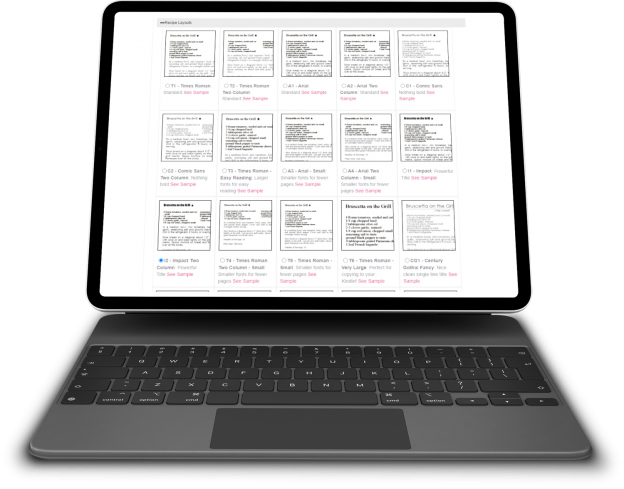
    The recipe layout controls the size and font of the recipe title, ingredients, directions and comments. It can also allow for one or two columns of text in the ingredients to save space.

    Finally, it determines where any photo will be displayed if there is one attached to the recipe.

    Here are some of the major changes:

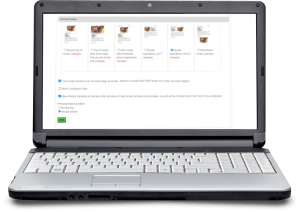
    Side by side viewing – The first thing you will notice when you select the Recipe Layout tool is the ability to see all of the options as thumbnails without having to click a pop-up link for each. The options are now laid out like the covers and dividers allowing you to see them all side by side. You can click on the thumbnail for a pop-up window full-sized view.

    Recipe Level Layout – We have always forced all of the recipes to be in the same layout for consistency within the cookbook. However sometimes you need the text just a little smaller so it will fit on a page. Or a recipe is very special and you want to highlight it. Now you can. Each recipe edit page now contains an option to change the layout for that one recipe. We recommend using this sparingly. We also offer a global reset button to get all of the recipes reset back to the original layout if needed. You can also choose the recipe photo position uniquely for any recipe – which also has a reset option incase things get to “messy”.

    Custom Layout Import – Custom Recipe Layout can import settings from any static layout we offer as a starting point and then you can change as aspect of that layout to fit your needs.

    Photo Positions – We have increased the number of places a photo can appear on a recipe than just above the title and at the end of the recipe. There are four new positions for photos:  After Title/before Ingredients; Top of recipe fade out (1 pic only); Left or Right side of Ingredients. The Recipe Layout Tool also shows you these options side-by-side. You can select your recipe photo position like the layouts above. You’ll see them listed with thumbnail views. Simply click the button to use one and save.


    Bill Rice is founder and Co-Publisher of the Great Family Cookbook Project, a website that helps families and individuals collect and share food memories through customized printed cookbooks filled with treasured recipes. Follow us on Facebook and Pinterest!

  • Introducing New BBQ Cookbook Covers

    Introducing New BBQ Cookbook Covers

    Both Chip and I, the two founders of Family CookbookProject.com, love to grill, smoke and BBQ. Cooking meat, seafood and veggies outside is kind of a guy thing (even though I know women that are excellent pitmasters!).

    I was working on a new cookbook for my family featuring my favorite BBQ recipes and I did not find a cover that I really liked ever though we have a great library of cookbook covers to choose from.

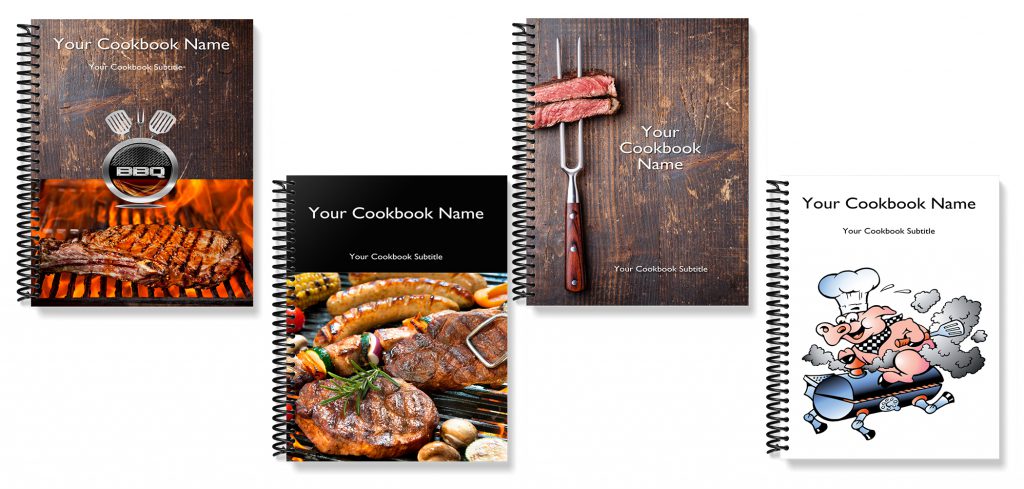
    So I had our professional designer come up with a series of cookbook covers that I loved so much that we are making them available to all of our cookbook editors to use.

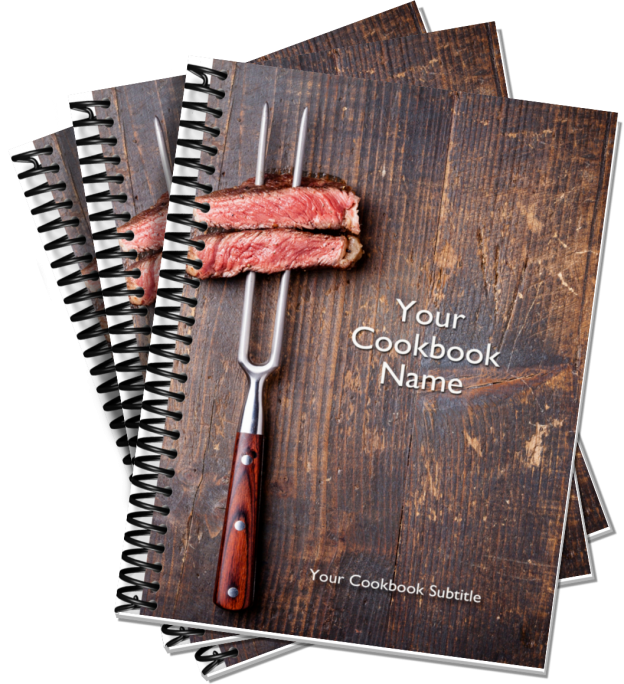
    Here are the new BBQ Cookbook covers:

    If you are interested in BBQ and great BBQ recipes, be sure to join our Facebook BBQ Recipe group.

    On Pinterest, we have two boards Food Guys Love and Family BBQ and Grilling Recipes to check out and follow.

    Finally, here is a fun video we created for the BBQ community.


    Bill Rice is founder and Co-Publisher of the Great Family Cookbook Project, a website that helps families and individuals collect and share food memories through customized printed cookbooks filled with treasured recipes. Follow us on Facebook and Pinterest!