
Category: FamilyCookbookProject.com
-
Foodie Gifts You Can Still Get in Time for Christmas
 The website Smart Traveler has named Family Cookbook Project software to it’s 40 Best Foodie Gifts You Can Still Get in Time for Christmas. Not only do family cookbooks filled with personal recipes make a great gift, but giving someone you love the gift of Family Cookbook Project allows them to create their own treasured cookbook!
-
Rating Your Favorite Recipes
 Creating a printed personal cookbook on FamilyCookbookProject.com can be a rewarding experience, but your interaction with the website does not have to stop there.
A majority of people who have created cookbooks continue to use the website as an online resource either from their desktop computer or by using our “award-winning” mobile app.
One fun thing to do is to rate the recipes you use from your cookbook.
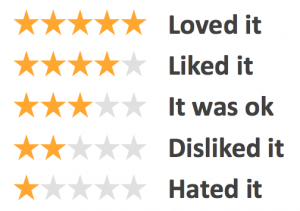
Rating recipes is easy. Go to the “view recipes by contributor” and find the favorite recipe that you have added to the cookbook so far. Click on the title of the recipe to view it. Right under the title is something that says “Rate this recipe” and 5 gray stars. To rate this recipe, simply click on the last star of your score. So if you think it is a “5 star” recipe, click on the last star. If it is a “4 star” recipe, click on the fourth star and so on.
You can also click in between to stars to give it a 4.5 star rating!
The next person who views the recipe will see your rating (although they will not know it came from you) and will be able to leave their own rating.
Over time you will see how many people rated your recipes and how much they liked them. It is one more way FamilyCookbookProject.com helps to build a dialog around your recipes.
Give it a try today and invite the others in your cookbook to do the same!
-
A Mother’s Gift
 We owe our mothers so much. They give us life, they nurture us, feed us and teach us.
Our mothers are also often our first teachers in the kitchen. From them we learn table manners, what a family meal is and how it brings us all together. Our lessons start when we watch and mimic what we see in the kitchen and at the dinner table. As we grow and understand, we are taught by being allowed to become a “mother’s helper” and do some of the simpler tasks of getting the family meal prepared. Later in life, we use all of the years of learning by contributing our favorite family dishes when the family gathers at holidays, taking some of the pressure off of our mothers.
As a mom, it is important to pass those life skills on to our children so they have the same foundation in the kitchen that we learned from our parents.
Here are some simple ideas to consider when teaching the next generation how to prepare the family meal:
Teach measurements– Find tasks for young ones that allow them to stay in one location, but keep them busy. Give them a measuring spoon and ask them to count how many teaspoons are in a cup of flour or water. Once they fill the cup, use it in your recipe.
Name the tools – Many of the tools of the trade in the kitchen have specific names and specific uses. Teach the names of the tool as well as their purpose in preparing the meal. That way when you ask for a wisk you don’t get a potato masher!
Plan meals together– For most families, dinner usually includes a main dish or entre, a side dish or two providing a starch and vegetable, and if we are lucky a dessert. Discuss why certain side dishes go together and how to plan a well-balanced meal.
Use recipes – Many mothers have made their favorite family recipes so many times, that they don’t even use a recipe any more or they never had one from their mother. Trial and error can come later, to start have a set of family recipes that can be used to provide step by step instructions to a young chef. If you don’t have them, write them down as you make a dish and start collecting them.
A great way to help mom collect and share her family recipes is to help her create a family cookbook. The Family Cookbook Project (www.FamilyCookbookProject.com) offers a gift certificate that can printed out and included in a Mother’s Day card. This gift will help any mom create an easy online family cookbook that can then be printed and shared for generations to come.
Mom’s can also give themselves a gift to help preserve their family food traditions. By creating a family cookbook and collecting your family recipes, you will be creating a helpful guide for future generations.
Bill Rice is Co-Publisher of the Great Family Cookbook Project, a website that helps families and individuals collect and share food memories. Follow us on Facebook and Pinterest!
-
2020 Cookbook Printing Deadlines For The Holidays
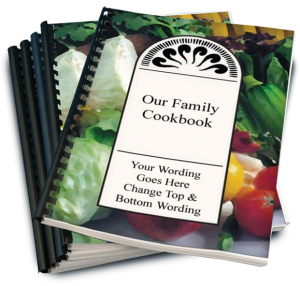 Giving the gift of a beautiful personalized family cookbook is something that many, many of our cookbook editors are looking forward this holiday season. As such, this is by far the busiest time for printing your cookbook.
Here are some deadlines to know about to make sure you have your cookbook print orders in hand when you want them:
- Thanksgiving: Sunday, November 1st
- Christmas: Monday, November 30th
So now is the time to contact all of your contributors with your Reminder Tool and tell them to enter their recipes now before it is too late. We recommend using a recipe submission deadline a couple weeks ahead of your deadline. So for Thanksgiving, give your helpers a deadline of October 15th in order to give you time to review the recipes, make sure all of the extra spaces are removed and words are spelled correctly, and still have time to place your order before the printing deadline.
And don’t feel you need to wait for the absolute deadline to submit your order either, those days and extremely busy and cookbooks are printed on a first come, first served basis. So the earlier your cookbook order is placed, the sooner you will have your cookbooks in hand.
Family cookbooks make wonderful gifts for family and friends alike. The effort you put into your cookbook now will pay off for your entire family for years to come.
-
How To Create a Mini Cookbook

Do you have a lot of recipes of a specific type? Maybe you love to make cookies or pies or cakes. You can create a “mini cookbook” to organize your recipes and even share with family and friends.
With a few as 10 recipes, you can create a single category cookbook or multiple categories within a theme.
For example, as the bartender for our family I am often asked what cocktails I can make. I show them my “Fabulous Family Cocktails” – a cookbook of 27 beverage recipes and let then choose what I can make for them.
Around the holidays our “Family Cookie Recipes” cookbook comes in real handy when getting ready for a cookie swap!
Next, I plan on creating a BBQ mini cookbook and giving it out as gifts for Christmas to my friends and family.
To create you own mini cookbook, go to the Production Center on your editor page and select “more cookbooks”. Here you can create your own mini cookbook and even import your recipes from your main cookbook using our recipe transfer tool.
Bill Rice is founder and Co-Publisher of the Great Family Cookbook Project, a website that helps families and individuals collect and share food memories through customized printed cookbooks filled with treasured recipes. Follow us on Facebook and Pinterest!
-
Why Blank Pages are Needed in a Family Cookbook
 One of the questions we get a lot as Cookbook Publishers is “how do I remove the blank pages in my cookbook?”
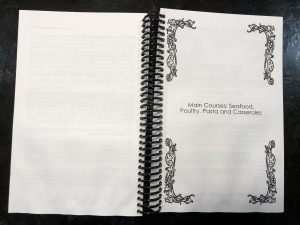
It seems that when people preview their family cookbook on FamilyCookbookProject.com, they see the cover, then a blank page, then the title page, then another blank page, and so on. They want those blank pages eliminated to lower the cost of printing.
In publishing, especially cookbook publishing, a cookbook needs to be laid out in a specific way in order for the most important pages to be on the right side when the book is opened. Think about it, Whenever you open a book, the title page is the first thing you see and it is always on the right page of a two page spread. Same goes for the Introduction, Table of Contents and the section dividers.
On FamilyCookbookProject.com, if you create a preview cookbook PDF, you want to open it in your Adobe Reader program and select the option to view “Facing Pages” or “Double-up” (look under the View menu), you’ll see how the pages back up to each other.
Now with that said, there is no reason why those pages have to be blank. The inside front cover can have a family photo photo or bio of the cookbook editor. The same goes for other blank pages as well. If your introduction is one page and after it is a blank page, consider writing more, adding a photo or even making the text larger to fill up that extra space.
One benefit form using FamilyCookbookProject.com is that we provide a complete set of handy kitchen information that can be used on the back of the recipe category dividers with the touch of a button.
Bill Rice is founder and Co-Publisher of the Great Family Cookbook Project, a website that helps families and individuals collect and share food memories through customized printed cookbooks filled with treasured recipes. Follow us on Facebook and Pinterest!
-
Family Cookbook Project.com and COVID-19
 Our hearts go out to anyone in our Family Cookbook Project.com community that have been affected by the recent COVID-19 pandemic, either through sickness, loss of a loss loved one, loss of employment, or the effects of social distancing. This affects all of us and only together will we rise above and beat this crisis.
With the forced isolation brought on by social distancing and quarantines, we have seen an increase in the number of recipes being added to the system each day. Our system is designed to handle any increase in traffic with minimal impact to the user. We hope this also corresponds with an increase in trying new interesting family recipes since dining out options have been limited.
As a Family Cookbook Project editor, here are some ideas to add a silver lining to this crisis.
- Reach out to your contributors and ask them if they have any extra time to contribute a few recipes to your cookbook.
- If you’ve already printed your cookbook, now is a good time to unlock it and ask contributors to start working on volume two.
- Add to a recipe story. Family Cookbook Project.com offers an online ability to add comments to recipes that you’ve tried in memories that you have. Ask people to contribute their stories to the recipes they make and try.
- Use your extra time to review for more than 50 professionally design covers available for your cookbook and get it ready for printing.
- Create a specialty cookbook. Do you have a lot of dessert recipes or maybe ethnic recipes? Consider creating a small cookbook with just those recipes. These kind of cookbooks make great gifts.
These are just some simple ideas to help you take your mind off of the difficult times we are experiencing and look forward to a brighter future.
Bill Rice is founder and Co-Publisher of the Great Family Cookbook Project, a website that helps families and individuals collect and share food memories through customized printed cookbooks filled with treasured recipes. Follow us on Facebook and Pinterest!
-

Understanding Recipe Privacy
 We at FamilyCookbookProject.com believe recipes are meant to be shared. Sure we all have our “secret recipes”, but if they are not written down and shared, they will not be enjoyed when we are gone.
However we give you the control to determine when and where you share your recipes.
When you or a contributor adds a recipe to your online cookbook, there is an option to make your recipe private. If you check this box just above the save button, your recipe will only be available to those individuals who are logged into your online cookbook. Some people choose this option when a recipe is not yet ready to be shared publicly or they simply want to limit the people who have access to it.
However, there are many benefits to sharing your recipe publicly. Public recipes are indexed by Google and other search engines. You can access your recipes simply by entering your name and the recipe name into Google. Online access from any computer without having to remember your log in information is very convenient.
Family Cookbook Project also searches the public recipes to look for the best recipes to be included one of the Family Cookbook Project’s “Best of” cookbooks we publish. We also promote public recipes on our Facebook pages and on Pinterest. This allows us to highlight your recipes to the other Cookbook Editors, which is truly an honor.
We believe recipes are made to be shared, just like the dishes that are made from them. So next time you enter your favorite recipe into your Family Cookbook Project online recipe box, be sure to mark it public so it can be shared.
Bill Rice is founder and Co-Publisher of the Great Family Cookbook Project, a website that helps families and individuals collect and share food memories through customized printed cookbooks filled with treasured recipes. Follow us on Facebook and Pinterest!
-
5 New Typefaces Available for Recipe Layouts
Family Cookbook Project has added five new typefaces to the custom recipe layout options for cookbooks created using the Family Cookbook Project system.
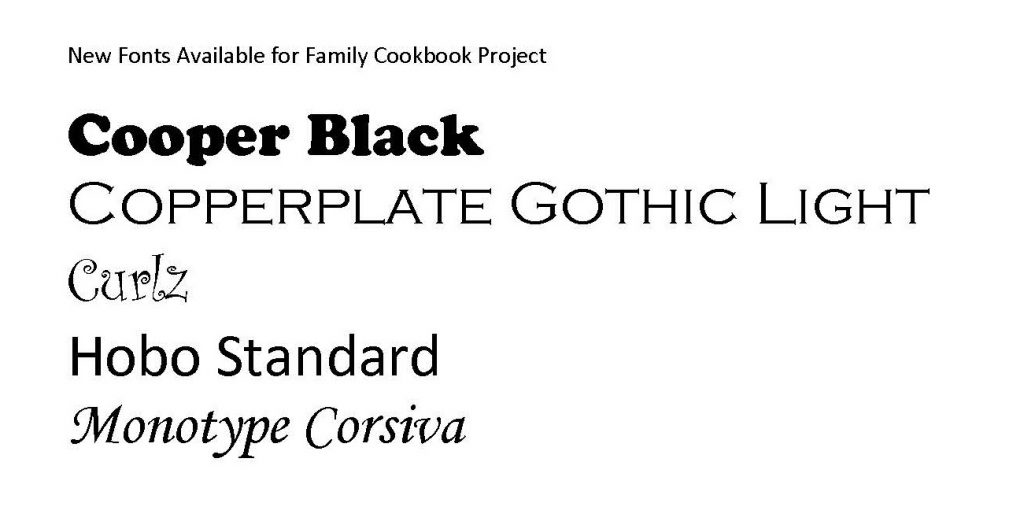
Cooper Black is an ultra-bold serif typeface intended for display use that was designed by Oswald Bruce Cooper in 1922. Its use in pop culture increased worldwide since 1966, when the Beach Boys used it for the cover artwork of their album Pet Sounds. It was then featured in the Doors’ L.A. Woman (1971) and David Bowie’s Ziggy Stardust (1972), and in the opening credits of The Bob Newhart Show, Garfield, and M*A*S*H. As a result, Cooper Black has become emblematic of late-’60s/early-’70s style.
Copperplate Gothic is a typeface designed by Frederic W. Goudy in 1901. While termed a “Gothic” (another term for sans-serif), the face has small glyphic serifs that act to emphasize the blunt terminus of vertical and horizontal strokes. It was designed in capitals only, since the design was intended to be used for headings and key words rather than for body text.The typeface is often used in stationery, for social printing and business cards. It is also classically seen acid-etched into glass on the doors of law offices, banks and restaurants.
Curlz is a whimsical OpenType Font display typeface designed by Carl Crossgrove and Steve Matteson in 1995. While decorative and without a historical model, the face bears comparison with the Emigre foundry’s 1991 typeface Remedy.
Hobo Standard is a sans-serif typeface. It is unusual in having virtually no straight lines and no descenders. It was created by Morris Fuller Benton in 1910. There are several theories regarding the font’s name, and in fact it is widely recognized as one of the more interesting mysteries in typographic history. The most complete and most plausible theory demonstrates how Benton, who lived and worked near a large Russian community, must have seen a particular cigar poster spelling what appears to read like “HOBO!” (“ново”, Russian for “New!”). The poster’s hand-lettering of the word bears striking and unique resemblances to the font; the shape of the O at the extreme right of the poster was probably traced by Benton to match his own Capital O precisely, and those shapes helped define the design of the font.
Monotype Corsiva is an italic typeface made in the style of the early Italian cursives, as exemplified by the work of the writing master Ludovico degli Arrighi in the sixteenth century. The capitals are of swash design, with characteristic flourishes, designed primarily for use as initial letters. Corsiva can be used for short text passages in advertising but is best used to add sparkle to invitations, greeting cards and menus, and to give a sense of occasion to certificates and awards. This is also used on the Family Cookbook Project Recipe Tree cover option.
Monotype Corsiva joins seven original typefaces in the Family Cookbook Project Standard Recipe Layout Options: Times Roman, Arial, Comic Sans, Impact, Century Gothic Fancy, Script, and Palatino Centered. The other new type faces are available in the custom layout option for now.
Visit the Custom Recipe Layout option in the Layout and Design Center to see all of the typeface options.