Blog

  • Standard Measurements for Family Cookbook Recipes

    Standard Measurements for Family Cookbook Recipes

    For many generations, recipes were handed down by word of mouth from mother to daughter. Recipes consisted of a little of this and a smidgin of that. The food always came our great – or at least that is what we told out mothers! Today things are different. Computers make is easy to write down our recipes and share them with friends and family members over the Internet. However it is important to remember that cooking has a language of its own. It is a language of ingredients and measurements and directions. I believe the most important of these is measurements. If we did not have standard measurements for cooking, “T” could be a teaspoon, a tablespoons, a thimble full or a truck load! Here are a list of Standard Measures Abbreviations commonly used in recipes.

    teaspoon……………………… tsp.
    tablespoon…………………… tbsp. or T.
    cup…………………………….. c.
    quart…………………………… qt.
    ounce…………………………. oz.
    pint…………………………….. pt.
    gallon…………………………. gal.
    inch…………………………….. in.
    pound………………………….. lb.
    milliliter…………………………. ml
    liter……………………………….. L
    milligram……………………….. mg
    gram……………………………… g
    kilogram ……………………….. kg
    millimeter……………………… mm
    centimeter…………………….. cm
    meter……………………………. m
    Celsius…………………………… C
    Fahrenheit……………………. F

    Another important thing about standard measurements is that they don’t work if you don’t use them! Including an ingredient in your recipe without a specific amount is likely to leave someone trying the recipe for the first time scratching their head and wondering what to do. Remember know one will know unless you include it in your recipe.


    Bill Rice is Co-Publisher of the Great Family Cookbook Project, a website that helps families and individuals collect, preserve and share food memories by creating their own printed personal cookbooks. He is the author of The Wellfleet Oyster Cookbook (Available on Amazon) and the Cape Cod Cocktail Cookbook, both created using FamilyCookbookProject.com. He is also editor of the Donovan Family Cookbook, now it’s third printing.

    Follow Family Cookbook Project on Facebook, Instagram and Pinterest!

  • Subscribe to the Family Cookbook YouTube Channel

    Subscribe to the Family Cookbook YouTube Channel

    Our job at Family Cookbook Project is to make the process of creating your own personal cookbook as easy as possible for you, our editors.

    That’s why we recently added the “How-To” section of FamilyCookbookProject.com with step-by-step directions to some of your most common requests. You’ll find it the second option in the black navigation bar along the top of every page of the site.

    However we also know that seeing can be easier to understand  that reading. That is why we offer the Family Cookbook Project YouTube Channel.

    We have started creating a series of video walk throughs to help you see how some of the tools are used in FamilyCookbookProject.com.

    • How to get started  – This tutorial walks you through the steps needed to create your FamilyCookbookProject.com account and takes a quick look at your editors account.
    • Editor Homepage Intro – Take an introductory video tour of the family Cookbook Project editor’s homepage and see all of the options available to create your own personal cookbook.
    • How to select a cookbook cover – Family Cookbook Project has an entire library of professionally designed cookbook covers that you can use on your custom cookbook. This tutorial show you have to select the cover that is right for you. Future tutorials will cover how to create a custom cover for your personal cookbook.
    • How To Use Custom Categories – Custom Categories allow Family Cookbook Project editors to change the default recipe categories in their cookbook to be personalized for their needs. It offers the flexibility to create your own custom recipe book the way you want it to appear.

    In addition to the How To videos, we also have a Features and Benefits Playlist which will show videos we use to promote FamilyCookbookProject.com and show why creating a custom recipe books is a great idea. Here are the first videos in the Features and Benefits playlist:

    Please let us know how you like these videos and what topics you’d like to see covered. Also you can help us by subscribing to the FamilyCookbookProject.com YouTube Channel and have any new videos delivered directly to your video feed.


    Bill Rice is Co-Publisher of the Great Family Cookbook Project, a website that helps families and individuals collect, preserve and share food memories by creating their own printed personal cookbooks. He is the author of The Wellfleet Oyster Cookbook (Available on Amazon) and the Cape Cod Cocktail Cookbook, both created using FamilyCookbookProject.com. He is also editor of the Donovan Family Cookbook, now it’s third printing.

    Follow Family Cookbook Project on Facebook, Instagram and Pinterest!
  • Why Your Cookbook Needs Blank Pages

    Why Your Cookbook Needs Blank Pages

    One of the questions we at FamilyCookbookProject.com get a lot is “Any way to remove blank pages that I will be charged for in printing?”

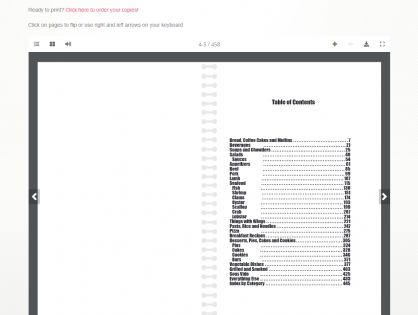
    While removing a few extra pages might save you a few pennies when printing, almost all blank pages are needed. In the publishing world, certain pages need to start on the right side of a two page layout.  The Table of Contents and Category Dividers are two examples of these types of pages that always are placed on the right side of a two page layout.

    If you run your preview and look at the 3D Preview, you’ll see that almost all blank pages are the end of sections to leave the new sections to start fresh.

    In terms of the recipes categories, if the last page of a recipe category is blank, that page was placed there so as to have the next category starts on the right page side. However, if you add additional recipes to that first section, the blank page may come and go depending on the number of recipes in the section.

    You have an option of adding a photo using the Cookbook Picture Manager or a custom page using the Custom Pages Tool to the “end” of any recipe section. That can help fill the blank page. However, if you have not finished the section and add/edit recipes, you may end up with a blank page after your photo/custom page, so wait until all of your recipes are added before considering adding any custom pages.

    Another way to eliminate blank pages on the back of recipes dividers is to include our “Helpful Tip” content on the back of the dividers or to add family photos and set the location in the Photo Manager Tool to the back of the divider.

    You also have the option to start the recipes on the back of the divider. This is done in the Layout and Design Center of your editors homepage. Select “Select Dividers” from the Frist Steps section and check the box for “Start recipes on divider back.” This is also where you can turn on and off “Helpful Tip”.


  • How to Motivate Your Family Cookbook Recipe Contributors

    How to Motivate Your Family Cookbook Recipe Contributors

    As with any family project, getting everyone to contribute can be a challenge, especially if they have not seen the end product beforehand.

    Here are some tips to keep your Family Cookbook Project contributors motivated:

    The more the merrier – Be sure to include everyone, not just the great cooks. Everyone likes to be asked to participate and the more you invite, the more recipes you’ll likely get. To add contributors and send an email invitation, > Use the Invitation Tool

    Set a reasonable deadline – Set the submission deadline on the “Project Information Editor” page, but don’t set it too far in the future. We all tend to put off whatever we can and contributing recipes is often one of those things. A month is usually enough time to give everyone to find the recipes they want to contribute and get them entered. Two things to remember: most of the recipes will come in just in time for the deadline and second, you can always extend the deadline if you want more recipes.

    Send regular updates – Use the Reminder Tool to email some or all of your contributors on a regular basis. Remind them of the deadline and ask them to meet a specific goal, like “please add one or two recipes to each category”.

    Target the biggest recipe boxes – Every family has a handful of people who are known for their cooking (you are most likely one of them in your family!). Send a personal message to them either using the remainder tool or reaching out by telephone, Facebook or with a personal visit. People are flattered when their skills are recognized. Let them know the cookbook would not be complete without their contributions.

    Ask for specific recipes – Send a reminder to everyone asking for a specific recipe from your family’s past that will get everyone thinking of past gatherings. Include your memories of that dish or the person who created it. It might help remind everyone why putting together a family cookbook is important.

    Use social media – As you add your own recipes to your family cookbook, it is easy to post them to Facebook or pin them to Pinterest. Sharing your recipes this way shows other family members that you are contributing and shows them they should as well.


    Bill Rice is Co-Publisher of the Great Family Cookbook Project, a website that helps families and individuals collect, preserve and share food memories by creating their own printed personal cookbooks. He is the author of The Wellfleet Oyster Cookbook (Available on Amazon) and the Cape Cod Cocktail Cookbook, both created using FamilyCookbookProject.com. He is also editor of the Donovan Family Cookbook, now it’s third printing.

    Follow Family Cookbook Project on Facebook, Instagram and Pinterest!

  • $10,000 Burger Contest

    $10,000 Burger Contest

    The Food Network is holding a contest to see who can create the best Blended Burger and the winners gets $10,000. Create your original spin on a blended burger using at least 25% chopped cultivated* mushrooms in the patty and upload your recipe and a photo of the burger to the competition website and if you’re burger is selected, you’ll be $10,000 richer!

    Wendy Tien of Saint Paul won the home cook division with the Buffalo Chicken Blended Burger, a mushroom-chicken burger topped with celery salad and blue cheese mayo.
    Alison Fagan of New York City created Bánh Mì Blended Burger, a pork-beef-shiitake burger loaded with pickled veggies and fried mushrooms to take top honors in the professional category.


    Bill Rice is Co-Publisher of the Great Family Cookbook Project, a website that helps families and individuals collect, preserve and share food memories by creating their own printed personal cookbooks. He is the author of The Wellfleet Oyster Cookbook (Available on Amazon) and the Cape Cod Cocktail Cookbook, both created using FamilyCookbookProject.com. He is also editor of the Donovan Family Cookbook, now it’s third printing. He also loves to grill hamburgers!

    Follow Family Cookbook Project on Facebook, Instagram and Pinterest!

  • What To Do Once You’ve Printed Your Personal Cookbook

    What To Do Once You’ve Printed Your Personal Cookbook

    You’ve done it. You have collected your recipes, got others to contribute their recipes, picked a cover and recipe layouts and used FamilyCookbookProject.com to publish your very own cookbook.

    Now what?

    The good news is just because you publish your first cookbook doesn’t mean that you have to be done.

    Here are some ideas on how to continue using your FamilyCookbookProject.com account

    Online recipe box. Many people find that they continue adding new recipes to their account even after publishing and printing their personal cookbook. It’s easy to add recipes and it’s convenient to have them all in one place.

    Use the mobile app – Access to your online recipes is only a few clicks away with the award-winning Family Cookbook Project mobile app for both Apple iPhones and android devices.

    Print a second volume for your family cookbook – Often times once a book is printed new people see its value and want to contribute recipes. Creating a second volume for your family cookbook is a great way to get additional people involved and to keep the project alive.

    Create a Best of cookbook – Our family cookbook has over 250 recipes but I personally have about 50 that I like cooking all the time. I created a separate cookbook just of my go to recipes which allows me to find what I’m looking for so much quicker. I printed one copy and keep it right into the kitchen where I can find it quickly.

    Create a personal cookbook – If you have created a family cookbook, you were allowed only to include so many of your recipes in order to give everyone a chance to participate. Consider creating a cookbook with just your recipes which will allow you to enter many more then or in the family cookbook.


    Bill Rice is Co-Publisher of the Great Family Cookbook Project, a website that helps families and individuals collect, preserve and share food memories by creating their own printed personal cookbooks. He is the author of The Wellfleet Oyster Cookbook (Available on Amazon) and the Cape Cod Cocktail Cookbook, both created using FamilyCookbookProject.com. He is also editor of the Donovan Family Cookbook, now it’s third printing.

    Follow Family Cookbook Project on Facebook, Instagram and Pinterest!

  • New Update To Family Cookbook Mobile App Available

    New Update To Family Cookbook Mobile App Available

    On of the benefits of having a FamilyCookbookProject.com account is that it is easy to take with you! The Family Cookbook Project online recipe box allows users to browse and use their recipes. Tools include our blog at your fingertips, latest recipes from our recipe database, notes for in the kitchen, a tip calculator and more! Users can enter their recipes at www.FamilyCookbookProject.com and have access anywhere!

    Recently we have upgraded the app to include additional features that were only available on our website. They include:

    • Multiple photo upload per recipe
    • Rotate photo
    • Recipe-to-recipe navigation
    • Bigger buttons to return to lists/menu
    • Search for recipes
    • Print recipes


    If you already have the app on your mobile device, simply update your app like you would any app.

    If you do not yet have it, use one of the links below to get it and take FamilyCookbookProject.com with you!

    Apple iPhone or iPad: https://itunes.apple.com/us/app/family-cookbook-project-recipes/id1128570224?ls=1&mt=8

    Android: https://play.google.com/store/apps/details?id=com.app_fcbrecipes1.layout


    Bill Rice is Co-Publisher of the Great Family Cookbook Project, a website that helps families and individuals collect, preserve and share food memories by creating their own printed personal cookbooks. He is the author of The Wellfleet Oyster Cookbook (Available on Amazon) and the Cape Cod Cocktail Cookbook, both created using FamilyCookbookProject.com. He is also editor of the Donovan Family Cookbook, now it’s third printing.

    Follow Family Cookbook Project on Facebook, Instagram and Pinterest!


  • Using Custom Recipe Layouts in a Family Cookbook Project

    Using Custom Recipe Layouts in a Family Cookbook Project

    One of the things that we are most proud of at FamilyCookbookProject.com is the ability to give complete control of every aspect of making a cookbook to the project’s editor. We provide professionally designed options that are perfect for most people, but some have visions of something different.

    We have already covered creating custom categories and custom cookbook cover or recipe category dividers. This article will cover creating a custom cookbook recipe layouts.

    FamilyCookbookProject.com currently offers 19 pre-set recipe layouts that set three aspects of your recipes that are perfect for most editors:

    • Font type
    • Font size
    • Number of columns for ingredients

    However if you want something different, that is where custom Layouts come in. You can control each section independently – title, contributor name, ingredients, directions and personal notes.

    In addition to the font type, size and columns above, you also can control:

    • Bold text
    • Italic text
    • Justification of text
    • Label of the Comments Field

    This option is not for someone who does not have strong computer skills, but it can be very effective in displaying your recipes exactly how you wish them displayed.


    Bill Rice is Co-Publisher of the Great Family Cookbook Project, a website that helps families and individuals collect, preserve and share food memories by creating their own printed personal cookbooks. He is the author of The Wellfleet Oyster Cookbook (Available on Amazon) and the Cape Cod Cocktail Cookbook, both created using FamilyCookbookProject.com. He is also editor of the Donovan Family Cookbook, now it’s third printing.

    Follow Family Cookbook Project on Facebook, Instagram and Pinterest!

  • Mother’s Day Gift Ideas – A Family Cookbook

    Mother’s Day Gift Ideas – A Family Cookbook

    Here is a great idea for your Mother’s Day idea – a personal cookbook filled with Mom’s favorite recipes and photos. Imagine having all of her favorite recipes in one beautiful printed cookbook to be passed down for future generations.  That would make a truly unique Mother’s Day gift that would be remembered for a long time.


    There are a few ways Family Cookbook Project can be used for a Mother’s Day gift.

    • If Mom is able to use a computer, she can select the recipes she wants to pass along and write her memories of them and why they are important to her.
    • If Mom is computer-challenged, someone can sit with her going over her recipes and entering them for her. This is a great bonding experience and can unlock cherished memories.
    • If Mom has passed, entering her recipes into a family cookbook is a great way to pay tribute to her and become a gift to the next generation of mothers.
    • Sometimes a recipe box can be used to get the ball rolling. It can be fun to see which recipes bring back strong memories of food, family and good times.

    Family Cookbook Project has helped tens of thousands of people create their own printed personal cookbooks. It is the fun, easy way to organize recipes and preserve her favorite family food traditions! Our product offers the ability to create online cookbooks with unlimited recipes and easy-to-use design tools. When you’re done, you can order printed versions for the whole family.

    Our Make-a-cookbook software allows you to do it yourself or have others help! Invite family or friends to add recipes and photos for a finished product that’s truly unique! Fill your cookbook with photos, stories and handwritten recipes for a gift that’s thoughtful and practical and makes a great gift.

    With 100s of layout and cover options and easy to use tools, you don’t have to be an expert to create a cherished heirloom that will keep our favorite recipes and memories alive forever.  Perfect for users of all ages, our software is highly intuitive and user-friendly as we automatically generate indexes, the table of contents and more.

    To start your own family cookbook, go to FamilyCookbookProject.com or you can give a gift certificate to start an account for your mom.


    Bill Rice is Co-Publisher of the Great Family Cookbook Project, a website that helps families and individuals collect, preserve and share food memories by creating their own printed personal cookbooks. He is the author of The Wellfleet Oyster Cookbook (Available on Amazon) and the Cape Cod Cocktail Cookbook, both created using FamilyCookbookProject.com. He is also editor of the Donovan Family Cookbook, now it’s third printing.

    Follow Family Cookbook Project on Facebook, Instagram and Pinterest!
  • Family Cookbook Project has an “Award-winning” Newsletter

    The Family Cookbook Project (www.familycookbookproject.com) has been named the Best Cooking and Recipe Online Newsletter of 2022 by the Web Marketing Association’s 20th annual Internet Advertising Competition Awards.  The Family Cookbook Project creates personalized cookbooks for individuals, families, church groups and schools.

    “The Great Family Cookbook Project is a website dedicated to helping families collect and preserve cherished recipes into a printed cookbook that can passed down from one generation to the next”, says Chip Lowell, Co-Publisher of the Family Cookbook Project.  “We are proud that our communication efforts have been recognized by the Web Marketing Association with this IAC Award.  Our monthly newsletter is sent to our cookbook editors to help them get the most out of their cookbook creating experience. We will continue to develop our site and our communication programs to help families, schools and church groups create both online and printed cookbooks that become treasured heirlooms.”

    The Family Cookbook Project Website was started as a project in 2003 to help one family collect and organize a family cookbook. Overwhelming feedback from those who used the website led to its continued development and public launch.  Currently, more than 140,000 families have started family cookbooks using the website and have entered more than 2.4 million individual recipes.

    The newsletter, Food for Thought, is sent to more than 96,000 editors each month and features ideas on creating a better cookbook, program enhancements, featured recipes from other editors, editor testimonials and famous food quotes.

    Thousands of entries from around the world were adjudicated in 85 industry categories during this year’s competition. Entries were judged on creativity, innovation, impact, design, copy writing, memorability and use of the medium. The competition was judged by a team of independent Internet professionals representing a variety of relevant disciplines of Web site development. Judges included members of the media, advertising executives, site designers, creative directors, corporate marketing executives, content providers and webmasters.

    This  is the second year in a row that Family Cookbook Project’s newsletter has been recognized by the Web Marketing Association as Best Cooking and Recipe Online Newsletter.