Blog

  • Mother’s Day Gift Ideas – A Family Cookbook

    Mother’s Day Gift Ideas – A Family Cookbook

    Here is a great idea for your Mother’s Day idea – a personal cookbook filled with Mom’s favorite recipes and photos. Imagine having all of her favorite recipes in one beautiful printed cookbook to be passed down for future generations.  That would make a truly unique Mother’s Day gift that would be remembered for a long time.


    There are a few ways Family Cookbook Project can be used for a Mother’s Day gift.

    • If Mom is able to use a computer, she can select the recipes she wants to pass along and write her memories of them and why they are important to her.
    • If Mom is computer-challenged, someone can sit with her going over her recipes and entering them for her. This is a great bonding experience and can unlock cherished memories.
    • If Mom has passed, entering her recipes into a family cookbook is a great way to pay tribute to her and become a gift to the next generation of mothers.
    • Sometimes a recipe box can be used to get the ball rolling. It can be fun to see which recipes bring back strong memories of food, family and good times.

    Family Cookbook Project has helped tens of thousands of people create their own printed personal cookbooks. It is the fun, easy way to organize recipes and preserve her favorite family food traditions! Our product offers the ability to create online cookbooks with unlimited recipes and easy-to-use design tools. When you’re done, you can order printed versions for the whole family.

    Our Make-a-cookbook software allows you to do it yourself or have others help! Invite family or friends to add recipes and photos for a finished product that’s truly unique! Fill your cookbook with photos, stories and handwritten recipes for a gift that’s thoughtful and practical and makes a great gift.

    With 100s of layout and cover options and easy to use tools, you don’t have to be an expert to create a cherished heirloom that will keep our favorite recipes and memories alive forever.  Perfect for users of all ages, our software is highly intuitive and user-friendly as we automatically generate indexes, the table of contents and more.

    To start your own family cookbook, go to FamilyCookbookProject.com or you can give a gift certificate to start an account for your mom.


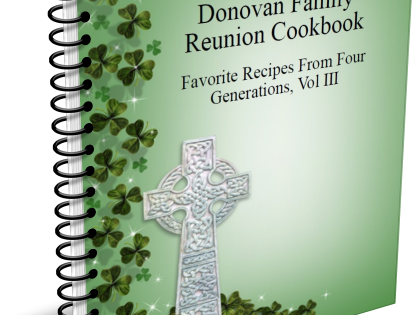
    Bill Rice is Co-Publisher of the Great Family Cookbook Project, a website that helps families and individuals collect, preserve and share food memories by creating their own printed personal cookbooks. He is the author of The Wellfleet Oyster Cookbook (Available on Amazon) and the Cape Cod Cocktail Cookbook, both created using FamilyCookbookProject.com. He is also editor of the Donovan Family Cookbook, now it’s third printing.

    Follow Family Cookbook Project on Facebook, Instagram and Pinterest!

  • Cookbooks as a Fundraising Powerhouse: Introducing Exciting Changes at CookbookFundraiser.com!

    Cookbooks as a Fundraising Powerhouse: Introducing Exciting Changes at CookbookFundraiser.com!

    Cookbooks have long been cherished sources of culinary inspiration, sharing treasured family recipes and showcasing the diverse flavors of different communities. But did you know that cookbooks can also serve as a powerful fundraising tool for organizations? At CookbookFundraiser.com, we are thrilled to announce some exciting changes that will revolutionize your fundraising experience! From simplified sign-in procedures to stunning cookbook covers and a dedicated fundraising page, we have everything you need to make your next fundraising campaign a resounding success.

    CookbookFundraiser.com has a long history of constantly evolving its online cookbook publishing platform  in response to our customer’s needs and to make the fundraising coordinator ‘s job as easy as possible. Continuing these efforts, we are pleased to announce the following upgrades to the CookbookFundraiser.com  website:

    1. Simplified Sign-In Procedures: A Seamless Experience for All We understand that managing a fundraising campaign requires the concerted efforts of multiple individuals. That’s why we’ve simplified our sign-in procedures to ensure a seamless experience for editors, committee members, and contributors alike. With user-friendly login processes, accessing your CookbookFundraiser.com account has never been easier. Say goodbye to complicated logins and embrace the efficiency of our streamlined system based on the users email address.
    2. Public Fundraising Project Pages: Unleashing the Power of Online Marketing In the digital age, a strong online presence is essential for successful fundraising. That’s why we’re excited to introduce public fundraising pages for each cookbook fundraiser project. Now, editors can provide their group with a single URL that directs interested individuals to a dedicated page where they can contribute or purchase a fundraising cookbook. This innovative feature acts as a powerful marketing tool, making it easier than ever to engage potential supporters and spread the word about your cause.
    3. Captivating Cookbook Cover Options: They say not to judge a book by its cover, but when it comes to cookbooks, an enticing cover can make all the difference. We’re proud to announce the launch of our new series of professionally designed artwork, starting with church cookbook fundraisers. These stunning covers, dividers, white space fillers, and thematic elements will captivate your audience from the moment they lay eyes on your cookbook. With these stock items, creating a visually appealing cookbook fundraiser becomes a breeze for both the committee and the editor. As always, you also have the option to create your own designs in CookbookFundraiser.com flexible system.
    4. Expanding Our Reach: Tailored Options for Diverse Fundraising Needs We believe that every organization deserves a cookbook fundraiser perfectly suited to their unique needs. That’s why, later this year, we will be introducing expanded options for school fundraisers, sports team fundraisers, cancer fundraisers, Scouting fundraisers, and countless other target audiences. With an extensive range of themes,  designs, and content made specifically for your fundraising group, you’ll be able to create a cookbook that resonates with your supporters and maximizes your fundraising potential.

    Cookbooks have the power to bring people together, and when combined with the energy of fundraising, they become an unstoppable force for positive change. At CookbookFundraiser.com, we’re committed to providing you with the tools and features you need to make your next fundraising endeavor a resounding success. From simplified sign-in procedures and public fundraising pages to captivating cookbook covers and tailored options for diverse audiences, we’ve got you covered every step of the way. Embrace the delicious fusion of culinary creativity and fundraising potential—join us at CookbookFundraiser.com and turn your organization’s dreams into reality!

  • Side-by-Side Recipe Layout Now Available

    Side-by-Side Recipe Layout Now Available

    Family Cookbook Project has added a new recipe layout option in response to requests from our cookbook editors.

    By default, recipe layouts have ingredients in 1 or 2 columns above/before directions.  You can also choose to have ingredients and directions side-by-side.  You can choose this option under Layout & Design>Select Recipe Layout. There are pre-set layouts that offer this layout type, for example see T7 and T8 Times Roman.  T7 has ingredients in the left column and directions on the right.  T8 is the other way around, ingredients on right, directions on left.  You can also add this to any custom recipe layout you may have created.

    If you like one of our pre-set layouts that doesn’t have this feature, you can also set any layout in this fashion by using the override setting under Long form recipe options in Recipe Layouts.

    Watch this video for a quick tutorial:

    https://www.youtube.com/watch?v=9Fq2NAjgk8A

  • From Family to Fundraising: Making the Switch to CookbookFundraiser.com

    From Family to Fundraising: Making the Switch to CookbookFundraiser.com

    For years, Family Cookbook Project editors have used their accounts to create fabulous fundraising cookbooks that are sold at a profit to support the good works of churches, schools, community groups, youth, sports teams, scout troops, cancer support, and more.

    While our members are certainly welcome to continue use this system for fundraising cookbooks, we would highly recommend you talk a look at our newly upgraded CookbookFundraiser.com to get the most out of your fundraising efforts.

    CookbookFundraiser.com uses the same Cookbook publishing engine that you know and love. However, there are many additional features that are designed specifically to make a fundraiser more profitable and easier for the coordinator.

    Here are some of the features that are not included in FamilyCookbookProject.com:

    • Group Login – instead of having to invite each contributor individually via email, CookbookFundraiser.com uses a group login. You distribute a personalized URL, and anyone who enters their name and email address automatically becomes a contributor.
    • Sales Hub Website: this feature allows you to create a personalized website for your supporters. You can use it to collect recipes and pre-sell your cookbook online.
    • Online Donations: sometimes your supporters are not interested in purchasing something that they might not use, but still want to support your efforts. We allow you to accept onlinei donations, directly from your Sales Hub, greatly increasing the profitability of your fundraiser.
    • No Upfront Printing Costs: Since you use the sales hub to pre-sell your Cookbook, you do not have to pay for Cookbook printing upfront, rather, you simply receive a check for the proceeds within two weeks of the fundraiser ending.
    • Cookbook Advertising: including advertising in your fundraising cookbook can significantly increase profitability. Our module walks you through the process and provides marketing materials to get it done.
    • Social Media Library: we provide preformatted, social media posts to help you collect recipes, except advertising and sell your cookbook. Piskin significantly boost your social media marketing.
    • Cookbook.Tips: this is our Cookbook fundraising blog, full of interesting articles and ideas to help you hold a successful Cookbook fundraiser.

    These are just some of the features you will have access to when using CookbookFundraiser.com to hold your next cookbook fundraiser.


    Bill Rice is the Co-Publisher of Family Cookbook Project and CookbookFundraiser.com which helps individuals, churches, schools, teams and other fundraising groups create cherished personalized cookbooks using peer-to-peer tools and the power of the Internet to meet group funding needs. Follow us on Facebook, Twitter, Instagram and Pinterest!

  • How to Use Scanned Recipes in Your Family Cookbook

    How to Use Scanned Recipes in Your Family Cookbook

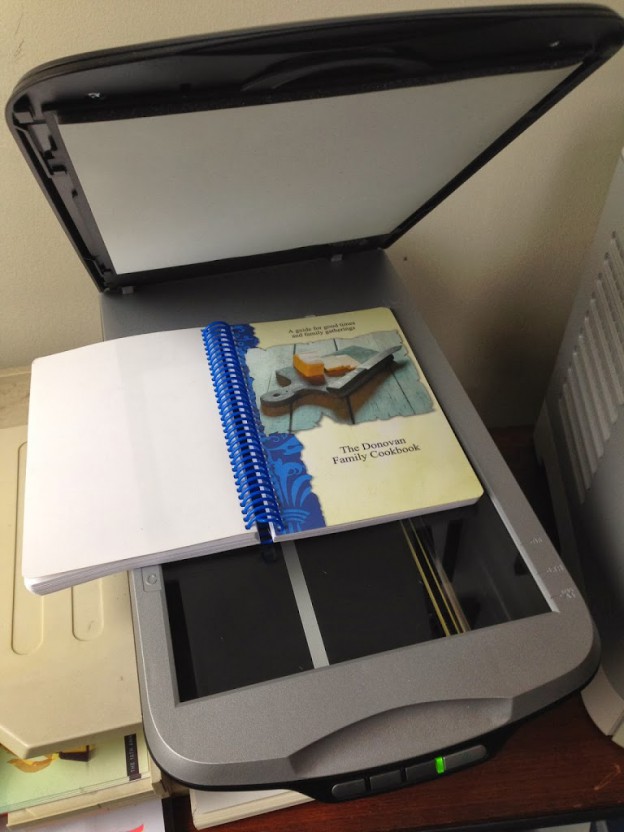
    Many computer Printers also include a scanner that can be used for recipes

    Many of us have old recipe boxes that contain many many recipes that are written in the handwriting of someone from the past that we would like to preserve and include it our cookbook. 

    At FamilyCookbookProject.com, you can scan a recipe, personal letter or other family treasure and include it in your cookbook very easily. Here’s how: First you need to scan the recipe card or find someone who can do this for you. Many people have home scanners that are very easy to use – or know someone who has one. 

    When scanning, make sure the scanner saves the image as a JPEG file (check the settings). If it saves it as a PDF, you will need to open the PDF and “save as” a JPEG. Another setting you need to check is the image quality. Usually 150 to 300 DPI (Dots per Inch) is high enough for including in your cookbook. 

    Scanning actually creates a photo image of your recipe card that we can import into your cookbook software. Now your scanned image can be simply placed into your cookbook as you would any other photo.  

    Collections of Scanned Recipes 

    Sometimes family cookbook editors was their entire cookbooks to be a collection of scanned recipes. While not impossible, this can be a lot of work for the editor. 

    The problem with scanned recipes is that the cookbook software system can not read the text in the image to create titles and indexes and other parts of the cookbook. The computer just sees them as photos. 

     So you have two options: 

    You can include the scanned images as photos attached to recipes that you have typed into the system. This way the original item is included above the typed version. I don’t know about you, but my mother’s cursive writing is not always the most easy thing to read (sorry mom) and recipe cards are often smudged with food from meals passed and not always easy to read. 

    The other option is to enter just the title of the recipe and it’s category and leave the rest of the fields on the “add a recipe” form blank. This will give you the title of the recipe and allow an index to be created. Next upload the scanned image of the recipe and save. This way, the image of your recipe will be the recipe itself.


    Bill Rice is Co-Publisher of the Great Family Cookbook Project, a website that helps families and individuals collect and share food memories. Follow us on Facebook and Pinterest!

  • How to Create a Hunter’s Cookbook: A Guide for the Modern Hunter

    How to Create a Hunter’s Cookbook: A Guide for the Modern Hunter

    Hunting is not only a time-honored tradition, but it also connects us deeply with nature, providing a source of food that is often leaner and more sustainable than store-bought meat. Whether you’re a seasoned hunter or just starting out, you’ve likely realized that preparing wild game requires a unique set of recipes and techniques to bring out the best flavors. If you’re finding yourself with a freezer full of venison, wild turkey, or game birds, creating a hunter’s cookbook is the perfect way to organize your recipes, document your hunting memories, and share your culinary skills with others.

    A hunter’s cookbook can be more than just a collection of recipes—it can serve as a tribute to the hunting lifestyle, complete with field-to-table preparation tips, stories from hunting trips, and even preservation methods. In this guide, FamilyCookbookProject.com will explore how to create your own hunter’s cookbook that showcases your game meat recipes and celebrates the spirit of the hunt.

      Why Create a Hunter’s Cookbook?

    As a hunter, you know that wild game meat is different from the standard cuts of beef, pork, or chicken you find at the store. Each type of game requires specific preparation methods to bring out its best qualities. A hunter’s cookbook helps you:

    –  Organize your favorite game meat recipes : Whether you’re grilling venison steaks or slow-cooking wild boar, your cookbook will serve as a valuable resource when deciding what to make.

    –  Share knowledge with others : Hunting often runs in families or communities, and a cookbook is a great way to pass down traditional recipes and techniques.

    –  Celebrate the hunt : Including personal stories, photos, and memories from hunting trips adds a deeper, personal touch to your cookbook, making it a cherished keepsake.

    –  Preserve wild game properly : Your cookbook can also include sections on how to clean, butcher, and preserve game meat, making it an all-encompassing resource for hunters.

    –  Make the most of your harvest : With the right recipes and tips, you can ensure that no part of the animal goes to waste and that you get the most value from your hunt.

      Step-by-Step Guide to Creating a Hunter’s Cookbook
    Whether you want to document your favorite wild game dishes or create a resource for fellow hunters, crafting a hunter’s cookbook can be a fulfilling project. Here’s how to get started:

     Gather Your Recipes

    The foundation of any great cookbook is, of course, the recipes. Start by gathering your go-to recipes for the types of game you typically hunt. Consider including:

    –  Venison : Popular recipes for deer include stews, steaks, jerky, and roasts.

    –  Wild Turkey : Think about how you prepare wild turkey for holiday feasts, BBQs, or sandwiches.

    –  Game Birds : Recipes for quail, pheasant, and grouse are often a bit more delicate, with grilled or roasted preparations.

    –  Small Game : Squirrel and rabbit stews are staples in many hunter’s kitchens.

    –  Waterfowl : Duck and goose recipes may range from grilled breast fillets to rich, flavorful casseroles.

    In addition to personal recipes, you may want to seek inspiration from cookbooks, websites, or fellow hunters. Don’t be afraid to experiment with different flavors and methods. Incorporate both traditional and modern techniques to give your cookbook a well-rounded selection.

    Organize by Game Type

    One of the benefits of creating your own cookbook is being able to organize it in a way that makes sense for your hunting lifestyle. For a hunter’s cookbook, consider creating sections for each type of game you harvest. Examples might include:

    –  Deer and Venison Recipes

    –  Wild Turkey Dishes

    –  Game Birds: Quail, Pheasant, and Grouse

    –  Waterfowl: Duck and Goose

    –  Small Game: Rabbit and Squirrel

    By breaking down your recipes by game type, you can quickly find the right recipe based on what you’ve harvested. This structure makes it easier to plan meals and ensure that you’re using your game meat efficiently.

    Include Field-to-Table Preparation Tips

    What sets a hunter’s cookbook apart from a traditional one is the emphasis on field-to-table preparation. Many people may not know how to handle game meat properly after the hunt, so including detailed instructions for cleaning, butchering, and preserving wild game is essential.

    Here are some field-to-table preparation tips you might want to include:

    –  Cleaning and Butchering Game: Provide step-by-step guides or illustrations on how to field-dress different types of game and prepare them for cooking.

    –  Aging Venison: Some hunters prefer to age venison for enhanced flavor. Include tips on how to properly age deer meat and the benefits of doing so.

    –  Freezing and Storing Game: Ensure readers know the best practices for freezing and storing game meat to maintain its quality over time.

    –  Using the Whole Animal: Teach readers how to make use of the whole animal, from making stock with bones to preparing organ meats like liver or heart.

    These tips make your cookbook a practical guide for hunters who want to ensure that their game meat is handled safely and cooked to perfection.

    Highlight Flavor Profiles and Pairings

    Wild game meat has unique flavor profiles that differ significantly from store-bought meat. For example, venison is often lean and slightly gamey, while duck can be rich and fatty. Help your readers understand how to work with these flavors by offering pairing suggestions.

    –  Venison: Best paired with hearty vegetables, red wine sauces, and earthy herbs like rosemary and thyme.

    –  Duck: Rich duck pairs well with sweet fruits (like apples or cherries) and acidic ingredients like balsamic vinegar.

    –  Rabbit:  Rabbit meat, often compared to chicken, works well in creamy sauces or paired with root vegetables.

    –  Pheasant: The mild flavor of pheasant pairs beautifully with mushrooms, sage, and other woodsy flavors.

    These flavor pairing suggestions will help elevate the recipes and teach your readers how to bring out the best in their game meat.

    Add Personal Stories and Hunting Memories

    What makes a hunter’s cookbook truly special is the personal touch. Hunting is often about more than just food—it’s about tradition, camaraderie, and time spent in nature. Consider adding personal stories or hunting memories throughout the cookbook. Some ideas might include:

    –  Anecdotes from your favorite hunting trips: Share memorable experiences from successful hunts, lessons learned in the field, or stories passed down from family members.

    –  Photos from the hunt: Including images of your hunting trips, the game you’ve harvested, and the preparation process can add a visual and personal element to your cookbook.

    –  Family traditions: If you have family recipes or traditions around hunting and cooking, document them. This is a great way to preserve these stories for future generations.

    These elements turn your cookbook into more than just a collection of recipes—it becomes a treasured family keepsake.

    Include Preservation and Smoking Techniques

    Hunting often yields large quantities of meat, and preservation techniques are crucial for ensuring none of it goes to waste. Include sections in your cookbook that cover different methods of preserving wild game:

    –  Smoking: Add recipes for smoked venison, duck, or turkey, and include instructions on how to properly smoke meat at home.

    –  Jerky Recipes: Venison jerky is a popular way to preserve meat for long-term storage. Share your favorite jerky recipes and tips for dehydrating meat.

    –  Curing and Sausages: If you enjoy making sausages or curing meats, be sure to include your methods and recipes for making venison sausage, smoked sausages, or cured meats.

    These preservation techniques ensure that hunters can enjoy their harvests year-round, even long after the hunting season has ended.

    Use a Cookbook Publishing Platform

    Once you’ve gathered your recipes, hunting stories, and tips, it’s time to compile them into a beautiful, organized cookbook. Using a platform like FamilyCookbookProject.com makes it easy to design a professional-looking cookbook, complete with custom categories, personal photos, and easy-to-follow recipes.

    These platforms allow you to print multiple copies, which can be shared with family and friends or even sold to fellow hunters. Creating a professionally bound book is a great way to showcase your hard work and preserve your recipes for future generations.

    A hunter’s cookbook is more than just a collection of wild game recipes—it’s a celebration of the hunting lifestyle, a way to honor tradition, and a valuable resource for preparing wild game. By organizing your recipes by game type, including field-to-table tips, and adding personal stories, you can create a cookbook that not only helps you make the most of your harvest but also becomes a cherished family heirloom.

    Whether you’re cooking venison steaks, wild turkey roasts, or making homemade jerky, your hunter’s cookbook will serve as a lasting tribute to the meals and memories that come from a successful hunt.


    Bill Rice is Founder and Co-Publisher of the Family Cookbook Project, a website that helps families and individuals collect, preserve and share food memories by creating their own printed personal cookbooks. He is the author of The Wellfleet Oyster Cookbook and the Cape Cod Cocktail Cookbook (Available on Amazon), both created using FamilyCookbookProject.com. He is also editor of the Donovan Family Cookbook, now it’s third printing and is an avid genealogist tracing his family back to the 1600’s.

    Follow Family Cookbook Project on Facebook, Instagram, Twitter TikTok, YouTube and Pinterest!


  • How to Take Great Food Photos for Your Recipes

    How to Take Great Food Photos for Your Recipes

    They say a picture is worth a thousand words and with recipes that is especially true.

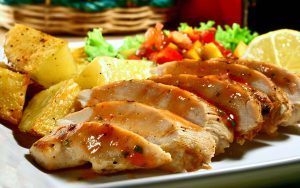
    It’s wonderful to read a list of ingredients and see the potential in a recipe, but to look at the finished product can make your mouth water!

    Family Cookbook Project highly recommends adding a photo to every recipe you can in your online cookbook. It helps people to see what to expect when they follow your recipe and gives them a standard to meet when comparing their finished dish to the original.

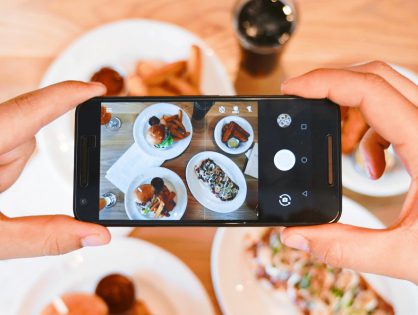
    With the advent of digital camera built into cell phones, you don’t have to be a professional photographer to take good food photos.

    Here are some pointers to help improve your recipe photos:
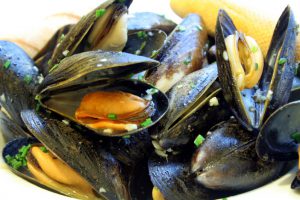
    Use Natural Light – Make sure that the light is right – shoot the food either next to a bright window or under a pendant light in the restaurant. Don’t use your camera’s flash! Set your dish near a window and turn off any artificial lights that might be on nearby. Try to photograph with the light at your back or to the side of a dish, so that the shadows are to the side or behind it. 

    Hold Still – Taking photos inside, even with ample natural light, often means you have to hold the camera very still to keep it from registering hand shake. If you have a tripod, that’s ideal. If you don’t, you can duplicate the tripod effect by resting your elbows on the table or counter and using them to stabilize the camera. Moving the camera when taking a photo will only lead to blurry unusable photos. 

    Get close to the food! – Don’t stand back three feet and get the food with the stove, the dirty dishes, and all the condiments around it. Move in and get up close and personal, and let the pan…or the plate…or the cutting board fill the frame.  

    Stage the shot – The food isn’t the only thing in the photo. Using plates, silverware and linens in complementary colors can help your dish come alive. Shoot food on a beautiful plate or on a table with texture and character. The more appetizing the ingredients, the better your photo will be. Plates that contain colored vegetables and/or meat, preferably in light-colored sauces, are often the most appealing to the eye in photos. Also Don’t be Afraid of a mess. A few crumbs or a smear of dressing can be beautiful, if you let them. 

    Focus on the food –  If you are using a DSLR, stop down your lens to f/1.8 or f/2.0 that limits your depth of field to one part of the image only, blurring out everything around the subject, simulating a shot taken with a macro lens. If you are using an iPhone, there are apps, such as Camera+ or VSCO Cam, that will create the same effect. Remember, you want the food to be the main focus, not the background. 

    Try different angles –  Get up over the food and shoot straight down on it. When shooting overheads, if appropriate, try filling up the frame with what’s already on the table such as cups, wine glasses, utensils and moving hands. You can also  think in three dimensions, You might not usually serve brownies piled in a vertical column, but stacking any flat food, like pancakes, cookies, or even onion rings, is a great way to show off texture and make the photo more appealing. You can also add dimension to your food photos by showing the dish right after the that first bite is taken, or the second and third. These are little details that make a viewer feel like they’ve sat down and are enjoying the meal. 
    Get Close to Ugly Foods  – Some foods, no matter how good they taste, just don’t make good photos. But the closer you get to your subject, the more the visual story becomes about texture and color, rather than pure mouth-watering beauty. Avoid foods that are white and gloppy, such as congealed gravy on white pasty mashed potatoes. 

    Size Matters –  Make sure your camera settings are set for a good sized photo. Small photos look blurry when they are enlarged on line. A photo viewed online only has to be 72 dpi (dots per inch, the measure for quality), but if you are going to print your photo, you want it to be at least 300 dpi. 600 pixels wide (a measurement for size) is a good target for minimum photo size.

    Using other’s photos – It is important to note that the Internet makes it easy to find photos of recipes already taken. While this might be much easier, the photo still is the property of whomever holds the rights. Don’t always assume that because a photo is on the Internet you can simply use it for your recipe. Make sure you ask permission from the owner before you use it.


    Bill Rice takes more than 20,000 photos a year and is Co-Publisher of the Great Family Cookbook Project Project, a website that helps families and individuals collect and share food memories. Follow us on Facebook, Instagram and Pinterest!

  • A Family Reunion Cookbook Brings Families Together

    A Family Reunion Cookbook Brings Families Together

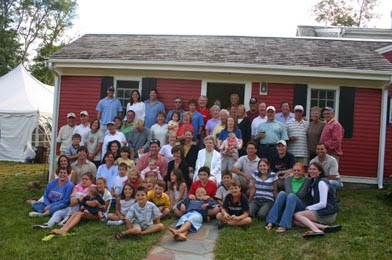
    The Donovan Family Reunion

    Few gatherings are as meaningful and memorable as family reunions. As families grow and people go their own ways, family reunions serve to bring us back together. They’re a chance to recombine, share experiences and renew connections.

    One great idea to make your family reunion truly memorable is to create a family cookbook. Everyone knows the best thing about a family reunion is the food! Everyone brings their favorite dishes and shares stories and food and fun.

    There are two different schools of thought on the best way to create a family reunion cookbook. You be the judge on what is best for your family.

    Reunion Specific Cookbook

    Since reunions take a fair amount of time to plan and often center around a theme, choosing a theme centering on food can be a natural choice. Family members are asked to contribute their favorite recipes to a family cookbook that can be distributed at the event. You set a date and ask everyone to contribute the recipes for the food they will be bringing to the event. The cost of printing the cookbooks is included in the cost of the event and everyone receives one the day of the event. This is also a great way to build buzz for your event!

    Reunion Showcase Cookbook

    The other way families create family cookbooks at family reunions is to use the event to show a sample of what a family cookbooks looks like and collect email addresses used to invite contributors.  People will see your excitement and want to participate as well. Find your favorite dishes at the event and ask whoever made them to contribute the recipe to the cookbook. They will be flattered that you asked and look forward to participating.  Set a deadline that will allow you to have your family cookbooks complete so people can give them as gifts for the holidays.

    Some things to consider when creating your reunion cookbook

    During the planning process, many families are looking for a way to communicate effectively via email. Adding lots of people to the sender line of an email list can result in people being left off and not being able to contact specific people or subsets of the list. FamilyCookbookProject.com can help make this easier. Use our Reminder Email Tool and you make it easy to contact some or all of your family members.

    Don’t wait until the last minute. When planning a family reunion cookbook, the event is a fixed date and comes and goes whether your cookbook is ready or not. Now is the time to start working on a family reunion cookbook if your event is in the summer.

    Remember to invite everyone to participate, not only the great cooks! This cookbook is for all the family members so it best to invite everyone to contribute – even if it is only a recipe or two.

    Finally remember family members no longer with us by including their recipes as well. Family cookbooks help to tell the story of our families. Contributors can be not only the present, but from the past as well.


    Bill Rice is Co-Publisher of the Great Family Cookbook Project, a website that helps families and individuals collect and share food memories. Follow us on Facebook and Pinterest!

  • How to Make Sure Your iPhone Photos Work On Family Cookbook Project

    How to Make Sure Your iPhone Photos Work On Family Cookbook Project

    If you have an iPhone, Apple has changed the format the camera uses to save photos on the iPhone. while this has many benefits, like taking less space for storage, it does have drawbacks, like not being compatible with non-Apple systems – like FamilyCookbookProject.com.

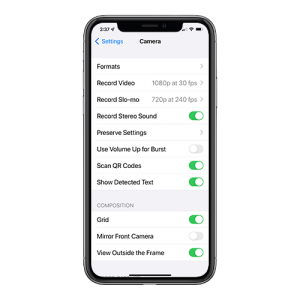
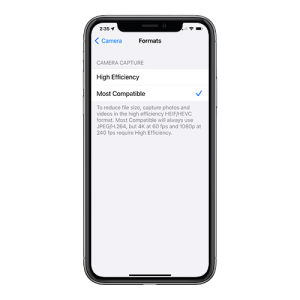
    To switch from HEIC to JPG, you must configure the camera capture format using the iPhone’s Settings app. There are two camera capture settings that you can opt for — High Efficiency and Most Compatible. The former will shoot photos in HEIC, while the latter will shoot photos in JPG.

    Here is how to change the settings in your iPhone to save image as Jpegs.

    Step 1: Open the Settings app on your iPhone. Scroll down and tap on Camera. Then, tap Formats from the list of Camera settings.


    Step 2: Under Camera Capture, tap Most Compatible.

    That’s it. Your iPhone will now shoot photos in the JPG format directly.

    If you have images already saved in HEIC, there are several free websites that will convert the images for you.


    Bill Rice is founder and Co-Publisher of the Great Family Cookbook Project, a website that helps families and individuals collect and share food memories through customized printed cookbooks filled with treasured recipes. Follow us on Facebook and Pinterest!
  • How to Make a One-Of-A-Kind Wedding Cookbook

    How to Make a One-Of-A-Kind Wedding Cookbook

    Here’s an idea for a truly unique wedding gift for a special couple – a printed cookbook filled with the bride and groom’s favorite family recipes and photos. It’s a great way to bring both families together before the wedding, makes a wonderful bridal shower theme, can be used as a wedding favor and gets the new couple cooking with family favorite recipes.

    Here’s how to create your own wedding cookbook:

    It starts with a bridal shower.

    One thing every new bride to be needs is great recipes to feed her family, especially with everyone needing to stay at home so much more these days. Both families as well as friends can help get this started by contributing recipes as part of a bridal shower!

    When you send out your bridal shower invitations, include a link to your FamilyCookbookProject.com cookbook, use the Invitation Tool and add everyone’s email. This will send everyone a link that will allow them to contribute their recipes. Set a deadline for entering recipes about three weeks from when the invitations are sent. Remember people will always wait until the deadline!

    Get both of the mother’s to contribute the most recipes if possible. This way both the bride and groom with have lots of recipes that they grew up with in their cookbook. Using Family Cookbook Project’s Custom Categories Tool, you can even create a special category for each mom’s recipes.

    As the recipes are being entered, start planning how the cookbook will look.

    Select a cover – Family Cookbook Project offers several cookbook covers specifically for bridal cookbooks or wedding cookbooks. You also can create a custom cover with the name of the cookbook and a photo of the couple.

    Write an introduction – The best bridal cookbooks will have an introduction written by the individuals giving the bridal shower. An introduction can be used wish the couple well wishes and to talk about the importance of family.

    Add Photos – Photos can help bring your cookbook to life. You can add photos of the lucky couple on top of recipes, or create custom pages to highlight photos of the bride and groom as they were growing up and while they were dating.

    Print your cookbook – Make sure you give yourself enough time to order your cookbooks and have them printed, at least 3-4 weeks if possible. Be sure to order enough copies for each attendee as well as several extra copies for family members that can not attend the event.

    For the event, make some of the dishes from bridal cookbook and serve them at the event. Include a place card with the dish name and include the page number from the cookbook.

    Finally, if you are looking for a great wedding favor, you can print additional cookbooks and give them to everyone attending the wedding!


    Bill Rice is founder and Co-Publisher of the Great Family Cookbook Project, a website that helps families and individuals collect and share food memories through customized printed cookbooks filled with treasured recipes. Follow us on Facebook and Pinterest!