
Blog

  • How To Share Your Family Cookbook Recipes

    How To Share Your Family Cookbook Recipes

    One of the real benefits of collecting all of your recipes in your online cookbook on FamilyCookbookProject.com is to be able to share them very easily with friends and family.

    Say you have friends over and they really like your split pea soup and want the recipe. All you need to do is go to your cookbook account either on your desktop computer or even on your mobile Mobile phone or tablet and pull up the recipe.  Now all you have to do is choose how you want to give it to him.

    Email – In the upper right hand corner, you’ll see a box marked email a recipe. Enter your friends email here and send them your recipe. It’s that easy!

    Posted on Facebook – Wow your friend might like your recipe, so will other friends. You can select the Facebook icon and post your recipe to your Facebook page to be seen by call your friends. Especially if you’ve been adding photos to your recipes, your posts will really stand out and be appreciated by lots of your friends and family.

    Posted on Pinterest – Here’s another way to share your recipes if they have photos attached. Pinterest was built around sharing photos and when you share one of your recipes on this social media platform, the photo becomes the pin and people who click on it will see your recipe.

    Print your recipe – If your friend simply wants a printed copy of your recipe, it is easy to select the print icon and simply print them a copy and give it to them.

    Give them a cookbook – Printing your family cookbook allows you to share all of your recipes with friends and family and is a great gift from the heart.

    You also might want to suggest to your friends that they create their own family cookbook account so they can share their recipes as well!


    Bill Rice is Co-Publisher of the Great Family Cookbook Project, a website that helps families and individuals collect, preserve and share food memories by creating their own printed personal cookbooks. He is the author of The Wellfleet Oyster Cookbook (Available on Amazon) and the Cape Cod Cocktail Cookbook, both created using FamilyCookbookProject.com. He is also editor of the Donovan Family Cookbook, now it’s third printing.

    Follow Family Cookbook Project on Facebook, Instagram and Pinterest!

  • What To Do Once You’ve Printed Your Family Cookbook

    What To Do Once You’ve Printed Your Family Cookbook

    You’ve done it. You have collected your recipes, got others to contribute their recipes, picked a cover and recipe layouts and used Family Cookbook Project.com to publish your very own cookbook.

    Now what?

    The good news is just because you publish your first cookbook doesn’t mean that you have to be done.

    Here are some ideas on how to continue using your Family Cookbook Project.com account

    Online recipe box – Many people find that they continue adding new recipes to their account even after publishing and printing their personal cookbook. It’s easy to add recipes and it’s convenient to have them all in one place.

    Use the mobile app – Access to your online recipes is only a few clicks away with the award-winning Family Cookbook Project mobile app for both Apple iPhones and android devices.

    Print a second volume for your family cookbook – Often times once a book is printed new people see its value and want to contribute recipes. Creating a second volume for your family cookbook is a great way to get additional people involved and to keep the project alive.

    Create a Best of cookbook – Our family cookbook has over 250 recipes but I personally have about 50 that I like cooking all the time. I created a separate cookbook just of my go to recipes which allows me to find what I’m looking for so much quicker. I printed one copy and keep it right into the kitchen where I can find it quickly.

    Create a personal cookbook – If you have created a family cookbook, you were allowed only to include so many of your recipes in order to give everyone a chance to participate. Consider creating a cookbook with just your recipes which will allow you to enter many more then or in the family cookbook.

    Contribute to someone else’s family cookbook – Share your cookbook with friends and family and let them know you created at FamilyCookbookProject.com and when they ask you to contribute recipes to their cookbook, you can use the handy recipe transfer tool and select which recipes you want to contribute without having to type any of them in a second time!

    Create a fundraising cookbook – Does your church ,school, scout troop or community organization need to raise funds? Suggest a fundraising cookbook and use our system to manage the recipes. Our CookbookFundraiser.com site uses much of the same programming you used and can be a great help to your community group.


    Bill Rice is Founder and Co-Publisher of the Great Family Cookbook Project, a website that helps families and individuals collect, preserve and share food memories by creating their own printed personal cookbooks. He is the author of The Wellfleet Oyster Cookbook (Available on Amazon) and the Cape Cod Cocktail Cookbook, all created using FamilyCookbookProject.com. He is also editor of the Ultimate Donovan Family Cookbook, now it’s third printing and is an avid genealogist tracing his family back to the 1600’s.

    Follow Family Cookbook Project on Facebook, Instagram, Twitter and Pinterest!

  • How to Convert iPhone Photos for Use In Family Cookbook

    How to Convert iPhone Photos for Use In Family Cookbook

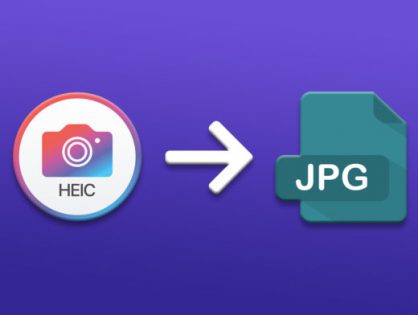
    Apple is always trying to be seen as innovated, such as introducing “live photos” that seem to move when you view them on your phone or iPad. To accomplish this, they created a new image format called HEIC (High Efficiency Image File Format) that was rolled out in 2017.

    Family Cookbook Project (and most web sites) accept JPG photos only.  If you are having issues with photos not uploading correctly, check to see if the file format on your Mac is HEIC.  That is Apple’s compressed format.  The good news is that it’s easy to convert to JPG.

    Here’s how to convert HEIC to JPG on Mac using Preview:

    1. Open any HEIC image in Preview.
    2. Click File ➙ Export in the menu bar.
    3. Select JPG in the format dropdown and adjust other settings as needed.
    4. Choose Save.

    Here’s how to convert HEIC to JPG on PC using Microsoft Paint:

    1. Open the file in Paint
    2. Go to File>Save As>JPEG picture
    3. Click Save.


    Bill Rice is Co-Publisher of the Great Family Cookbook Project, a website that helps families and individuals collect, preserve and share food memories by creating their own printed personal cookbooks. He is the author of The Wellfleet Oyster Cookbook (Available on Amazon) and the Cape Cod Cocktail Cookbook, both created using FamilyCookbookProject.com. He is also editor of the Donovan Family Cookbook, now it’s third printing.

    Follow Family Cookbook Project on Facebook, Instagram and Pinterest!

  • How Profitable is a Cookbook Fundraiser?

    How Profitable is a Cookbook Fundraiser?

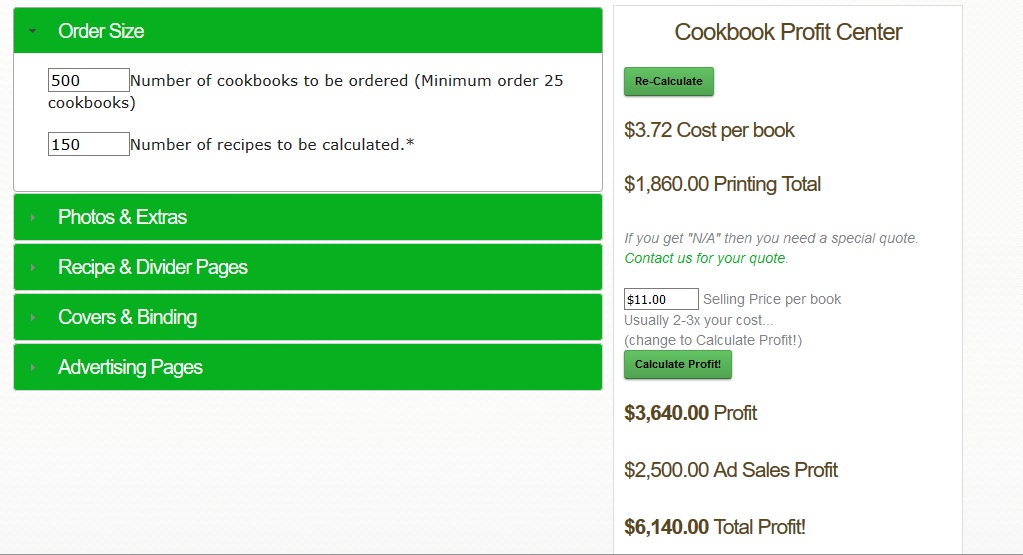
    One of the hardest things about creating a cookbook fundraiser is planning for how big your cookbook needs to be to generate the profit you wish to raise. Our Cookbook Fundraiser Profit Calculator at CookbookFundraiser.com lets you change variables to help you determine the scope of your project.

    Cookbook Fundraiser Profit Calculator

    Click on the Green bars and enter the details for your Cookbook Fundraising project and see how much potential profit your fundraiser. Click the link above and give it a try.     Bill Rice is the Co-Publisher at Family Cookbook Project and CookbookFundraiser.com which helps individuals, churches, schools, teams and other fundraising groups create cherished personalized cookbooks using the power of the Internet to meet funding needs. Follow us on Facebook, Twitter, Instagram and Pinterest!  

  • The Best Christmas Cookie Recipes Can Be Frozen

    The Best Christmas Cookie Recipes Can Be Frozen

    In our house, there is nothing like a warm, soft cookie right out of the oven. However since it is not practical to make dough for only a few cookies at a time, the next best thing is to freeze your cookie dough and pull out enough cookies for your immediate needs.

    Freezing cookies also provides time saving opportunities when you want to get ready for a holiday cookie swap in October or getting ready for a school bake sale anytime.

    How you best freeze cookies depends on what type of cookie you are making. The Family Cookbook Project had collected thousands of cookie recipes if you need a suggestion.

    Cookies like chocolate chip and oatmeal-raisin freeze best if you make the actual cookie beforehand. Scoop out the dough just as if you were about to bake it and place it on a baking sheet lined with parchment or a Silpat (they can be close, but not touching). Instead of putting it into the oven, but them into the freezer for at least 6 hours instead. Once frozen, the dough balls get sealed inside a plastic freezer bag and when it is time to bake, you are ready to go.

    Cookies like shortbread or sandies, or any smooth slice-and-bake cookies can be pressed into logs, wrapped in wax paper and frozen solid. Prepare the dough as usual, then shape it into one or two logs that can be covered with wax paper and placed in a plastic freezer bag. When you’re ready to bake, let them warm on the counter for 10 to 15 minutes before slicing. You might also want to let the logs thaw in the fridge for a few hours before you’re ready to use the dough. Slice the cookies into thick disks and you’re ready to put them in the oven as usual.

    The third type of cookies that can be frozen are cut-out cookies, like sugar cookies and many holiday cookies. The dough for these cookies can be frozen in disks and then stacked together with wax paper between them. When ready to bake, thaw until bendable and continue with the recipe.

    Most frozen cookies will need an extra minute or two in the oven. Otherwise, prepping and baking the cookies is exactly the same as in the recipe.


    Bill Rice is founder and Co-Publisher of the Great Family Cookbook Project, a website that helps families and individuals collect and share food memories through customized printed cookbooks filled with treasured recipes. Follow us on Facebook and Pinterest! 

  • Food Related Holidays – December 2023 need dates

    Food Related Holidays – December 2023 need dates

    It seems that every day is a special day for something. Especially when it comes to our favorite (or not so favorite) foods.

    FamilyCookbookProject.com created a list of special food related holidays that you may not be aware of.

    For fun, pick some of your favorites and served them on their national day.


    December Food Related National Days

    1 –

    2 –

    3 –

    4-

    5 –

    6 –

    7 –

    8 –

    9 –

    10 –

    11 –

    12 –

    13 –

    14 –

    15 –

    16 –

    17 –

    18 –

    19 –

    20 –

    21 –

    22 –

    23 –

    24 –

    25 –

    26 –

    27 –

    28 –

    29 –

    30 –

    31 –


    Source: National Day Calendar


    Bill Rice is Co-Publisher of the Great Family Cookbook Project, a website that helps families and individuals collect, preserve and share food memories by creating their own printed personal cookbooks. He is the author of The Wellfleet Oyster Cookbook (Available on Amazon) and the Cape Cod Cocktail Cookbook, both created using FamilyCookbookProject.com. He is also editor of the Donovan Family Cookbook, now it’s third printing and is an avid genealogist tracing his family back to the 1600’s.

    Follow Family Cookbook Project on Facebook, Instagram, Twitter and Pinterest!

  • Holiday Printing Deadline EXTENDED!!

    Holiday Printing Deadline EXTENDED!!

    If you plan to have your cookbooks printed by us and received by Christmas, the EXTENDED deadline to order and make payment is December 5th. You may certainly order after that, but expedited shipping will be required for last minute delivery.

    We are working around the clock to get the submitted cookbook orders reviewed, printed, bound and shipped as quickly as possible. The sooner you place your order, the sooner you will receive them ready for holiday gift giving!


  • Christmas Holiday Cookbook Print Deadline is Today!

    Christmas Holiday Cookbook Print Deadline is Today!

    Just a reminder, for Christmas delivery, the deadline to order your family cookbook or fund raising cookbook is TODAY, November 30th. Cookbooks are printed on a first come, first served basis, so the sooner you place your order, the better we all will be.

    We will still accept orders after the deadline, but you may need to pay for expedited shipping.

    Have fun!

  • Only 1 Week Left Until Christmas Print Deadline

    Only 1 Week Left Until Christmas Print Deadline

    This is just a reminder that if you are planning on having your cookbook printed in time for holiday gift giving, you have just 1 weeks left until the Christmas Print Deadline of November 30th. If you place your paid order by November 30th, you will receive your printed cookbooks before December 24th.
    The cookbook print orders are rolling in every day so most of our editors are not waiting until the last minute. However, if you are one of those editors that wants to give your printed cookbooks as holiday gifts and have not placed your order yet, time is running out.

    This is by far the busiest time of the year for us because a personalized cookbook makes such a wonderful thoughtful gift for family and friends. There is still time to complete your cookbook, but you need to get moving.

    Orders are processed on a first come, first served basis, so don’t wait. Get your print orders in as soon as possible and receive your cookbooks before Christmas.

  • Cookbook Editor Recipe Editing Tip

    Cookbook Editor Recipe Editing Tip

    Did you ever wish you could know which recipes you have edited and which you still have to do? Here is an expert tip from Family Cookbook Project Co-Founder Chip Lowell:

    Go to View Recipes by Category.  Unselect all recipes and update.  Now, no recipes are marked to be in the cookbook.  Edit recipes to proof them, and then in edit mode, check the box to include the recipe in the printed cookbook.  In effect, that is now marked as “proofed”.  Work your way through any not yet included.  You can see them all in the View by Category as unchecked any time.

    We hope this makes your job as editor a little easier.


    Bill Rice is the Co-Publisher at Family Cookbook Project and CookbookFundraiser.com which helps individuals, churches, schools, teams and other fundraising groups create cherished personalized cookbooks using the power of the Internet to meet funding needs. Follow us on Facebook, Twitter, Instagram and Pinterest!