Category: General Cookbook

  • Organizing your recipes in your Personal cookbook

    Over the past 15 years, Family Cookbook Project has continually updated its software to meet the needs of you, our cookbook editors. One of the things that we have done is make it easy to organize your recipes as much as you’d like. This blog post will go over some of the ways you can organize how your recipes appear in your personal cookbook.

    Recipe categories

    Recipe categories are general classifications that allow similar recipes to be placed together. For example, appetizers or desserts. Here are some of your options for categories in the Family Cookbook Project:

    Default categories – when you first start your cookbook, these are the categories that are assigned to every cookbook. They are well thought out and can cover just about every type of recipe you may want to add to your cookbook.

    Custom categories – whether you want to add just a single new category or completely redo the categories to best meet your needs, you can use the custom category tool to accomplish this.

    Subcategories – One of the newer additions to the software is the ability to add subcategories to your cat. This allows you to group recipes of a specific category under the main, or top-level, category. For example in the default category appetizers and beverages, you may want to create a subcategory for appetizers and a sub category for beverages. That way each type of recipe appears with like recipes.

    Recipe sorting

    Recipe sorting determines in which order the recipes appear within a category. Here are your options for recipe sorting:

    Shortest to longest – this is the default sorting option. It places the shortest recipes upfront so more recipes can appear on a single page. Usually it is the most cost-effective way to organize your recipes.

    Alphabetical – this is a very popular way to sort your recipes. The titles are organized alphabetically so that As come before the Bs and so on.

    Custom Sort – One of the coolest additions to the software is the ability to sort your recipes anywhere you want. This tool will show you a list of all your recipes and you can move them to the location and it makes sense to you.

    How you sort your recipes is completely up to you. Family Cookbook Project just wants to make sure you have the tools you need to create the perfect personalized cookbook.
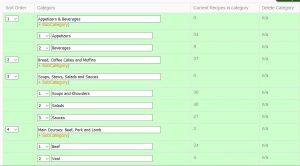
    Sample of the custom sort tool


    Bill Rice is the Co-Publisher at Family Cookbook Project which helps individuals and fundraising groups create cherished personalized cookbooks using the power of the Internet. Follow us on Facebook and Pinterest.

  • Copyrighting Recipes

    One issue that comes up regularly for family cookbook project editors is the topic of copy-writing recipes and proper usage. While we at the FamilyCookbookProject.com are not lawyers and do not give legal advice, our research shows that recipes cannot generally be copyrighted. At the same time, it does not make it right to simply take credit for other people’s work. One way to avoid this is to give credit where credit is due. If your contributor submits a recipe that they originally found in a magazine or cookbook, it is appropriate to list the source in the notes section of the recipe.

    A few articles of interest in this topic

    Copyright Office flyer on recipes
    http://www.copyright.gov/fls/fl122.pdf

    Copyrighting Recipes
    http://smallbusiness.findlaw.com/copyright/copyright-realworld/recipe-copyrighting.html

    Questions & Answers – Copyrighting Recipes
    http://whatscookingamerica.net/Q-A/CookbookAdvice.htm


    Bill Rice is the Co-Publisher at Family Cookbook Project which helps individuals and fundraising groups create cherished personalized cookbooks using the power of the Internet. Follow us on Facebook and Pinterest.

  • Highlighting recipes with recipe symbols

    We would like to announce a new feature to Family Cookbook Project – recipe symbols.

    Many of our editors have asked for the ability to add special icons to recipe titles to call special attention to them in a cookbook table of contents. We thought it was a good idea, so we have updated our programming to add this new feature.

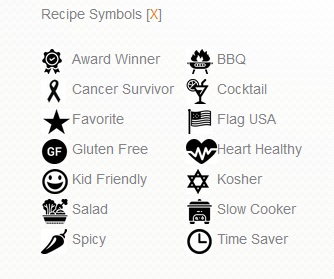
    Here are the current set of recipe symbols:

    New Recipe Symbols from Family Cookbook Project

    As the editor you can add these recipe symbols to any recipe right after you have entered the recipe title on the “Add a recipe” page. There is a drop-down menu to select the symbol to be included in that recipe.

    For recipes already added to your cookbook, you can edit that recipe and add a symbol of your choice.

    A key of icons and their meanings used in your cookbook will also appear on the bottom of your table of contents page. If you don’t include a specific symbol, it will not be included in your icon key list.

    Right now, only the editor can add recipe symbols to the titles of recipes. That is to give you control over the look and feel of your cookbook. In the future we might add the ability for contributors to add symbols and the editor to approve their placement, but that will be considered for future enhancements.

    This new feature will be available on both the FamilyCookbookProject.com site as well as the CookbookFundraiser.com site.

    Please let us know how you like the recipe symbols.


    Bill Rice is the Co-Publisher at Family Cookbook Project which helps individuals and fundraising groups create cherished personalized cookbooks using the power of the Internet. Follow us on Facebook and Pinterest.
  • We love happy customers!

    Here are some comments from Family Cookbook Project editors who have received their finished cookbooks:


    “I received my cookbooks several weeks ago. Not only am I extremely pleased with the published book but everyone that I have given one to has been thrilled. The cookbook looks very professional and your software made it very easy to create. Thank you.”
    –June Ledet, Favorite Family Recipes of the Ledets and Blocks


    “This has been a very good experience for me. My order is a very small, humble one, but please know how very important it is for my family. My mom passed away a few months ago and the 2 year anniversary of my dad’s death is next week. They were married for over 60 years. I feel their absence most acutely. However, my mom was a wonderful cook, and working on this project has really helped me feel closer to her. And my older son is really following in her footsteps. At 26, he is already becoming a very good cook. This cookbook is really for him and me. So, although the project is a small one for you, it is a very big one for us. It has already made a profound impact on my life, one that I know will only be increased as he and I begin using the cookbook to make my mom’s long lost recipes. Thank you from the bottom of my heart.”
    –Barbara Pauly, In the Kitchen with Nana


    Bill Rice is the Co-Publisher at Family Cookbook Project which helps individuals and fundraising groups create cherished personalized cookbooks using the power of the Internet. Follow us on Facebook and Pinterest.

  • Top Cookbook Covers of 2018


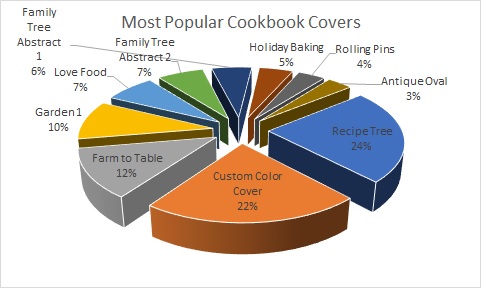
    At FamilyCookbookProject.com, we offer 55 different professionally designed covers to help editors create their perfect cookbook. We thought it might be interesting to see what was the most popular covers printed over the past 12 months. Here are covers chosen on print orders in 2018.  Note, Garden 1 is the default and sometimes people with full custom covers have that and it’s hidden, but they did not actually choose it.

    The most popular cookbook cover last year was Recipe Tree, accounting for almost a quarter of all printed covers. This is followed by Custom Covers when editors use their own design skills to create a personalized cover.

    To see all of our available professionally designed cookbook covers, go to the Layout and Design Center in your editor’s account and select Cookbook Covers.


    Bill Rice is the Co-Publisher at Family Cookbook Project which helps individuals and fundraising groups create cherished personalized cookbooks using the power of the Internet. Follow us on Facebook and Pinterest.

  • How To Make A Bridal Shower Cookbook

    How To Make A Bridal Shower Cookbook

    Here is a great idea next you need to plan a bridal shower for a friend or family member – a bridal cookbook!

    One thing every new bride to be needs is great recipes to feed her family. Both families as well as friends can help get this started by contributing recipes as part of a bridal shower!

    Here’s how to do it:

    When you send out your bridal shower invitations, include a link to your Family Cookbook Project cookbook, use the Invitation Tool and add everyone’s email. This will send everyone a link that will allow them to contribute their recipes. Set a deadline for entering recipes about three weeks from when the invitations are sent. Remember people will also wait until the deadline!

    Get both of the mother’s to contribute the most recipes if possible. This way both the bride and groom with have lots of recipes that they grew up with in their cookbook. Using Family Cookbook Project’s Custom Categories Tool, you can even create a special category for each mom’s recipes.

    As the recipes are being entered, start planning how the cookbook will look.

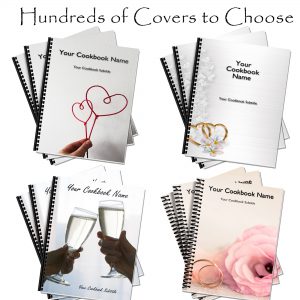
    Cover – Family Cookbook Project offers several cookbook covers specifically for bridal cookbooks or wedding cookbooks. You also can create a custom cover with the name of the cookbook and a photo of the couple.

    Write an introduction – The best bridal cookbooks will have an introduction written by the individuals giving the bridal shower. An introduction can be used wish the couple well wishes and to talk about the importance of family.

    Add Photos – Photos can help bring your cookbook to life. You can add photos of the lucky couple on top of recipes, or create custom pages to highlight photos of the bride and groom as they were growing up and while they were dating.

    Finally, it is time to print your cookbook. Make sure you give yourself enough time to order your cookbooks and have them printed, at least 3-4 weeks if possible. Be sure to order enough copies for each attendee as well as several extra copies for family members that can not attend the event.

    For the event, make some of the dishes from bridal cookbook and serve them at the event. Include a place card with the dish name and include the page number from the cookbook. Finally, if you are looking for a great wedding favor, try creating a Wedding Cookbook for your family and friends!


    Bill Rice is Co-Publisher of the Great Family Cookbook Project, a website that helps families and individuals collect and share food memories. Follow us on Facebook and Pinterest!

  • Why Cookbooks Make a Great Fundraiser

    Funding worthwhile projects can be a challenge. While there are many fundraising programs that happen year after year, it’s always good to try something new every once in a while to keep people interested.

    A fundraising cookbook not only can help you find important projects and activities, but it also can help to bring a community together in a fun activity that everyone can benefit from.

    Who doesn’t like to see their name in print? Having a recipe submitted and included in a community cookbook gives added incentive to buy those cookbooks and share them with friends and family.

    Here are some ideas on how to get the most from your fundraising cookbook project.

    1) The more people you get involved with your cookbook, the more people will likely be your target audience to buy that cookbook once it is printed.

    Cookbook fundraiser.com has built-in tools to invite as many people as possible to contribute to your cookbook. We make it easy!

    2) Include advertising from local businesses and individuals to help support the cost of printing the cookbook. That way the proceeds from the sale of the cookbook can go directly to the worthy cause.

    Cookbookfundraiser.com allows you to add as many extra pages to the back of your cookbook as you would like. These make it easy to add advertising pages!

    3) Most fundraising cookbooks seem to be priced between $12 and $20 and contain about 150 recipes. Determine how much money your organization wants to raise and that will help you determine how many copies you need to sell and at what price to reach your goal.

    Our website has a great cost estimator to help you determine what to expect from your printing cost. We also offer many hints on how to format your cookbook to decrease the cost of printing.

    4) Reach out to not only those who contributed recipes, but all those in your community to pre-order the cookbook before you go to print. The more copies you presell, the more copies you can order which will lower your per copy cost.

    Our pre-ordering tool makes getting orders from contributors a snap. You can also order a single copy of your cookbook to display at community events and help to generate additional sales.

    5) Add an ISBN number and bar code to your cookbook and you can sell the cookbook at local bookstores and online on Amazon.com. This can provide ongoing revenue for your organization.

    Family cookbook project offers a marketing package that includes an ISBN number and barcode. We also will get your cookbook listed on Amazon.com!

    6) Ask local retail stores to also sell your cookbook to their customers. Often grocery stores and small retailers will support community fundraising efforts at no charge by offering the product at their checkout counter.

    These are but I handful of ways to help you get the most from your cookbook fundraiser project. However, as with every fundraising project, it takes one individual to get the ball rolling.

    To get started with your cookbook fundraiser project, go to www.CookbookFundraiser.com and create a free account today!

    Bill Rice is the Co-Publisher at Family Cookbook Project which helps individuals and fundraising groups create cherished personalized cookbooks using the power of the Internet. Follow us on Facebook and Pinterest.
  • Anatomy of a Great Recipe

    One of the keys to a great family cookbook is to have great recipes that your family and friends have come to love. Here are some simple tips to help you capture the magic of the food you make.

    1. Use catchy titles. Using a catchy title will make your recipe sound more interesting. It is more interesting to people when they see the title “Gooey Triple Chocolate Cake” rather than just “Chocolate Cake”. When you are writing a title for a recipe, try to think of not only what the final dish will be, but what makes it special as well. 

    2. Include photos. Using images in your recipes can allow the person reading your cookbook to see what the final dish will look like and give then a guidepost to follow. Next time you make one of your special dishes, snap a quick photo and add it to your recipe the next time you log in.

    3. Be specific with your Ingredients. For many cooks, include a can of crushed tomatoes in your recipe and they know exactly what you mean or maybe not. Tell them to include a 12oz can of crushed tomatoes and everyone will know exactly what your recipe needs.

    4. Use step by step instructions. You might have made this recipe a thousand times, but someone new will need detailed directions for how to do it. Remember to include pan sizes, cooking times, the order that ingredients are added and how to tell when a dish is done. Also adding how many servings a recipe can make will help with meal planning. 

    5. Add personal notes. One of the things that make a family cooks so important is that it helps to capture the family traditions. Include a note with each recipe about how you first were introduced to the recipe and when it is typically served in your household. It makes the recipe more interesting and more meaningful to later generations.


    Chip Lowell is Co-Publisher of the Great Family Cookbook Project, a website that helps families and individuals collect and share food memories. Follow us on Facebook and Pinterest!

  • New TV Show Looking For Summer Grill Masters

    The Food Network is currently looking for chefs for a brand new summer grilling cook-out show. If you think you have the skills to bet the competition, fill out the contact form telling them why you’d be a great TV star and maybe, just maybe, you’ll be picked to be included in the filming next April!


  • Using Photos with Recipes

    They say a picture is worth a thousand words and with recipes that is especially true. 

    It’s wonderful to read a list of ingredients and see the potential in a recipe, but to look at the finished product can make your mouth water!

    The Family Cookbook Project highly recommends adding a photo to every recipe you can in your online cookbook. It helps people to see what to expect when they follow your recipe and gives them a standard to meet when comparing their finished dish to the original.

    With the advent of digital camera built into cell phones, you don’t have to be a professional photographer to take good food photos. 

    Here are some pointers to help improve your recipe photos:

    Use Natural Light – Make sure that the light is right – shoot the food either next to a bright window or under a pendant light in the restaurant. Don’t use your camera’s flash! Set your dish near a window and turn off any artificial lights that might be on nearby. Try to photograph with the light at your back or to the side of a dish, so that the shadows are to the side or behind it. 

    Hold Still – Taking photos inside, even with ample natural light, often means you have to hold the camera very still to keep it from registering hand shake. If you have a tripod, that’s ideal. If you don’t, you can duplicate the tripod effect by resting your elbows on the table or counter and using them to stabilize the camera. Moving the camera when taking a photo will only lead to blurry unusable photos. 

    Get close to the food! – Don’t stand back three feet and get the food with the stove, the dirty dishes, and all the condiments around it. Move in and get up close and personal, and let the pan…or the plate…or the cutting board fill the frame.  

    Stage the shot – The food isn’t the only thing in the photo. Using plates, silverware and linens in complementary colors can help your dish come alive. Shoot food on a beautiful plate or on a table with texture and character. The more appetizing the ingredients, the better your photo will be. Plates that contain colored vegetables and/or meat, preferably in light-colored sauces, are often the most appealing to the eye in photos. Also Don’t be Afraid of a mess. A few crumbs or a smear of dressing can be beautiful, if you let them. 

    Focus on the food –  If you are using a DSLR, stop down your lens to f/1.8 or f/2.0 that limits your depth of field to one part of the image only, blurring out everything around the subject, simulating a shot taken with a macro lens. If you are using an iPhone, there are apps, such as Camera+ or VSCO Cam, that will create the same effect. Remember, you want the food to be the main focus, not the background. 

    Try different angles –  Get up over the food and shoot straight down on it. When shooting overheads, if appropriate, try filling up the frame with what’s already on the table such as cups, wine glasses, utensils and moving hands. You can also  think in three dimensions, You might not usually serve brownies piled in a vertical column, but stacking any flat food, like pancakes, cookies, or even onion rings, is a great way to show off texture and make the photo more appealing. You can also add dimension to your food photos by showing the dish right after the that first bite is taken, or the second and third. These are little details that make a viewer feel like they’ve sat down and are enjoying the meal. 

    Get Close to Ugly Foods  – Some foods, no matter how good they taste, just don’t make good photos. But the closer you get to your subject, the more the visual story becomes about texture and color, rather than pure mouth-watering beauty.Avoid foods that are white and gloppy, such as congealed gravy on white pasty mashed potatoes. 

    Size Matters –  Make sure your camera settings are set for a good sized photo. Small photos look blurry when they are enlarged on line. A photo viewed online only has to be 72 dpi (dots per inch, the measure for quality), but if you are going to print your photo, you want it to be at least 300 dpi. 600 pixels wide (a measurement for size) is a good target for minimum photo size.

    Using other’s photos – It is important to note that the Internet makes it easy to find photos of recipes already taken. While this might be much easier, the photo still is the property of whomever holds the rights. Don’t always assume that because a photo is on the Internet you can simply use it for your recipe. Make sure you ask permission from the owner before you use it.

    Bill Rice takes more than 20,000 photos a year and is Co-Publisher of the Great Family Cookbook Project, a website that helps families and individuals collect and share food memories. Follow us on Facebook and Pinterest!