
Once your family has successfully created its first custom cookbook, you might think the project is complete. But if you’re like many families, there’s always something new that could be added—whether it’s an old recipe someone forgot to contribute, or new dishes that have become family favorites. That’s where creating a second edition of your family cookbook comes in!
Adding a second edition not only allows you to preserve even more family recipes, but it also helps keep your cookbook up-to-date with new culinary traditions. Whether you’re adding a few new recipes to your original cookbook, creating an entirely new volume, or establishing a tradition of annual updates, a second edition can expand your family’s culinary legacy.
In this post, we’ll explore the different ways to create a second edition of your family cookbook, how to organize it, and some tips for making each edition special and distinct.
Why Create a Second Edition?
Family cookbooks often start with a great burst of energy, collecting everyone’s favorite recipes in one place. But over time, new recipes are discovered, new family members may want to contribute, and other recipes that were overlooked during the first round become worth adding. Creating a second edition of your cookbook allows you to:
• Include Recipes That Were Missed: Sometimes recipes are accidentally left out of the original cookbook. Perhaps a cousin forgot to submit their holiday casserole recipe, or someone recently rediscovered Grandma’s handwritten notes for her famous pie. A second edition is the perfect opportunity to include these gems.
• Incorporate New Family Favorites: New traditions form over time, and certain dishes may become staples at family gatherings after the original cookbook was created. Whether it’s a dish someone perfected or a recipe passed down from a new family member, a second edition lets you add these new contributions.
• Celebrate Milestones: Some families like to update their cookbooks regularly, creating annual or milestone editions that document the evolution of the family’s culinary history. These volumes can be dated (e.g., “The Donovan Family Cookbook 2024”) or numbered (“Volume 2, 3, 4”) to celebrate the passing years and the continued growth of family traditions.
How to Approach Your Second Edition
When creating a second edition of your family cookbook, there are a few different approaches you can take, depending on how much new content you plan to include and how you want to organize the recipes.
1. Expanded Edition
If you’re looking to simply add a handful of new recipes, an expanded edition of your original cookbook is a great option. You can preserve the original content but add new sections or chapters with the latest recipes. This keeps everything in one place while acknowledging that your family’s culinary story is always growing.
• How to Organize: Consider adding a special section for “New Family Favorites” or “Recent Discoveries.” You can also intersperse the new recipes throughout the cookbook based on meal type (e.g., appetizers, mains, desserts).
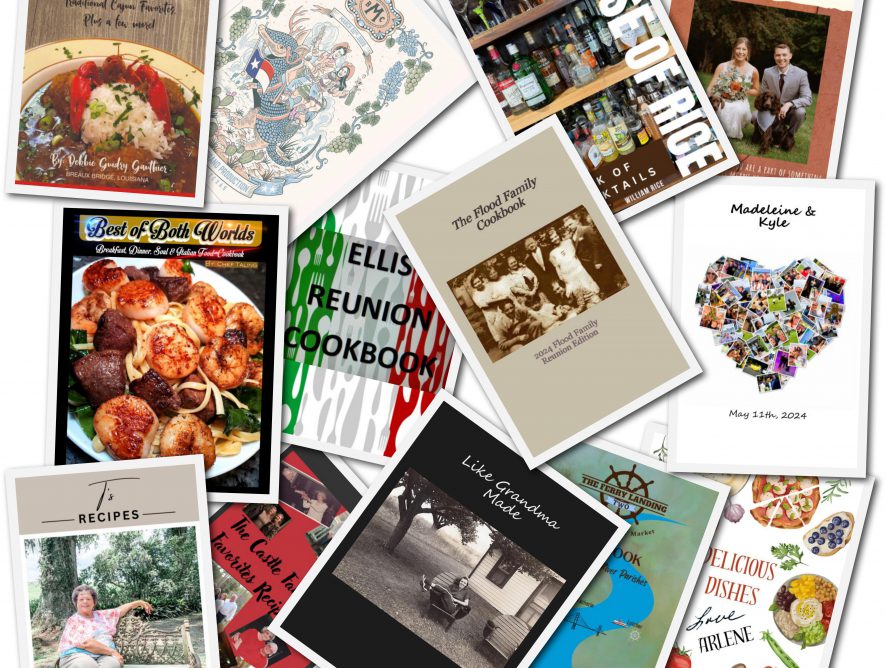
• Visual Changes: While the core content of the cookbook remains the same, you can update the cover to signal that this is a new edition. Changing the color scheme or adding a “Second Edition” label on the cover helps family members distinguish between versions.
2. New Volume (Volume 2, 3, etc.)
If there are enough new recipes to create an entirely new book, you might want to treat it as the next volume in a series. This is a fun way to build a tradition of multiple family cookbooks over time, with each volume representing a new chapter in your family’s food history.
• How to Organize: Each new volume can follow the same structure as the original, with sections for appetizers, soups, salads, mains, and desserts. However, you can also introduce new themes—such as “Holiday Recipes,” “Summer Barbecue Favorites,” or “Healthy Dishes”—to give each volume a unique flavor.
• Visual Changes: It’s important to create a distinct cover for each volume so that they stand out when placed side by side. Consider using a different family photo or a unique design for each new book. You can also label them as “Volume 2,” “Volume 3,” and so on for easy identification.
3. Annual Cookbook Tradition
Some families turn their cookbook creation into an annual tradition, updating the book each year with new recipes. This approach is perfect for families who enjoy experimenting with new dishes and want to capture each year’s culinary highlights.
• How to Organize: If you’re creating annual cookbooks (e.g., “The Donovan Family Cookbook 2024”), consider dating each edition and organizing the recipes by year. This way, family members can look back at what they were cooking in 2023, 2024, 2025, and so on, creating a unique snapshot of your family’s evolving tastes.
• Visual Changes: Since each edition is tied to a specific year, you can use the year itself as part of the cover design. You might also choose a theme for each year’s cookbook, such as “Summer Recipes” or “Holiday Favorites,” and reflect that in the cover art.
Tips for Creating a Successful Second Edition
1. Get Input from the Family
Involve your family in the process of creating a second edition by asking them for new recipes, stories, and photos to include. A collaborative approach will ensure that everyone feels included and excited about the new edition. You can even hold a “recipe submission” event where family members gather to cook and share their latest dishes.
2. Use Photos to Differentiate Editions
Updating the cover design is essential when creating a second edition. You can change the photo, color scheme, or theme to make it clear that this is a new volume. Consider using family photos from recent gatherings or events to make each edition more personal and reflective of the current family dynamic.
3. Include Special Sections for Milestones
If your family has celebrated major milestones—such as weddings, anniversaries, or graduations—since the original cookbook, you can include a section in the second edition dedicated to those moments. You could feature recipes from special celebrations or even include a “Family Milestones” section that highlights key events.
4. Create a Digital Version
If you want to make it easy for family members to access both the original cookbook and the second edition, consider creating a digital version in addition to the printed copy. A digital cookbook allows family members to quickly search for recipes and keep a copy on their devices, making it more accessible for everyone.
The Importance of Changing the Cover
One important tip when creating a second edition is to always change the cover design. This helps family members easily differentiate between the original cookbook and any subsequent editions. By choosing a new family photo or changing the color scheme, you give each edition its own unique identity while still preserving the continuity of the collection.
Whether you’re expanding your original cookbook or creating an entirely new volume, a second edition allows your family’s culinary traditions to continue growing and evolving. It’s a wonderful way to preserve both the old and the new, ensuring that future generations will have a complete record of the recipes that have shaped your family.
Bill Rice is Founder and Co-Publisher of the Family Cookbook Project, the leading online cookbook publisher with a website that helps families and individuals collect, preserve and share food memories by creating their own printed custom cookbooks. He is the author of The Wellfleet Oyster Cookbook and the Cape Cod Cocktail Cookbook (Available on Amazon), both created using FamilyCookbookProject.com. He is also editor of the Donovan Family Cookbook, now it’s third printing and is an avid genealogist tracing his family back to the 1600’s.
Follow Family Cookbook Project on Facebook, Instagram, Twitter TikTok, YouTube and Pinterest!