Category: Editor Tips

  • Family Cookbook Project Launches New Cookbook Cover Selection Tool

    Cover ToolFor more than a decade, Family Cookbook Project has helped families, churches, schools, community groups and individuals create personalized cookbooks to share with family and friends and to raise money for good causes. That process just got even easier!

    Family Cookbook Project is pleased to announce its new Cookbook Cover Selection Tool. Part of the cookbook design section, this new tool displays images of each professionally designed cookbook cover that users can select with a single click.

    The covers are divided into categories, including: Family, Farm, Food, Fundraising, General, Holiday, Kitchen, Religious, School, Wedding. There is also an option to see all of the covers at the same time. New categories and covers are already in the works and will be announced shortly.

    Users also have the option to create their own custom cookbook cover and upload that to the Family Cookbook Project Website.

    To view the Cookbook Cover Selection Tool, log in to your editor’s account and select “book options and design”. Here you will see the cover categories displayed with a “+” next to it. Click on the category label to expand the section and see the covers associated with that category. It’s that simple.

    In addition to cookbook covers, divider options and recipe layout options have been upgraded to use the same technology to display options in a convenient, easy to use arrangement.

    Save

  • Get Your Sport’s Team Fundraising Cookbooks Here!

    Football Fundraising CookbookTeam sports are a great way to instill valuable life lessons to our youth. Teamwork, hard work, perseverance, how to both win and lose. These things are learned by being part of a team. However the cost for running team sport program can be more than what many families can afford.  Team organizers often turn to fundraisers to help defray the costs of expenses like gear, travel, field and court time and more.

    For many years, youth football programs, youth soccer programs, cheer squads, have used fundraising cookbooks as a way to bring the team and it’s community together. The team members share their family food traditions and at the same time create a lasting reminder of their membership on the team and even or raise funds for worthy causes.

    Family Cookbook Project, using the power of the Internet, has been helping teams create team fundraiser cookbooks successfully and profitably. Our step by step guidance and simple online make creating a successful fundraising cookbook a breeze.

    Family Cookbook Project recently added 5 new sports-themed cookbook cover option to our already extensive offerings. And more are on the way!

    Cheer Fundraising Cookbook Soccer Fundraising Cookbook Cheerleading Fundraiser Cookbook Soccer Fundraiser Cookbook Football Fundraising Cookbook


    To start your own team fundraising cookbook project, go to our fundraising specific site www.CookbookFundraiser.com

  • How To Make A Bridal Shower Cookbook

    Here is a great idea next you need to plan a bridal shower for a friend or family member – a bridal cookbook!

    One thing every new bride to be needs is great recipes to feed her family. Both families as well as friends can help get this started by contributing recipes as part of a bridal shower!

    Here’s how to do it:

    When you send out your bridal shower invitations, include a link to your family cookbook project cookbook, use the Invitation Tool and add everyone’s email. This will send everyone a link that will allow them to contribute their recipes. Set a deadline for entering recipes about three weeks from when the invitations are sent. Remember people will also wait until the deadline!

    Get both of the mother’s to contribute the most recipes if possible. This way both the bride and groom with have lots of recipes that they grew up with in their cookbook. Using Family Cookbook Project’s Custom Categories Tool, you can even create a special category for each mom’s recipes.

    As the recipes are being entered, start planning how the cookbook will look.

    Cover – Family Cookbook Project offers several cookbook covers specifically for bridal cookbooks or wedding cookbooks. You also can create a custom cover with the name of the cookbook and a photo of the couple.

    Write an introduction – The best bridal cookbooks will have an introduction written by the individuals giving the bridal shower. An introduction can be used wish the couple well wishes and to talk about the importance of family.

    Add Photos – Photos can help bring your cookbook to life. You can add photos of the lucky couple on top of recipes, or create custom pages to highlight photos of the bride and groom as they were growing up and while they were dating.

    Finally, it is time to print your cookbook. Make sure you give yourself enough time to order your cookbooks and have them printed, at least 3-4 weeks if possible. Be sure to order enough copies for each attendee as well as several extra copies for family members that can not attend the event.

    For the event, make some of the dishes from bridal cookbook and serve them at the event. Include a place card with the dish name and include the page number from the cookbook. Finally, if you are looking for a great wedding favor, try creating a Wedding Cookbook for your family and friends!


    Bill Rice is Co-Publisher of the Great Family Cookbook Project, a website that helps families and individuals collect and share food memories. Follow us on Facebook and Pinterest!

  • How to Use Scanned Recipes in Your Family Cookbook

    How to Use Scanned Recipes in Your Family Cookbook

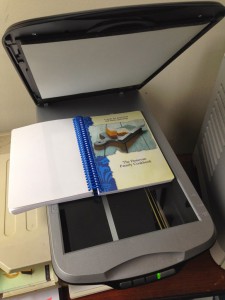
    Scan_Cookbook1Many of us have old recipe boxes that contain many many recipes that are written in the handwriting of someone from the past that we would like to preserve and include it our cookbook. 

    At FamilyCookbookProject.com, you can scan a recipe, personal letter or other family treasure and include it in your cookbook very easily. Here’s how: First you need to scan the recipe card or find someone who can do this for you. Many people have home scanners that are very easy to use – or know someone who has one. 

    When scanning, make sure the scanner saves the image as a JPEG file (check the settings). If it saves it as a PDF, you will need to open the PDF and “save as” a JPEG. Another setting you need to check is the image quality. Usually 150 to 300 DPI (Dots per Inch) is high enough for including in your cookbook. 

    Scanning actually creates a photo image of your recipe card that we can import into your cookbook software. Now your scanned image can be simply placed into your cookbook as you would any other photo.  

    Collections of Scanned Recipes 

    Sometimes family cookbook editors was their entire cookbooks to be a collection of scanned recipes. While not impossible, this can be a lot of work for the editor. 

    The problem with scanned recipes is that the cookbook software system can not read the text in the image to create titles and indexes and other parts of the cookbook. The computer just sees them as photos. 

     So you have two options: 

    You can include the scanned images as photos attached to recipes that you have typed into the system. This way the original item is included above the typed version. I don’t know about you, but my mother’s cursive writing is not always the most easy thing to read (sorry mom) and recipe cards are often smudged with food from meals passed and not always easy to read. 

    The other option is to enter just the title of the recipe and it’s category and leave the rest of the fields on the “add a recipe” form blank. This will give you the title of the recipe and allow an index to be created. Next upload the scanned image of the recipe and save. This way, the image of your recipe will be the recipe itself.


    Bill Rice is Co-Publisher of the Great Family Cookbook Project, a website that helps families and individuals collect and share food memories. Follow us on Facebook and Pinterest!

  • Recipe Standard Measurements

     measuring_cup

    For many generations, recipes were handed down by word of mouth from mother to daughter. Recipes consisted of a little of this and a smidgin of that. The food always came our great – or at least that is what we told out mothers! Today things are different. Computers make is easy to write down our recipes and share them with friends and family members over the Internet. However it is important to remember that cooking has a language of its own. It is a language of ingredients and measurements and directions. I believe the most important of these is measurements. If we did not have standard measurements for cooking, “T” could be a teaspoon, a tablespoons, a thimble full or a truck load! Here are a list of Standard Measures Abbreviations commonly used in recipes.

    teaspoon……………………… tsp.
    tablespoon…………………… tbsp. or T.
    cup…………………………….. c.
    quart…………………………… qt.
    ounce…………………………. oz.
    pint…………………………….. pt.
    gallon…………………………. gal.
    inch…………………………….. in.
    pound………………………….. lb.
    milliliter…………………………. ml
    liter……………………………….. L
    milligram……………………….. mg
    gram……………………………… g
    kilogram ……………………….. kg
    millimeter……………………… mm
    centimeter…………………….. cm
    meter……………………………. m
    Celsius…………………………… C
    Fahrenheit……………………. F

    Another important thing about standard measurements is that they don’t work if you don’t use them! Including an ingredient in your recipe without a specific amount is likely to leave someone trying the recipe for the first time scratching their head and wondering what to do. Remember know one will know unless you include it in your recipe.

    Bill Rice is Co-Publisher of the Great Family Cookbook Project, a website that helps families and individuals collect and share food memories. Follow us on Facebook and Pinterest!

  • Keeping Your Cookbook Contributors Motivated

    megaphoneAs with any family project, getting everyone to contribute can be a challenge, especially if they have not seen the end product beforehand.

    Here are some tips to keep your contributors motivated:

    The more the merrier – Be sure to include everyone, not just the great cooks. Everyone likes to be asked to participate and the more you invite, the more recipes you’ll likely get. To add contributors and send an email invitation, > Use the Invitation Tool

    Set a reasonable deadline – Set the submission deadline on the “Project Information Editor” page, but don’t set it too far in the future. We all tend to put off whatever we can and contributing recipes is often one of those things. A month is usually enough time to give everyone to find the recipes they want to contribute and get them entered. Two things to remember: most of the recipes will come in just in time for the deadline and second, you can always extend the deadline if you want more recipes.

    Send regular updates – Use the Reminder Tool to email some or all of your contributors on a regular basis. Remind them of the deadline and ask them to meet a specific goal, like “please add one or two recipes to each category”.

    Target the biggest recipe boxes – Every family has a handful of people who are known for their cooking (you are most likely one of them in your family!). Send a personal message to them either using the remainder tool or reaching out by telephone, Facebook or with a personal visit. People are flattered when their skills are recognized. Let them know the cookbook would not be complete without their contributions.

    Ask for specific recipes – Send a reminder to everyone asking for a specific recipe from your family’s past that will get everyone thinking of past gatherings. Include your memories of that dish or the person who created it. It might help remind everyone why putting together a family cookbook is important.

    Use social media – As you add your own recipes to your family cookbook, it is easy to post them to Facebook or pin them to Pinterest. Sharing your recipes this way shows other family members that you are contributing and shows them they should as well.

    Bill Rice is Co-Publisher of the Great Family Cookbook Project, a website that helps families and individuals collect and share food memories. Follow us on Facebook and Pinterest!

  • Why Blank Pages Are Important In Your Family Cookbook

    Blank_Cookbook1

    One of the questions we get a lot as Cookbook Publishers is “how do I remove the blank pages in my cookbook?”

    It seems that when people preview their family cookbook on FamilyCookbookProject.com, they see the cover, then a blank page, then the title page, then another blank page, and so on. They want those blank pages eliminated to lower the cost of printing.

    In publishing, especially cookbook publishing, a cookbook needs to be laid out in a specific way in order for the most important pages to be on the right side when the book is opened. Think about it, Whenever you open a book, the title page is the first thing you see and it is always on the right page of a two page spread. Same goes for the Introduction, Table of Contents and the section dividers.

    On FamilyCookbookProject.com, if you create a preview cookbook PDF, you want to open it in your Adobe Reader program and select the option to view “Facing Pages” or “Double-up” (look under the View menu), you’ll see how the pages back up to each other.

    Now with that said, there is no reason why those pages have to be blank. The inside front cover can have a family photo photo or bio of the cookbook editor. The same goes for other blank pages as well. If your introduction is one page and after it is a blank page, consider writing more, adding a photo or even making the text larger to fill up that extra space.

    One benefit form using FamilyCookbookProject.com is that we provide a complete set of handy kitchen information that can be used on the back of the recipe category dividers with the touch of a button.

    Bill Rice takes more than 20,000 photos a year and is Co-Publisher of the Great Family Cookbook Project, a website that helps families and individuals collect and share food memories. Follow us on Facebook and Pinterest!

  • How Many Recipes Does My Cookbook Need?

    spiralbinderclosedOne question every cookbook editor wants to know is how many recipes should my cookbook have? Too many and printing costs are higher, not enough and the cookbook is not as valuable. What’s a family cookbook editor to do?

    Looking at the thousands of cookbooks we have printed over the past decade, there is no real number of recipes that make up a good cookbook  – you have what you have.  We have printed cookbooks with just 15 great recipes and as many as 1200!  However, that 1200 recipe book was 750 pages – HUGE!

    The average size seems to be around 150 recipes and that is why we use that number in our cost calculator.

    When a great cookbook has less recipes, often the editor includes other content to augment the food offerings. Photos of each dish, a section of family photos, a family tree or family stories about people remembered can really add value to a smaller cookbook.

    Larger cookbooks can be impressive simply by the number of recipes it contains. However, since printing cost is directly related to the number of pages that need to be printed, it is important to be mindful of your design choices when choosing your layout options.

    At the end of the day, your cookbook is exactly that – your cookbook. You need to balance the number and quality of the recipes included with the needs of your family.

  • Easy ways to add recipes into your cookbook

    CookbooksMany people who have entered recipes in the past into a word processing program, like Microsoft Word, often of ask us for a way to import these recipes into Family Cookbook Project.

    Unfortunately, there is no automatic way to import these recipes into our system because each source uses its own layout and there is no way for us to identify what information needs to needs to be entered into our fields.

    Cut and Paste

    The good news is that it’s quick and easy to copy and paste a recipe into Family Cookbook Project using cut and paste on your computer.

    Here’s how: Simply highlight all the ingredients in your source document and hold down the Ctrl key while pressing the “C” key on your keyboard. Next go to “add a new recipe” in your family cookbook site. Click in the ingredients box and now hold the Ctrl key while pressing the “v” key. This pastes what you have copied into the field. Repeat for title, directions and notes and you are done!

    This process also can be used to import recipes from other websites. However, remember to credit the source of the recipe in your recipe notes.

    Scanning recipes

    Another way editors look to add recipes is by scanning. The problem with scanned recipes is that the system can not read the text to create titles and indexes and other parts of the cookbook. The computer just sees them as photos.

    Here is a blog post that should help answer your questions:

    http://www.familycookbookproject.com/theblog/2014/03/scanning-recipes-into-a-cookbook.html

    Moving recipes between cookbooks

    If want to transfer recipes from one cookbook to another, you can do so by using the Recipe Transfer Tool.  Go to Editor Tools>Multi-book Dashboard. You will find the link at the bottom of the page since it is still in the testing (beta) phase. This tool offers step by step instructions on how to move your recipes to the new cookbook

  • The most important part of your recipe – the title

    495379recipepic65541-Jacques-Torres-Secret-Chocolate-Chip-Cookie-RecipeYour recipe title is the single most important element of your recipe. This is because your title is a headline, and the headline in any type of content has one special and powerful property.

    Think about how you read a cookbook looking for a recipe to try.  You don’t start in the front and read every page like a novel then pick the one you want. No, you scan the pages looking for a photo or recipe title that catches your eye and looks interesting!

    Of all the elements in your recipe, the title has the greatest power for grabbing your readers’ attention and the greatest responsibility for enticing them to continue and read your recipe It follows that the better your title, the higher the chance of turning a recipe scanner into a recipe reader (and ultimately a recipe user).

    For a recipe title to be effective it needs to consider several things:

    Grab Attention – Like any headline you need to grab the readers attention.

    Describe the food being prepared – “Gruel” is one of my son’s favorite dishes, however it no one outside the family knows what it is. Including the main ingredient of the dish and even how it us prepared make the title more useful. “Baked Hamburger Gravy” would be a more descriptive title for our gruel.

    Be different and unique – If you have seen the recipe title before, it does not belong on your recipe!

    Include the source – In family cookbooks, certain people are associated with certain recipes. Grandma’s Apple Pie or Lou’s Lemon Bars help the reader image exactly what dish you are referring to. It just does not help anyone who is not at family gatherings!

    Sell the sizzle as well as the steak – This means to highlight the benefit, the reason why this recipe is worth making.

    Recipe titles that address cooking and eating needs are more likely to seduce the reader into the recipe itself. A good title clearly shows the reader which of their cooking and eating needs the recipe addresses. Every readers’ need is different. For example, it could be for something indulgent or something low fat, or something quick and easy or something sophisticated and thus involved, or something refined or something rustic.

    Consider the following recipe titles: ‘Soft and Chewy Chocolate Chip Cookies’, ‘Quick ‘n’ Easy Chocolate Chip Cookies’, ‘Grandma’s Favorite Chocolate Chip Cookies’, ‘Gluten Free Chocolate Chip Cookies’. Notice how each title addresses a different need and even appeals to different audiences. Quite simply, as the chocolate chip cookie examples show, it’s all down to the words you choose for your title.

    With a little thought and imagination, your recipe titles can stand out and make your readers give your recipes the attention they deserve.

    Bill Rice is Co-Publisher of the Great Family Cookbook Project, a website that helps families and individuals collect and share food memories. Follow us on Facebook and Pinterest!