Blog

  • How to Dictate a Recipe Into Your Family Cookbook Project

    How to Dictate a Recipe Into Your Family Cookbook Project

    If you have a pile of recipes that you need to enter into familycookbookproject.com but are not looking forward to having to spend your days typing, there is an easier way. You can dictate your recipes using speech to text software built into your phone or computer. Your recipes are turned into text that can be edited and then cut and pasted into the Add a Recipe form in your editor account.

    There are several very easy ways to dictate recipes.
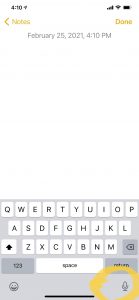
    Mobile phones – If you use an iPhone, simply open up your notes application and create a new note. Next, look at the bottom right corner of your pop-up keyboard. You’ll see a little microphone. Click on this and you can start talking and the software in the phone will change your words into written text.

    You might have to do some editing because it does not always get it right, but it still can be a great timesaver.

    Microsoft Word – while typing is certainly the most common way to create documents, you’re not limited to using the keyboard. Word will let you dictate your writing using voice recognition. This works on both a Mac and a PC.
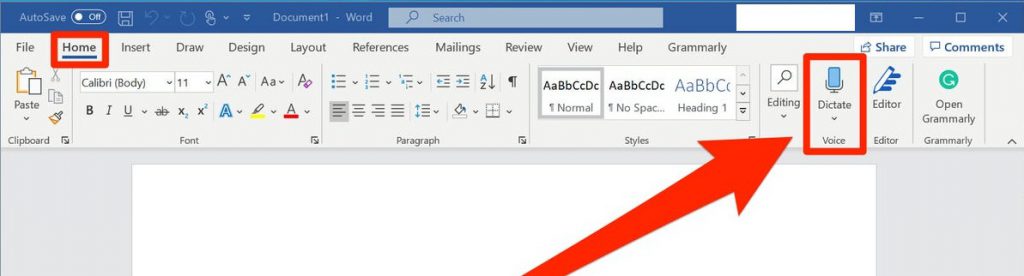
    Make sure your computer has a microphone attached. This can be built-in like on a laptop or a separate microphone you plug into the computer. Make sure you are in the home tab of a word document and then look for the microphone icon on the right side of the menu bar that says dictate.

    Remember to speak clearly and speak punctuation out loud as you go. For example you can say “new line“ if you want to drop down a line. When you finish a sentence, you just say the word “period”.

    Dedicated application – There are also other commercially available apps that you can use to dictate your recipes. However, with the simplicity of your mobile phone or word processing software, I don’t know why you would need it.

    Dictating your recipes can be a great timesaver. Once you have the text in a document, then you can simply cut and paste that recipe into the Add A Recipe form and you are good to go.

    By the way, this entire article was dictated on my iPhone. Good luck!


    Bill Rice is Founder and Co-Publisher of the Great Family Cookbook Project, a website that helps families and individuals collect, preserve and share food memories by creating their own printed personal cookbooks. He is the author of The Wellfleet Oyster Cookbook and the Cape Cod Cocktail Cookbook (Available on Amazon), both created using FamilyCookbookProject.com. He is also editor of the Donovan Family Cookbook, now it’s third printing and is an avid genealogist tracing his family back to the 1600’s.

    Follow Family Cookbook Project on Facebook, Instagram, Twitter and Pinterest!


  • Food Related Holidays – July 2023

    Food Related Holidays – July 2023

    It seems that every day is a special day for something. Especially when it comes to our favorite (or not so favorite) foods.

    FamilyCookbookProject.com created a list of special food related holidays that you may not be aware of.

    For fun, pick some of your favorites and served them on their national day. Remember to tell us what your favorite day of the month is for March!

    July Food Related National Days

    1 –

    3 –

    4-

    5 –

    6 –

    7 –

    8 –

    9 –

    10 –

    11 –

    12 –

    13 –

    14 –

    15 –

    16 –

    17 –

    18 –

    19 –

    20 –

    21 –

    22 –

    23 –

    24 –

    25 –

    26 –

    27 –

    28 –

    29 –

    30 –

    31 –


    Bill Rice is Co-Publisher of the Great Family Cookbook Project, a website that helps families and individuals collect, preserve and share food memories by creating their own printed personal cookbooks. He is the author of The Wellfleet Oyster Cookbook (Available on Amazon) and the Cape Cod Cocktail Cookbook, both created using FamilyCookbookProject.com. He is also editor of the Donovan Family Cookbook, now it’s third printing and is an avid genealogist tracing his family back to the 1600’s.

    Follow Family Cookbook Project on Facebook, Instagram, Twitter and Pinterest!


  • Preserving Family Recipes For Future Generations

    Preserving Family Recipes For Future Generations

    A lifetime of feeding our families can generate a wealth of tried and true family recipes. The recipes that everyone loves at holiday gatherings and the everyday meals that we used to feed our kids. All of them are special and need to be written down for future generations.

    In years past, our mothers and grandmothers used recipe boxes and index cards to keep track of their recipes if they ever bothered to write them down. Unfortunately if someone wanted a recipe, someone would have to find the recipe card, and hand write a new copy so that recipe can be shared.

    Today, computers and the power of the Internet allow us to create online cookbooks that can be printed and easily shared with friends and family members.

    A family cookbook allows us to choose which recipes were most important to us and tell the story behind the recipe. Which holidays was it used for, how did you get the recipe, who’s favorite recipe was it?

    Recipes are not just a set of instructions, The best recipes tell the story of the food and the family behind it.

    Here are some tips for starting your own family cookbook from the Family Cookbook Project.

    Get others involved – Everyone in the family has their favorites, so ask them which recipes they would like included. You can even invite them to contribute and enter those recipes directly into the program to save you time and effort.

    Set a deadline – Everyone is busy and will wait until the last minute to contribute recipes. That is why setting a deadline at least a month into the future is a good idea. That way people have something to shoot for and give you a reason to contact them to remind them that recipes are due.

    Select a cover that stands out – People will judge this cookbook by its cover so make sure it reflects your family’s personality. You can include a photo or pick a design that is meaningful to yourself and the family.

    Include photos – Photos make a cookbook come alive. Showing images of family members, past and present, helps put the family in the family cookbook.

    Read the recipes – As editor, it is your responsibility to check the recipes for typos and completeness. If a recipe lists an ingredient, make sure it has an amount and is included in the directions as well.

    Print extra copies – Ask all of the family members if they want a cookbook before placing your print order (or give them as gifts for the holidays), but be sure to order a few extra copies. Once people see the physical cookbook, it’s amazing how many additional people will want a copy.

    A family cookbook is a rewarding project that brings a family together and is a reminder of one of the important elements that help bind us together – memories of family meals, the food that was served and the people who made them.


    Bill Rice is Founder and Co-Publisher of the Great Family Cookbook Project, a website that helps families and individuals collect, preserve and share food memories by creating their own printed personal cookbooks. He is the author of The Wellfleet Oyster Cookbook and the Cape Cod Cocktail Cookbook (Available on Amazon), both created using FamilyCookbookProject.com. He is also editor of the Donovan Family Cookbook, now it’s third printing and is an avid genealogist tracing his family back to the 1600’s.

    Follow Family Cookbook Project on Facebook, Instagram, Twitter and Pinterest!

  • How To Bold Text In Your Family Cookbook Project Recipe

    How To Bold Text In Your Family Cookbook Project Recipe

    Have you ever wanted to call everyone’s attention to a specific line in a recipe?

    Do not cook longer than 10 minutes!

    Add ingredients in this specific order!

    Do not preheat your oven!

    Certain directions are critical to the outcome of a favorite dish and Family Cookbook Project has made it easy if you want to bold your text in a recipe.  You just have to learn HTML or HyperText Markup Language, the programming language of every website on the Internet.

    Now before you say “I’m not a computer programmer, I can barely turn on my laptop””. It’s super easy for what you want to do.

    In directions, comments and ingredients when you are adding a new recipe, you can use simple HTML tags like:

    <b>BOLD</b>

    <i>Italic</i>

    <u>Underline</u>

    Replace the word between the tags with what you want to appear in that format. It’s as simple as that!


    For example <b>Do not cook longer than 10 minutes!</b> looks like this Do not cook longer than 10 minutes!

    If you use Do not cook longer than 10 minutes! it will look like this: Do not cook longer than 10 minutes!

    and if you use <u>Do not cook longer than 10 minutes!</u> it will look like this Do not cook longer than 10 minutes!

    The most important thing to remember is that all tags start with “<>” and end with a “</>”. If you forget the /> then everything else in your recipe will be based on the tag you used. Don’t forget your “</>”!

    Family Cookbook Project is always looking for ways to make your favorite recipes come to life for you and your family.


    Bill Rice is Founder and Co-Publisher of the Great Family Cookbook Project, a website that helps families and individuals collect, preserve and share food memories by creating their own printed personal cookbooks. He is the author of The Wellfleet Oyster Cookbook and the Cape Cod Cocktail Cookbook (Available on Amazon), both created using FamilyCookbookProject.com. He is also editor of the Donovan Family Cookbook, now it’s third printing and is an avid genealogist tracing his family back to the 1600’s.

    Follow Family Cookbook Project on Facebook, Instagram, Twitter and Pinterest!

    Save

  • How To Share Your Family Cookbook Recipes

    How To Share Your Family Cookbook Recipes

    One of the real benefits of collecting all of your recipes in your online cookbook on FamilyCookbookProject.com is to be able to share them very easily with friends and family.

    Say you have friends over and they really like your split pea soup and want the recipe. All you need to do is go to your cookbook account either on your desktop computer or even on your mobile Mobile phone or tablet and pull up the recipe.  Now all you have to do is choose how you want to give it to him.

    Email – In the upper right hand corner, you’ll see a box marked email a recipe. Enter your friend’s email here and send them your recipe. It’s that easy!

    Posted on Facebook – Wow your friend might like your recipe, so will other friends. You can select the Facebook icon and post your recipe to your Facebook page to be seen by calling your friends. Especially if you’ve been adding photos to your recipes, your posts will really stand out and be appreciated by lots of your friends and family.

    Posted on Pinterest – Here’s another way to share your recipes if they have photos attached. Pinterest was built around sharing photos and when you share one of your recipes on this social media platform, the photo becomes the pin and people who click on it will see your recipe.

    Print your recipe – If your friend simply wants a printed copy of your recipe, it is easy to select the print icon and simply print them a copy and give it to them.

    Give them a cookbook – Printing your family cookbook allows you to share all of your recipes with friends and family and is a great gift from the heart.

    You also might want to suggest to your friends that they create their own family cookbook account so they can share their recipes as well!


    Bill Rice is Founder and Co-Publisher of the Great Family Cookbook Project, a website that helps families and individuals collect, preserve and share food memories by creating their own printed personal cookbooks. He is the author of The Wellfleet Oyster Cookbook and the Cape Cod Cocktail Cookbook (Available on Amazon), both created using FamilyCookbookProject.com. He is also editor of the Donovan Family Cookbook, now it’s third printing and is an avid genealogist tracing his family back to the 1600’s.

    Follow Family Cookbook Project on Facebook, Instagram, Twitter and Pinterest!

  • New Update To Family Cookbook Mobile App Available

    On of the benefits of having a FamilyCookbookProject.com account is that it is easy to take with you! The Family Cookbook Project online recipe box allows users to browse and use their recipes. Tools include our blog at your fingertips, latest recipes from our recipe database, notes for in the kitchen, a tip calculator and more! Users can enter their recipes at www.FamilyCookbookProject.com and have access anywhere!

    Recently we have upgraded the app to include additional features that were only available on our website. They include:

    • Access to our award winning blog
    • Rotate photo
    • Recipe-to-recipe navigation
    • Bigger buttons to return to lists/menu
    • Search for recipes


    If you already have the app on your mobile device, simply update your app like you would any app.

    If you do not yet have it, use one of the links below to get it and take FamilyCookbookProject.com with you!

    Apple iPhone or iPad: https://itunes.apple.com/us/app/family-cookbook-project-recipes/id1128570224?ls=1&mt=8

    Android: https://play.google.com/store/apps/details?id=com.app_fcbrecipes1.layout


    Bill Rice is Co-Publisher of the Great Family Cookbook Project, a website that helps families and individuals collect, preserve and share food memories by creating their own printed personal cookbooks. He is the author of The Wellfleet Oyster Cookbook (Available on Amazon) and the Cape Cod Cocktail Cookbook, both created using FamilyCookbookProject.com. He is also editor of the Donovan Family Cookbook, now it’s third printing.

    Follow Family Cookbook Project on Facebook, Instagram, Twitter, and Pinterest!


  • Family Cookbook Project App on Apple is Temporarily Unavailable

    Family Cookbook Project App on Apple is Temporarily Unavailable

    Our award-winning Apple/iOS app is undergoing an upgrade – which is great!  Unfortunately, while Apple was making us jump through hoops, the app was offline via the Apple Store for a day.  The app is now back on line with the first of the upgraded features and a new look and feel.

    Please go to the Apple App store and update your app if it has not done so automatically. This will allow you full functionality to the app once again.

  • Help Us With A Review Of Family Cookbook Project

    Help Us With A Review Of Family Cookbook Project

    In the online world, customer reviews are one of the most powerful tools to help people who do not have experience with a product to find out if it might be right for them. Positive reviews can really make a difference in attracting new customers to the Family Cookbook Project and we need your help.

    Would you kindly take a moment of your time and leave a positive review for us on the rating services below. This will help us attract new users to our site and allow us to continue to offer expanded services and programming to our existing customers.

    Thank you for your support.


    Bill Rice and Chip Lowell

    Publishers, Family Cookbook Project

  • How To Use The Custom Cover Arranger Tool Video

    How To Use The Custom Cover Arranger Tool Video

    You have full creative control on your cover text and photo layouts with the Cover Arranger Tool.  Go to Layout & Design>Select Cover.  You’ll see a link/button for “Custom Cover Arranger Tool.”

    You will see your cover as it will look in your printed book, sized according to your settings on a layout screen.  You can edit your title and subtitle text, fonts and location.  On the right side of the screen, select the cover item to “edit” in the drop down box.  You can move them around and resize them any way you’d like.  If you want your photos to retain their correct aspect ratio, check the little box on each photo’s lower left.  They can also be layered one on top of another.  You’ll see that when moving a photo, it automatically comes to the top/front of all others.  When done, click the “Save” button.

    You can also manage your cover photo settings on the right.  In the select box, choose “Picture”.  Click [Edit Photo] to set things like border style and color-B/W.  Those will be added normally in your printed book on the photos.

    If you wish to reset your cover text and photos to the default, check the boxes next to the Save button and click Save.


    About the Family Cookbook Project

    The Family Cookbook Project helps individuals and families collect and preserve the time-honored recipes that are so important to our family traditions. The website at www.familycookbookproject.com provides step-by-step instructions and online tools to create a valuable family heirloom that preserves recipes and memories for future generation.  Personalized cookbooks are also used by schools, church and other groups as important fundraisers.

  • Food Related Holidays – June 2023

    Food Related Holidays – June 2023

    It seems that every day is a special day for something. Especially when it comes to our favorite (or not so favorite) foods.

    FamilyCookbookProject.com created a list of special food related holidays that you may not be aware of.

    For fun, pick some of your favorites and served them on their national day.


    June Food Related National Days

    1 –

    2 –

    3 –

    4-

    5 –

    6 –

    7 –

    9 –

    10 –

    11 –

    12 –

    14 –

    16 –

    17 –

    20 –

    21 –

    22 –

    23 –

    24 –

    25 –

    26 –

    27 –

    29 –


    Source: National Day Calendar


    Bill Rice is Co-Publisher of the Great Family Cookbook Project, a website that helps families and individuals collect, preserve and share food memories by creating their own printed personal cookbooks. He is the author of The Wellfleet Oyster Cookbook (Available on Amazon) and the Cape Cod Cocktail Cookbook, both created using FamilyCookbookProject.com. He is also editor of the Donovan Family Cookbook, now it’s third printing and is an avid genealogist tracing his family back to the 1600’s.

    Follow Family Cookbook Project on Facebook, Instagram, Twitter and Pinterest!