Category: FamilyCookbookProject.com

  • Help Us With A Review Of Family Cookbook Project

    Help Us With A Review Of Family Cookbook Project

    In the online world, customer reviews are one of the most powerful tools to help people who do not have experience with a product to find out if it might be right for them. Positive reviews can really make a difference in attracting new customers to the Family Cookbook Project and we need your help.

    Would you kindly take a moment of your time and leave a positive review for us on the rating services below. This will help us attract new users to our site and allow us to continue to offer expanded services and programming to our existing customers.

    Thank you for your support.


    Bill Rice and Chip Lowell

    Publishers, Family Cookbook Project

  • Multi Cookbook Dashboard Enhanced

    Multi Cookbook Dashboard Enhanced

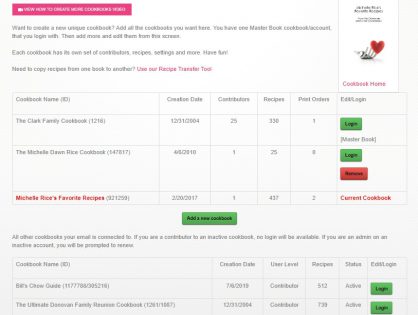
    For those of you who participate in more than one Family Cookbook Project cookbooks, we’ve just made it easier for you to access all of the projects you are involved in.

    Many cookbook editors are also a contributor on other cookbooks or have started multiple cookbooks themselves. Using the multi cookbook dashboard option in your navigation you now will be able to see not only the cookbooks that you are editor on, but all of the cookbooks that you are contributors on as well.

    If one of your contributors also has her own cookbook, they will be able to log into yours through their multi cookbook dashboard.

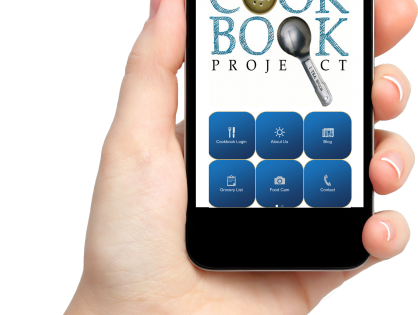
    In the familycookbookproject.com app, simply go to the option marked switch cookbooks, and you will see all of the cookbooks that you are associated with.

    Remember, these cookbooks are linked through your email address. If you have different email addresses on different accounts, they will not be linked unless you update the email address in your update your info tab in that cookbook account.

    We are always looking for ways to make familycookbookproject.com the easiest and most user-friendly online cookbook publishing platform available.

    If you have any ideas of how we can make things better, please use the green questions box on each page of the site and send us your suggestion.

  • Help Us With A Review Of Family Cookbook Project

    Help Us With A Review Of Family Cookbook Project

    In the online world, customer reviews are one of the most powerful tools to help people who do not have experience with a product to find out if it might be right for them. Positive reviews can really make a difference in attracting new customers to the Family Cookbook Project and we need your help.

    Would you kindly take a moment of your time and leave a positive review for us on the rating services below. This will help us attract new users to our site and allow us to continue to offer expanded services and programming to our existing customers.

    • Leave a review on Amazon.com  (You did not have to purchase your product there, you just had to be a user of the Family Cookbook Project)


    Bill Rice and Chip Lowell

    Publishers, Family Cookbook Project

  • How To Not Type Your Recipes into a Family Cookbook

    How To Not Type Your Recipes into a Family Cookbook

    For many people, the hardest thing about working with FamilyCookbokProject.com is getting all of our beloved recipes entered into the system so we can create a one of a kind cookbook for family and friends.

    You have several options when you want to enter a recipe into your own recipe book.

    Here are some of my favorite:

    Typing – This is straightforward. You open the Add A Recipe form and use your keyboard to type in the recipe and click on the save button (don’t forget the last part!).

    Other People Typing – One of the features that makes FamilyCookbookProject.com unique is that we make it easy to invite others to contribute recipes to your cookbook so you don’t have to do all of the work. Use the invitation tool and have others submit recipes that you can then edit. It’s a great way to build a family cookbook and bring everyone together.

    Cut and Paste – If you already have many of your recipes in a text format, like in a Word document, you can cut and paste the recipes into the form. This also works when you find a recipe on a website and you’d like to include it in your cookbook.

    Here’s how: Simply highlight all the ingredients in your source document and hold down the Ctrl key while pressing the “C” key on your keyboard. Next go to “add a new recipe” in your family cookbook site. Click in the ingredients box and now hold the Ctrl key while pressing the “v” key. This pastes what you have copied into the field. Repeat for title, directions and notes and you are done!

    Import a recipe from a website – We have created a tool to import recipes from some websites. However, it does not always work because every website is different in the way it lays out its recipes.

    From your quick start editors menu, click on the Recipe Center button. There you will find a link to “Import Recipes from another website”. This will allow you to take the URL from the recipe page and try to import it into your cookbook. If that does not work, you can cut and paste the ingredients and directions into a new recipe page which is very easy to do.

    Dictate recipes – If you don’t like to type, you can also talk your recipes into text form that can be cut and pasted into the Add A Recipe form. To see how to do this, see our blog post How to Dictate a Recipe Into Your Family Cookbook Project.

    Use a photo – You can include the scanned images as photos attached to recipes that you have typed into the system. This preserved the original form of the recipe card and makes the recipe highly readable.  One of the most asked questions we get is “How can I scan a recipe and use it in my cookbook?”

    If you have a recipe box or collection of recipes that you would like to scan and use as your recipes in a family cookbook, it can be done. However, a problem with scanned or photographed recipes is that the system can not read the text to create titles and indexes and other parts of the cookbook. The computer just sees them as photos.

    So you have two options:

    You can include the scanned images as photos attached to recipes that you have typed into the system. This preserved the original form of  the recipe card and makes the recipe highly readable.

    Second, you can upload the recipe card image on the Add A Recipe form as the recipe itself and just type the recipe title and contributor name. This saves typing and you get to use the image as the entire recipe. You can add personal notes if you want.

    So however you get your recipes entered into FamilyCookbookProject.com, it is the first step to creating what will certainly be a treasured family heirloom to be passed down to future generations.


    Bill Rice is Co-Publisher of the Great Family Cookbook Project, a website that helps families and individuals collect, preserve and share food memories by creating their own printed personal cookbooks. He is the author of The Wellfleet Oyster Cookbook (Available on Amazon) and the Cape Cod Cocktail Cookbook, both created using FamilyCookbookProject.com. He is also editor of the Donovan Family Cookbook, now it’s third printing.

    Follow Family Cookbook Project on Facebook, Instagram and Pinterest!

     

  • Family Cookbook Project Android App Update

    Family Cookbook Project Android App Update

    We have been notified by one of our customers that the Family Cookbook Project android app has been removed from the Google play store.

    We are looking into the issue and hope to have this resolved shortly.

    Family Cookbook Project

  • How To Share Your Family Cookbook Recipes

    How To Share Your Family Cookbook Recipes

    One of the real benefits of collecting all of your recipes in your online cookbook on FamilyCookbookProject.com is to be able to share them very easily with friends and family.

    Say you have friends over and they really like your split pea soup and want the recipe. All you need to do is go to your cookbook account either on your desktop computer or even on your mobile Mobile phone or tablet and pull up the recipe.  Now all you have to do is choose how you want to give it to him.

    Email – In the upper right hand corner, you’ll see a box marked email a recipe. Enter your friend’s email here and send them your recipe. It’s that easy!

    Posted on Facebook – Wow your friend might like your recipe, so will other friends. You can select the Facebook icon and post your recipe to your Facebook page to be seen by all your friends. Especially if you’ve been adding photos to your recipes, your posts will really stand out and be appreciated by lots of your friends and family.

    Posted on Pinterest – Here’s another way to share your recipes if they have photos attached. Pinterest was built around sharing photos and when you share one of your recipes on this social media platform, the photo becomes the pin and people who click on it will see your recipe.

    Print your recipe – If your friend simply wants a printed copy of your recipe, it is easy to select the print icon and simply print them a copy and give it to them.

    Give them your Family Cookbook – Printing your family cookbook allows you to share all of your recipes with friends and family and is a great gift from the heart.

    You also might want to suggest to your friends that they create their own family cookbook account so they can share their recipes as well!


    Bill Rice is Founder and Co-Publisher of the Great Family Cookbook Project, a website that helps families and individuals collect, preserve and share food memories by creating their own printed personal cookbooks. He is the author of The Wellfleet Oyster Cookbook and the Cape Cod Cocktail Cookbook (Available on Amazon), both created using FamilyCookbookProject.com. He is also editor of the Donovan Family Cookbook, now it’s third printing and is an avid genealogist tracing his family back to the 1600’s.

    Follow Family Cookbook Project on Facebook, Instagram, Twitter and Pinterest!

  • Another Happy Family Cookbook Project Editor

    Another Happy Family Cookbook Project Editor

    I can’t even tell you how excited I was to get my box of cookbooks!!! Last January I started looking online for a program to produce a cookbook from my recipes. I wanted them for Christmas for my daughters and daughter-in-laws. I anticipated taking all year typing them up. When I found this program using photographs of the recipe cards I was thrilled! Absolutely brilliant and the process was so slick! I wanted to keep it a secret but worried I would have to ask for help as I’m not that computer savvy, but I did the whole thing myself! It was very simple and definitely earns five stars from me! The finished book is beautiful. My family is beyond thrilled and I look forward to gifting these to my grandchildren as well. Thank you for your program that took me way beyond my expectations.

    — Cindy Jensen, Grandma Cindy’s Cookbook


    Bill Rice is Founder and Co-Publisher of the Great Family Cookbook Project, a website that helps families and individuals collect, preserve and share food memories by creating their own printed personal cookbooks. He is the author of The Wellfleet Oyster Cookbook and the Cape Cod Cocktail Cookbook (Available on Amazon), both created using FamilyCookbookProject.com. He is also editor of the Donovan Family Cookbook, now it’s third printing and is an avid genealogist tracing his family back to the 1600’s.

    Follow Family Cookbook Project on Facebook, Instagram, Twitter and Pinterest!

  • How To Add A Co-Editor To Your Family Cookbook Project

    How To Add A Co-Editor To Your Family Cookbook Project

    With the FamilyCookbookProject.com Publishing System, we recommend that only one person serve as Editor – “too many cooks spoil the soup” so to speak.  You really need one person with full control or you cannot keep up with what might have been changed.

    That said, you have the ability to promote any contributor to the level of Co-Editor.  To do so, go to the Communication Center and click on their name in the list.  Check the box next to their username and update.  The next time they login they will have access to:

    • Editor Activities Menu with all tools
    • Add/Edit any recipe to help with cookbook editing
    • Communication Center – they can promote/demote users as Co-Editors

    We highly recommend allowing only trusted helpers serving as co-editor.

    Here is a quick tutorial video that shows you how:  https://www.youtube.com/watch?v=99NcfrI-PKM


    Bill Rice is Founder and Co-Publisher of the Great Family Cookbook Project, a website that helps families and individuals collect, preserve and share food memories by creating their own printed personal cookbooks. He is the author of The Wellfleet Oyster Cookbook and the Cape Cod Cocktail Cookbook (Available on Amazon), both created using FamilyCookbookProject.com. He is also editor of the Donovan Family Cookbook, now it’s third printing and is an avid genealogist tracing his family back to the 1600’s.

    Follow Family Cookbook Project on Facebook, Instagram, Twitter and Pinterest!

  • Season’s Greetings From Family Cookbook Project

    Season’s Greetings From Family Cookbook Project

    The staff of Family Cookbook Project wishes you a happy and safe holiday season and a joyous New Year!

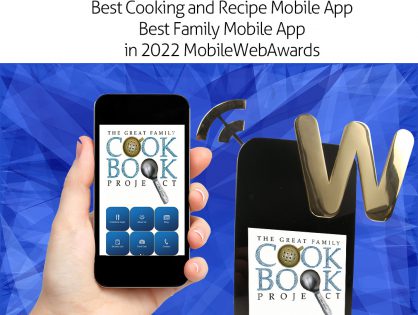
  • Family Cookbook Project Wins Best Family Mobile Application

    Family Cookbook Project Wins Best Family Mobile Application

    The Family Cookbook Project (www.familycookbookproject.com) has been named Best Family Mobile Application and Best Cooking and Recipe in the Web Marketing Association’s 11th annual MobileWebAward Competition. The Family Cookbook Project creates personalized cookbooks for individuals, families, church groups and schools. Designed for use on the Apple iPhone or iPad, the free app can be downloaded at https://itunes.apple.com/us/app/family-cookbook-recipes/id503938411?mt=8 or Android https://play.google.com/store/apps/details?id=com.app_fcbrecipes.layout

    The Family Cookbook Project online recipe box allows users to browse and use their recipes. Tools include our blog at your fingertips, latest recipes from our recipe database, notes for in the kitchen, a tip calculator and more! Users can enter their recipes at www.familycookbookproject.com and have access anywhere!

    “The Great Family Cookbook Project is a website dedicated to helping families collect and preserve cherished recipes into a printed cookbook that can be passed down from one generation to the next,” says Chip Lowell, Co-Publisher and Technical Director of the Family Cookbook Project. “However, many people also like to access their recipes on the go from their mobile device. iPhone and iPad users now have an easy to use option to access their recipes”.

    The Family Cookbook Project Website was started as a project in 2003 to help one family collect and organize a family cookbook. Overwhelming feedback from those who used the website led to its continued development and public launch. Currently, more than 106,000 families and groups have started family cookbooks using the website and contributors have entered more than 1.5 million individual recipes.

    “Personalized cookbooks have been around since the 1950s, however the process of collecting and organizing recipes has always been a labor intensive project for the cookbook editor,” says Lowell. “Now it’s easy and cost effective to have your very own cookbook printed. The Family Cookbook Project website provides step by step instructions and tools to help cookbook editors invite others to participate and allow them to enter their favorite recipes directly into the online system. The editor then simply reviews and edits the recipes, selects printing options, and sends the cookbook to be printed. The finished printed cookbooks are then received by the editor in only a few weeks”.

    “We thank Web Marketing Association MobileWebAward judges for recognizing our work. We will continue to develop ways to help families, schools and church groups create both online and printed cookbooks that become treasured heirlooms,” continued Lowell.

    About the Web Marketing Association

    Since 2011, the annual MobileWebAward Competition has been conducted by the Web Marketing Association, an independent organization founded with the purpose of evaluating and recognizing the standard of excellence on the World Wide Web. Award programs run by the Web Marketing Association include the WebAward Competition for Website Development, the Internet Advertising Competition and the MobileWebAwards.

    About the Family Cookbook Project

    The Family Cookbook Project is dedicated to helping individuals and families collect and preserve the time-honored recipes that are so important to our family traditions. The website at www.familycookbookproject.com provides step-by-step instructions and online tools to create a valuable family heirloom. Personalized cookbooks are also used by schools and church groups as important fundraisers. Groups looking to create cookbooks for fundraising efforts, can also check out www.cookbookfundraiser.com.