Category: FamilyCookbookProject.com

  • New Cookbook Editor Recipe Editing Navigation now available

    At Family Cookbook Project, we listen to our editors and our contributors and it usually gives us the ideas we use for future development. Today we are announcing the Family Cookbook Project’s Recipe navigation to make it easier to spellcheck and edit recipes before finalizing your cookbook for printing.

    Editor Mode

    When you go to your VIEW RECIPES and then VIEW RECIPES BY CATEGORY, click on the edit link for the first recipes to edit.

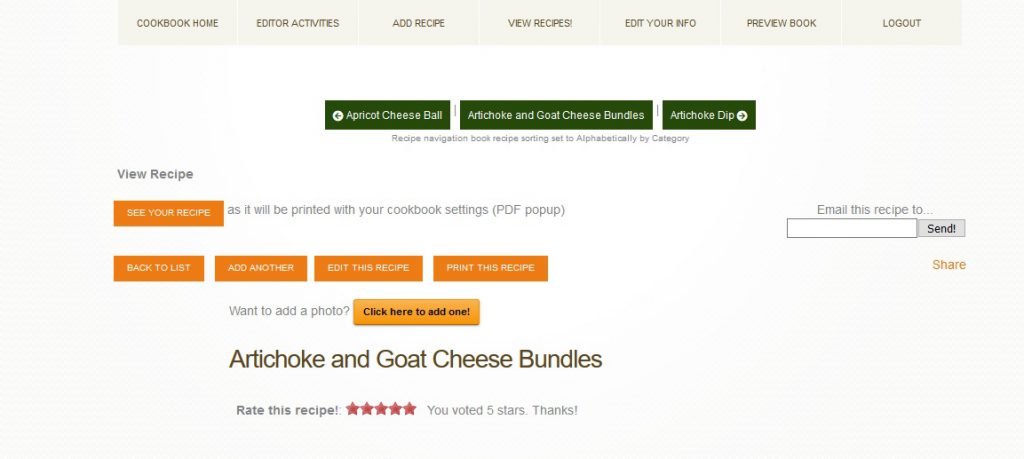
    You will notice two things. First any misspelled words will be underlined in red. Right click on the word to see correct spelling options. Second you will notice a recipe navigation bar that shows green buttons with the current recipe title and the next and prior titles as well.This allows you to move from one recipe to the next without having to go back to the index of recipes every time!

    Contributors will also have this same functionality, but only for the recipes that they submit.

    In the image below taken from my own family cookbook, the recipe title is “Artichoke and Goat Cheese Bundles” which also appears in the center green button. “Artichoke Dip” is the next recipe to edited when you click on that button. Or you can go back to the last recipe “Apricot Cheese Ball” by clicking on the button to the left.

    Always remember to save your changes before moving to the next recipe!


  • It’s Family Reunion and Summer Planning Time!

    iStock 000007045996Small

    June seems to be one of the busiest months for families. It also is the gateway to summer family reunions, picnics and vacations.

    Planning Ahead
    If you are using your family cookbooks as part of a celebration, either a family reunion, Mother’s Day gift, Christmas gift, wedding favor, or other specific event, it is important that you plan ahead and give yourself plenty of time to have your cookbooks printed and shipped for the event.

    Family Cookbook Project uses the latest in high speed digital printing to produce your family heirlooms. Generally it takes 2-3 weeks to get the files ready for the presses, print, bind and package to ship directly to you. However, during our busiest seasons – right before Mother’s Day and Christmas – it can take much longer.

    Another thing to consider is shipping. We use UPS and USPS to ship our family cookbooks all over the USA and Canada. Shipping can take an additional week to have your cookbooks reach you.

    Since personalized family cookbooks can make such great Christmas gifts, editors rush to get their print orders submitted in November in order to receive them in time for Christmas time gift giving. Normally, we have a November 30th deadline for delivery in time for Christmas. Save yourself (and us) the danger of not having your cookbooks ready and submit your holiday cookbook orders in October and beat the November rush.

    When setting your deadline for recipe contributions, leave enough time for you to review all of the recipes and finalize formatting before you can submit your order for printing. In just 2-3 weeks, your cookbooks should be in your hands!

    Wedding Season!

    iStock 000002823714XSmall

    There is no better way to get wedding guests involved prior to the event than asking them to contribute recipes for a wedding cookbook. Once the recipes are preserved online, they can be shared with other family members by email, individual printed recipes or provide a valuable lasting gift for attendees at the wedding reception.

    “I just received our box of ‘Jake and Julia’s Friends and Family Cookbooks’ today! They turned out fabulous! I am so pleased, and so excited to give it to them at their wedding! Thanks so much for the wonderful website! This was just what we wanted, and we received such a great response from our family members who contributed.”
    –Rita Flatz, Jake and Julia’s Friends and Family Cookbooks

  • Family Cookbook Project Launches 4 new Pinterest Boards

    Family Cookbook Project Pinterest Account

    Many of our cookbook editors and contributors are frequent users of the social media sharing site Pinterest and one of the biggest categories are recipes. Who doesn’t like looking at photos of food and having access to the recipe to boot!

    Family Cookbook Project is launching four new collections of recipes, known on Pinterest as “Boards”. Each one will focus on a different category of recipes contributed by our cookbook community.

    These new Pinterest boards join our existing 11 boards:

    If you are a Pinterest user, please follow Family Cookbook Project or any of the boards of interest.

    If you are not yet a Pinterest user, what are you waiting for! You can click on any of the links above to see what it is like and then create a free account to save pins to your own board. And be sure to follow Family Cookbook Project!


    Bill Rice is the Co-Publisher of FamilyCookbookProject, a website that helps people create personalized cookbooks for families, friends and fundraising efforts.

  • Organizing your recipes in your Personal cookbook

    Over the past 15 years, Family Cookbook Project has continually updated its software to meet the needs of you, our cookbook editors. One of the things that we have done is make it easy to organize your recipes as much as you’d like. This blog post will go over some of the ways you can organize how your recipes appear in your personal cookbook.

    Recipe categories

    Recipe categories are general classifications that allow similar recipes to be placed together. For example, appetizers or desserts. Here are some of your options for categories in the Family Cookbook Project:

    Default categories – when you first start your cookbook, these are the categories that are assigned to every cookbook. They are well thought out and can cover just about every type of recipe you may want to add to your cookbook.

    Custom categories – whether you want to add just a single new category or completely redo the categories to best meet your needs, you can use the custom category tool to accomplish this.

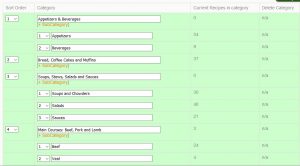
    Subcategories – One of the newer additions to the software is the ability to add subcategories to your cat. This allows you to group recipes of a specific category under the main, or top-level, category. For example in the default category appetizers and beverages, you may want to create a subcategory for appetizers and a sub category for beverages. That way each type of recipe appears with like recipes.

    Recipe sorting

    Recipe sorting determines in which order the recipes appear within a category. Here are your options for recipe sorting:

    Shortest to longest – this is the default sorting option. It places the shortest recipes upfront so more recipes can appear on a single page. Usually it is the most cost-effective way to organize your recipes.

    Alphabetical – this is a very popular way to sort your recipes. The titles are organized alphabetically so that As come before the Bs and so on.

    Custom Sort – One of the coolest additions to the software is the ability to sort your recipes anywhere you want. This tool will show you a list of all your recipes and you can move them to the location and it makes sense to you.

    How you sort your recipes is completely up to you. Family Cookbook Project just wants to make sure you have the tools you need to create the perfect personalized cookbook.

    Sample of the custom sort tool


    Bill Rice is the Co-Publisher at Family Cookbook Project which helps individuals and fundraising groups create cherished personalized cookbooks using the power of the Internet. Follow us on Facebook and Pinterest.
  • Why Cookbooks Make a Great Fundraiser

    Funding worthwhile projects can be a challenge. While there are many fundraising programs that happen year after year, it’s always good to try something new every once in a while to keep people interested.

    A fundraising cookbook not only can help you find important projects and activities, but it also can help to bring a community together in a fun activity that everyone can benefit from.

    Who doesn’t like to see their name in print? Having a recipe submitted and included in a community cookbook gives added incentive to buy those cookbooks and share them with friends and family.

    Here are some ideas on how to get the most from your fundraising cookbook project.

    1) The more people you get involved with your cookbook, the more people will likely be your target audience to buy that cookbook once it is printed.

    Cookbook fundraiser.com has built-in tools to invite as many people as possible to contribute to your cookbook. We make it easy!

    2) Include advertising from local businesses and individuals to help support the cost of printing the cookbook. That way the proceeds from the sale of the cookbook can go directly to the worthy cause.

    Cookbookfundraiser.com allows you to add as many extra pages to the back of your cookbook as you would like. These make it easy to add advertising pages!

    3) Most fundraising cookbooks seem to be priced between $12 and $20 and contain about 150 recipes. Determine how much money your organization wants to raise and that will help you determine how many copies you need to sell and at what price to reach your goal.

    Our website has a great cost estimator to help you determine what to expect from your printing cost. We also offer many hints on how to format your cookbook to decrease the cost of printing.

    4) Reach out to not only those who contributed recipes, but all those in your community to pre-order the cookbook before you go to print. The more copies you presell, the more copies you can order which will lower your per copy cost.

    Our pre-ordering tool makes getting orders from contributors a snap. You can also order a single copy of your cookbook to display at community events and help to generate additional sales.

    5) Add an ISBN number and bar code to your cookbook and you can sell the cookbook at local bookstores and online on Amazon.com. This can provide ongoing revenue for your organization.

    Family cookbook project offers a marketing package that includes an ISBN number and barcode. We also will get your cookbook listed on Amazon.com!

    6) Ask local retail stores to also sell your cookbook to their customers. Often grocery stores and small retailers will support community fundraising efforts at no charge by offering the product at their checkout counter.

    These are but I handful of ways to help you get the most from your cookbook fundraiser project. However, as with every fundraising project, it takes one individual to get the ball rolling.

    To get started with your cookbook fundraiser project, go to www.CookbookFundraiser.com and create a free account today!

    Bill Rice is the Co-Publisher at Family Cookbook Project which helps individuals and fundraising groups create cherished personalized cookbooks using the power of the Internet. Follow us on Facebook and Pinterest.

  • Meet the Guys Behind Family Cookbook Project

    Meet the Guys Behind Family Cookbook Project

    Chip Lowell and Bill Rice at a beach picnic on Cape Cod

    Family Cookbook Project was began 14 years ago and was developed by two friends who both love cooking and food.  Bill Rice is the father of four and has worked on his family’s genealogy for more than two decades.  Over a wonderful summertime family meal on Cape Cod, Bill and some of his family decided to create a family cookbook.  Bill turned to his long time friend and programming expert Chip Lowell to develop a simple website to facilitate the project.  The site was such a hit with Bill’s family, the two decided to offer it access to other families looking for an opportunity to create a lasting family heirloom.

    Both Bill and Chip brought a strong understanding of web development, marketing and the need for top notch customer service to help the development of Family Cookbook Project.

    Bill Rice is an entrepreneur and the President of the Web Marketing Association. He brings a strong marketing and usability focus to the development of the website and it’s products. He also has written much of the text for the site and many of the blog posts (including this one!). He is an avid photographer and a senior contributor on the TripAdvisor website.

    Chip Lowell is the technology guru behind the programming of Family Cookbook Project. He is also the Director of Sales and Marketing at CodeBlue Technology, LLC, based in Richmond, Virginia.  CodeBlue provides IT services throughout Richmond and central Virginia. Chip is also a grill master and loves to spend his free time (if he had any) in his back yard with his wife Sally trying new recipes on his Big Green Egg grill.

    In 14 years, we have had more than 60,000 cookbook editors use our system to collect and create online cookbooks for their family, friends, church, school, group or as a fundraiser. More than 227,600 contributors have submitted over 1.6 million recipes so far and hundreds of new recipes are added every day.

    So when you wonder why all of our customer service is usually done via email, it’s because we both have day jobs. However, Family Cookbook Project is a passion of ours. We love to be able to help promote the concept of personalized cookbooks for families and fundraising efforts.

  • Family cookbook project.com just got easier

    QuickStart HomepageOne of the things we are most proud of about the Award-winning FamilyCookbookProject.com is how easy it is to use. While the site offers so many options to make your personal cookbook look just like dreamed it would. But it still was not easy enough for us.

    That is why for the past several months we have been developing a new Editor’s “Quick Start” homepage specifically to make being a cookbook editor easy. We’ve created five separate centers and added all of the features, tools and options that relate to that center in one place. You will also find quick links to the most used functions on the homepage itself.

    These new Centers are:

    Recipe Center

    Cookbook Layout Center

    Cookbook Account Center

    Helpers and Contributors Center

    Cookbook Printing Center


    Your Choice

    Now, the first thing most of you long time editors will think is that “I know where everything is now, why do I have to learn it all over!”. Well, you don’t. You will have the option to keep your existing homepage or switch to the new one. However, all new accounts will automatically start on the new homepage experience.

    Instant Hints

    Another new feature to help you when you use a desktop is our “Instant Hint” feature. You will now find <?> icons throughout the site and if you hover over them with your computer pointer, you will get more details on what that link does without having to click on it!

    How to Select the new Editor’s homepage

    The first item in your Family Cookbook Message center (the right column of your homepage) is now option to “Set Home Page”. Change this to “Quick Start” and you’ll be switched to the new homepage. Change it back to “Full Home” and you’ll reset it to the original homepage.

    We Need your Help

    Now it is your turn to make the site even easier. Please give the new homepage a try and then give us your feedback about what you like and dislike about our new Editor’s Homepage. Is anything is the wrong Center? What else would you like to see? Is it easier or more difficult? It’s up to you to let us know what you think and help make Family Cookbook Project the best personal cookbook publishing site on the Internet.


  • Family Cookbook Project adds three new cover choices

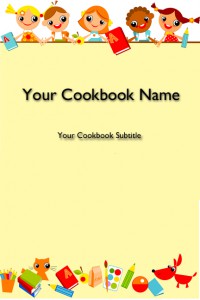
    BackToSchool4txtIn an effort to continually build its library of professionally designed covers for its editors to choose from, Family Cookbook Project has added three new cookbook covers.
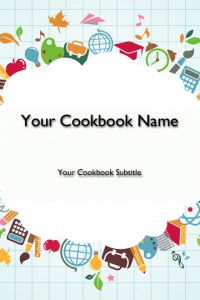
    Back to School – Kids: This cookbook cover is perfect for a daycare, elementary school or other cookbook involving young children. The images are fun whimsical cartoon characters having a good time.


    BackToSchool3txt


    Back to School – Supplies: Another school related cookbook cover, this cookbook cover features schools supplies such as a globe, artist paint brush, calculator, apple, etc.


    RedWhiteBluetxt


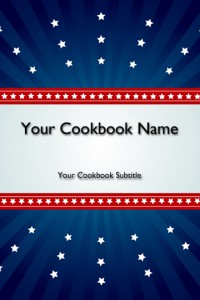
    Red, White and Blue: Looking for a patriotic cookbook, this may be your cover! A blue background with red stripes and white stars provide a colorful cover for any cookbook need.

    Family Cookbook Project is working on additional covers that will be available in the coming months. If you have a cover that you think we should add to our collection, please let us know!

  • 3 Ring Binding Now Available from Family Cookbook Project

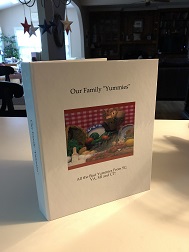
    IMG_8389A family cookbook is a living thing. New recipes are always being tried and added. Many people like to have a three-ring binder for their cookbooks so that adding recipes is quick and easy.
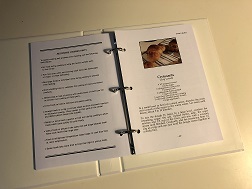
    We are excited to offer 3-ring binders as an option for our Family Cookbook Project members. A 3-ring binder will be the same great size as our traditional cookbooks but also have the name of the cookbook on the spine. The binder itself is quite a bit larger than just the pages – about an inch all around or so. The binding opens to allow you to add additional recipes as you go. The one difference between the two binding styles is you can’t have inside front or back cover content with the new 3-ring binders.

    IMG_8391In the Book Options and Design tool, you can choose from our standard coil binding in black or white or the new 3-ring binder options. The cost for the 3-ring binding is slightly higher than the coil binding because of the cost of printing.
    At Family Cookbook Project we are always looking for new ways to make your cookbooks better for you. We have other exciting announcements coming so stay tuned!


  • Cookbook Cover Selection Tool

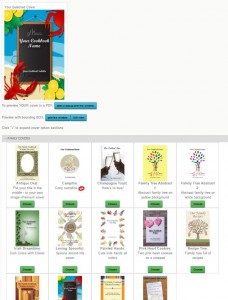
    covertoolHow do you select a great cover for your family cookbook? You use our Cookbook Cover Selection Tool. Part of the cookbook design section, this tool displays images of each professionally designed cookbook cover that users can select with a single click.

    The covers are divided into categories, including: Family, Farm, Food, Fundraising, General, Holiday, Kitchen, Religious, School, Wedding. There is also an option to see all of the covers at the same time. New categories and covers are already in the works and will be announced shortly.

    Users also have the option to create their own custom cookbook cover and upload that to the Family Cookbook Project Website.

    To view the Cookbook Cover Selection Tool, log in to your editor’s account and select “Book Options and Design”. Here you will see the cover categories displayed with a “+” next to it. Click on the category label to expand the section and see the covers associated with that category. It’s that simple.

    In addition to cookbook covers, divider options and recipe layout options have been upgraded to use the same technology to display options in a convenient, easy to use arrangement.