Year: 2023

  • How to Take Great Food Photos for Your Recipes

    How to Take Great Food Photos for Your Recipes

    They say a picture is worth a thousand words and with recipes that is especially true.

    It’s wonderful to read a list of ingredients and see the potential in a recipe, but to look at the finished product can make your mouth water!

    Family Cookbook Project highly recommends adding a photo to every recipe you can in your online cookbook. It helps people to see what to expect when they follow your recipe and gives them a standard to meet when comparing their finished dish to the original.

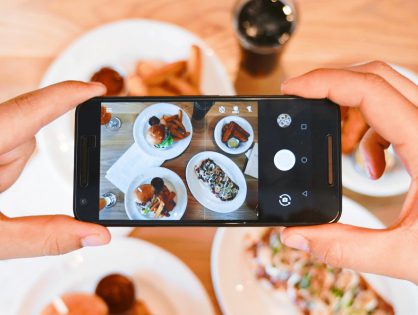
    With the advent of digital camera built into cell phones, you don’t have to be a professional photographer to take good food photos.

    Here are some pointers to help improve your recipe photos:
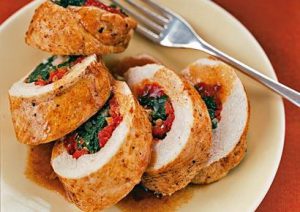
    Use Natural Light – Make sure that the light is right – shoot the food either next to a bright window or under a pendant light in the restaurant. Don’t use your camera’s flash! Set your dish near a window and turn off any artificial lights that might be on nearby. Try to photograph with the light at your back or to the side of a dish, so that the shadows are to the side or behind it. 

    Hold Still – Taking photos inside, even with ample natural light, often means you have to hold the camera very still to keep it from registering hand shake. If you have a tripod, that’s ideal. If you don’t, you can duplicate the tripod effect by resting your elbows on the table or counter and using them to stabilize the camera. Moving the camera when taking a photo will only lead to blurry unusable photos. 

    Get close to the food! – Don’t stand back three feet and get the food with the stove, the dirty dishes, and all the condiments around it. Move in and get up close and personal, and let the pan…or the plate…or the cutting board fill the frame.  

    Stage the shot – The food isn’t the only thing in the photo. Using plates, silverware and linens in complementary colors can help your dish come alive. Shoot food on a beautiful plate or on a table with texture and character. The more appetizing the ingredients, the better your photo will be. Plates that contain colored vegetables and/or meat, preferably in light-colored sauces, are often the most appealing to the eye in photos. Also Don’t be Afraid of a mess. A few crumbs or a smear of dressing can be beautiful, if you let them. 

    Focus on the food –  If you are using a DSLR, stop down your lens to f/1.8 or f/2.0 that limits your depth of field to one part of the image only, blurring out everything around the subject, simulating a shot taken with a macro lens. If you are using an iPhone, there are apps, such as Camera+ or VSCO Cam, that will create the same effect. Remember, you want the food to be the main focus, not the background. 

    Try different angles –  Get up over the food and shoot straight down on it. When shooting overheads, if appropriate, try filling up the frame with what’s already on the table such as cups, wine glasses, utensils and moving hands. You can also  think in three dimensions, You might not usually serve brownies piled in a vertical column, but stacking any flat food, like pancakes, cookies, or even onion rings, is a great way to show off texture and make the photo more appealing. You can also add dimension to your food photos by showing the dish right after the that first bite is taken, or the second and third. These are little details that make a viewer feel like they’ve sat down and are enjoying the meal. 
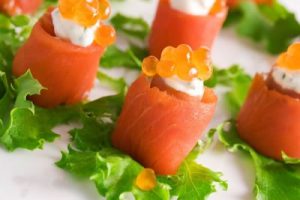
    Get Close to Ugly Foods  – Some foods, no matter how good they taste, just don’t make good photos. But the closer you get to your subject, the more the visual story becomes about texture and color, rather than pure mouth-watering beauty. Avoid foods that are white and gloppy, such as congealed gravy on white pasty mashed potatoes. 

    Size Matters –  Make sure your camera settings are set for a good sized photo. Small photos look blurry when they are enlarged on line. A photo viewed online only has to be 72 dpi (dots per inch, the measure for quality), but if you are going to print your photo, you want it to be at least 300 dpi. 600 pixels wide (a measurement for size) is a good target for minimum photo size.

    Using other’s photos – It is important to note that the Internet makes it easy to find photos of recipes already taken. While this might be much easier, the photo still is the property of whomever holds the rights. Don’t always assume that because a photo is on the Internet you can simply use it for your recipe. Make sure you ask permission from the owner before you use it.


    Bill Rice takes more than 20,000 photos a year and is Co-Publisher of the Great Family Cookbook Project Project, a website that helps families and individuals collect and share food memories. Follow us on Facebook, Instagram and Pinterest!

  • Food Related Holidays – August 2023

    Food Related Holidays – August 2023

    It seems that every day is a special day for something. Especially when it comes to our favorite (or not so favorite) foods.

    FamilyCookbookProject.com created a list of special food related holidays that you may not be aware of.

    For fun, pick some of your favorites and served them on their national day.


    August Food Related National Days

    1 –

    2 –

    3 –

    4-

    5 –

    6 –

    7 –

    8 –

    9 –

    10 –

    11 –

    12 –

    13 –

    14 –

    15 –

    16 –

    18 –

    19 –

    20 –

    21 –

    22 –

    23 –

    24 –

    25 –

    26 –

    27 –

    28 –

    29 –

    30 –

    31 –


    Source: National Day Calendar


    Bill Rice is Co-Publisher of the Great Family Cookbook Project, a website that helps families and individuals collect, preserve and share food memories by creating their own printed personal cookbooks. He is the author of The Wellfleet Oyster Cookbook (Available on Amazon) and the Cape Cod Cocktail Cookbook, both created using FamilyCookbookProject.com. He is also editor of the Donovan Family Cookbook, now it’s third printing and is an avid genealogist tracing his family back to the 1600’s.

    Follow Family Cookbook Project on Facebook, Instagram, Twitter and Pinterest!

  • 4 Family Cookbook Mistakes to Avoid

    4 Family Cookbook Mistakes to Avoid

    At Family Cookbook Project, we have been helping people create custom cookbooks for more than 15 years. We have learned a lot in that time and we wanted to point out some of the things not to do to make your personal cookbook a success.

    Mistake #1 -Thinking that everyone in the family will be interested in participating. While it is always a good thing to invite as many people as possible to contribute to your family cookbook, expecting everyone to participate is simply unrealistic. There’s a lot of people in every family that just don’t like to cook, think they are too busy or simply forget and miss the deadline.

    It’s important that once you invite your contributors that you keep them motivated by sending messages using family cookbook project reminder tool on a regular basis. You also can have them contacted when new recipes are added to the cookbook.

    Mistake #2 – Making the One Final Perfect Family Cookbook. let’s face it, family cookbooks are living documents that are currently evolving just like the families themselves. my family is already on its third volume of recipes. A lot of people also add and use recipes online.

    So the bottom line is don’t hold up the entire cookbook waiting for one or two specific recipes or contributors.

    Mistake #3 – Making the Family Recipe Book Only About Recipes. Sure the cookbook will have great recipes, however what people really like to read are the personal notes about the recipes and why they are important to the people who contributed them. Family photos are another great way to make your cookbook truly your family cookbook.

    Mistake #4 – Bad Proof Reading. One of the most important jobs as editor is reading all of the recipes activate been submitted to make sure the format is consistent and any miss spelled words are corrected.

    Luckily Family Cookbook Project has created an “editor edit mode” which allows you to go through each recipe and make changes to them quickly and efficiently. You browser’s spell check will also point out questionably spelled words.

    We would add a fifth mistake – not using Family Cookbook Project to organize and print your family cookbook!


    Bill Rice is Co-Publisher of the Great Family Cookbook Project, a website that helps families and individuals collect, preserve and share food memories by creating their own printed personal cookbooks. He is the author of The Wellfleet Oyster Cookbook (Available on Amazon) and the Cape Cod Cocktail Cookbook, both created using FamilyCookbookProject.com. He is also editor of the Donovan Family Cookbook, now it’s third printing.

    Follow Family Cookbook Project on Facebook, Instagram and Pinterest!


  • It’s Time To Start Thinking About Christmas

    It’s Time To Start Thinking About Christmas

    There is a reason why 90% of the cookbooks FamilyCookbookProject.com prints are submitted in late November and early December. Everyone knows that family cookbook‘s make great Christmas gifts! Everyone wants something personal and special to give to love ones at the holidays and a family cookbook is makes the perfect gift.

    Why are we telling you this in July? Well cookbooks don’t just happen by themselves, they need to be have recipes at it, professionally design covers selected and everything proofread before they are submitted for printing.

    The time it takes to have your cookbook printed and shipped also more than doubles just before the holidays because of the sheer volume. So now is the time to put your efforts into your cookbook and have it completed and submitted for printing by the time September rolls around.


    Bill Rice is Co-Publisher of the Great Family Cookbook Project, a website that helps families and individuals collect and share food memories by creating their own printed personal cookbooks. Follow us on Facebook, Instagram and Pinterest!

  • How To Create A Multi-Part Recipe

    How To Create A Multi-Part Recipe

    Have you ever had a cake recipe that really needed a specific frosting? Or a meat recipe that required a special sauce? Wouldn’t it be great if a a recipe could have sub recipes attached to keep them together?

    Many of our FamilyCookbookProject.com editors have asked for the ability to have multiple sections or steps in recipes. We like to listen and have added it! Now you can have up to 5 “sub” recipes or steps within a recipe, each with its own set of ingredients and directions. Example? You have Carrot Cake and you want a section for the “Cake” with its ingredients and directions, then “Cream Cheese Frosting” with another set of ingredients and directions.

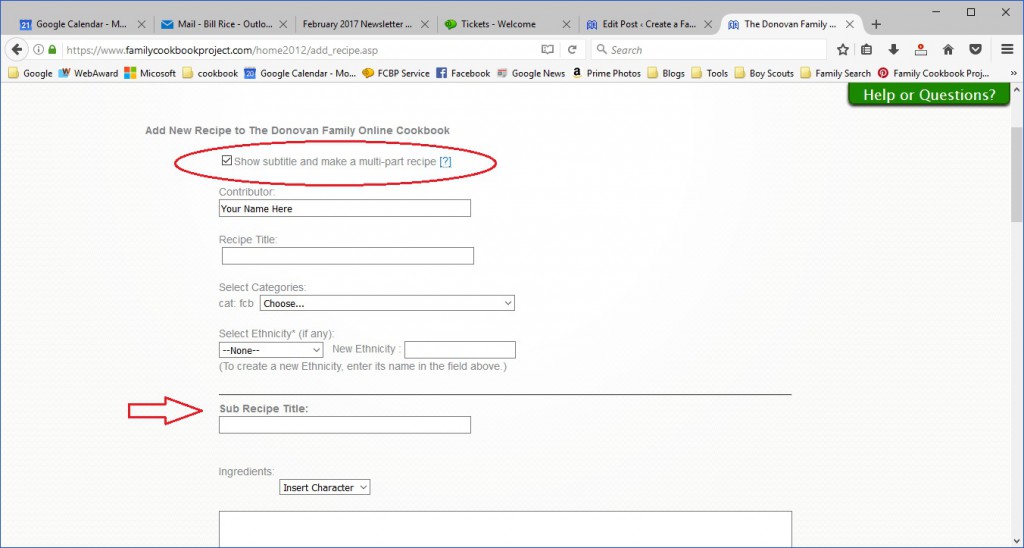
    To use this feature, simply go to Add Recipe or Edit an existing recipe. First check the box for “Show subtitle and make a multi-part recipe” right under the contributor field. This will add a field for sub-recipe title.

    Using our example above, here is where you would add your carrot cake ingredients and directions.

    Next, click on the green button to “Add new sub recipe”. This will add fields for a second set of sub recipe title, ingredients and directions for your Cream Cheese Frosting.

    You can add up to five sub recipes for your overall recipe.

    When you are done, make sure to click on the green button on the bottom of the page to save your recipe before moving on to your next recipe.


    Bill Rice is Co-Publisher of the Great Family Cookbook Project, a website that helps families and individuals collect, preserve and share food memories by creating their own printed personal cookbooks. He is the author of The Wellfleet Oyster Cookbook (Available on Amazon) and the Cape Cod Cocktail Cookbook, both created using FamilyCookbookProject.com. He is also editor of the Donovan Family Cookbook, now it’s third printing.

    Follow Family Cookbook Project on Facebook, Instagram and Pinterest!
  • How-to Add A Co-Editor To A Family Cookbook Project Video

    How-to Add A Co-Editor To A Family Cookbook Project Video

    This video demonstrates how to add a “co-editor” to help you get your custom cookbook project ready for production.


    About the Family Cookbook Project

    The Family Cookbook Project helps individuals and families collect and preserve the time-honored recipes that are so important to our family traditions. The website at www.familycookbookproject.com provides step-by-step instructions and online tools to create a valuable family heirloom that preserves recipes and memories for future generation.  Personalized cookbooks are also used by schools, church and other groups as important fundraisers.

  • How to Dictate a Recipe Into Your Family Cookbook Project

    How to Dictate a Recipe Into Your Family Cookbook Project

    If you have a pile of recipes that you need to enter into familycookbookproject.com but are not looking forward to having to spend your days typing, there is an easier way. You can dictate your recipes using speech to text software built into your phone or computer. Your recipes are turned into text that can be edited and then cut and pasted into the Add a Recipe form in your editor account.

    There are several very easy ways to dictate recipes.

    Mobile phones – If you use an iPhone, simply open up your notes application and create a new note. Next, look at the bottom right corner of your pop-up keyboard. You’ll see a little microphone. Click on this and you can start talking and the software in the phone will change your words into written text.
    You might have to do some editing because it does not always get it right, but it still can be a great timesaver.

    Microsoft Word – while typing is certainly the most common way to create documents, you’re not limited to using the keyboard. Word will let you dictate your writing using voice recognition. This works on both a Mac and a PC.

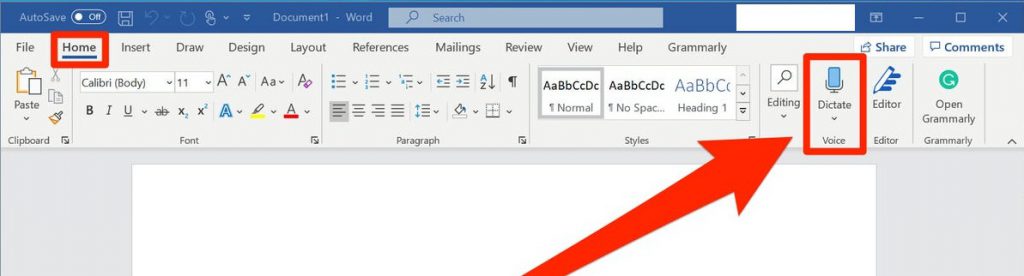
    Make sure your computer has a microphone attached. This can be built-in like on a laptop or a separate microphone you plug into the computer. Make sure you are in the home tab of a word document and then look for the microphone icon on the right side of the menu bar that says dictate.

    Remember to speak clearly and speak punctuation out loud as you go. For example you can say “new line“ if you want to drop down a line. When you finish a sentence, you just say the word “period”.

    Dedicated application – There are also other commercially available apps that you can use to dictate your recipes. However, with the simplicity of your mobile phone or word processing software, I don’t know why you would need it.

    Dictating your recipes can be a great timesaver. Once you have the text in a document, then you can simply cut and paste that recipe into the Add A Recipe form and you are good to go.

    By the way, this entire article was dictated on my iPhone. Good luck!


    Bill Rice is Founder and Co-Publisher of the Great Family Cookbook Project, a website that helps families and individuals collect, preserve and share food memories by creating their own printed personal cookbooks. He is the author of The Wellfleet Oyster Cookbook and the Cape Cod Cocktail Cookbook (Available on Amazon), both created using FamilyCookbookProject.com. He is also editor of the Donovan Family Cookbook, now it’s third printing and is an avid genealogist tracing his family back to the 1600’s.

    Follow Family Cookbook Project on Facebook, Instagram, Twitter and Pinterest!


  • Food Related Holidays – July 2023

    Food Related Holidays – July 2023

    It seems that every day is a special day for something. Especially when it comes to our favorite (or not so favorite) foods.

    FamilyCookbookProject.com created a list of special food related holidays that you may not be aware of.

    For fun, pick some of your favorites and served them on their national day. Remember to tell us what your favorite day of the month is for March!

    July Food Related National Days

    1 –

    3 –

    4-

    5 –

    6 –

    7 –

    8 –

    9 –

    10 –

    11 –

    12 –

    13 –

    14 –

    15 –

    16 –

    17 –

    18 –

    19 –

    20 –

    21 –

    22 –

    23 –

    24 –

    25 –

    26 –

    27 –

    28 –

    29 –

    30 –

    31 –


    Bill Rice is Co-Publisher of the Great Family Cookbook Project, a website that helps families and individuals collect, preserve and share food memories by creating their own printed personal cookbooks. He is the author of The Wellfleet Oyster Cookbook (Available on Amazon) and the Cape Cod Cocktail Cookbook, both created using FamilyCookbookProject.com. He is also editor of the Donovan Family Cookbook, now it’s third printing and is an avid genealogist tracing his family back to the 1600’s.

    Follow Family Cookbook Project on Facebook, Instagram, Twitter and Pinterest!


  • Preserving Family Recipes For Future Generations

    Preserving Family Recipes For Future Generations

    A lifetime of feeding our families can generate a wealth of tried and true family recipes. The recipes that everyone loves at holiday gatherings and the everyday meals that we used to feed our kids. All of them are special and need to be written down for future generations.

    In years past, our mothers and grandmothers used recipe boxes and index cards to keep track of their recipes if they ever bothered to write them down. Unfortunately if someone wanted a recipe, someone would have to find the recipe card, and hand write a new copy so that recipe can be shared.

    Today, computers and the power of the Internet allow us to create online cookbooks that can be printed and easily shared with friends and family members.

    A family cookbook allows us to choose which recipes were most important to us and tell the story behind the recipe. Which holidays was it used for, how did you get the recipe, who’s favorite recipe was it?

    Recipes are not just a set of instructions, The best recipes tell the story of the food and the family behind it.

    Here are some tips for starting your own family cookbook from the Family Cookbook Project.

    Get others involved – Everyone in the family has their favorites, so ask them which recipes they would like included. You can even invite them to contribute and enter those recipes directly into the program to save you time and effort.

    Set a deadline – Everyone is busy and will wait until the last minute to contribute recipes. That is why setting a deadline at least a month into the future is a good idea. That way people have something to shoot for and give you a reason to contact them to remind them that recipes are due.

    Select a cover that stands out – People will judge this cookbook by its cover so make sure it reflects your family’s personality. You can include a photo or pick a design that is meaningful to yourself and the family.

    Include photos – Photos make a cookbook come alive. Showing images of family members, past and present, helps put the family in the family cookbook.

    Read the recipes – As editor, it is your responsibility to check the recipes for typos and completeness. If a recipe lists an ingredient, make sure it has an amount and is included in the directions as well.

    Print extra copies – Ask all of the family members if they want a cookbook before placing your print order (or give them as gifts for the holidays), but be sure to order a few extra copies. Once people see the physical cookbook, it’s amazing how many additional people will want a copy.

    A family cookbook is a rewarding project that brings a family together and is a reminder of one of the important elements that help bind us together – memories of family meals, the food that was served and the people who made them.


    Bill Rice is Founder and Co-Publisher of the Great Family Cookbook Project, a website that helps families and individuals collect, preserve and share food memories by creating their own printed personal cookbooks. He is the author of The Wellfleet Oyster Cookbook and the Cape Cod Cocktail Cookbook (Available on Amazon), both created using FamilyCookbookProject.com. He is also editor of the Donovan Family Cookbook, now it’s third printing and is an avid genealogist tracing his family back to the 1600’s.

    Follow Family Cookbook Project on Facebook, Instagram, Twitter and Pinterest!

  • How To Bold Text In Your Family Cookbook Project Recipe

    How To Bold Text In Your Family Cookbook Project Recipe

    Have you ever wanted to call everyone’s attention to a specific line in a recipe?

    Do not cook longer than 10 minutes!

    Add ingredients in this specific order!

    Do not preheat your oven!

    Certain directions are critical to the outcome of a favorite dish and Family Cookbook Project has made it easy if you want to bold your text in a recipe.  You just have to learn HTML or HyperText Markup Language, the programming language of every website on the Internet.

    Now before you say “I’m not a computer programmer, I can barely turn on my laptop””. It’s super easy for what you want to do.

    In directions, comments and ingredients when you are adding a new recipe, you can use simple HTML tags like:

    <b>BOLD</b>

    <i>Italic</i>

    <u>Underline</u>

    Replace the word between the tags with what you want to appear in that format. It’s as simple as that!


    For example <b>Do not cook longer than 10 minutes!</b> looks like this Do not cook longer than 10 minutes!

    If you use Do not cook longer than 10 minutes! it will look like this: Do not cook longer than 10 minutes!

    and if you use <u>Do not cook longer than 10 minutes!</u> it will look like this Do not cook longer than 10 minutes!

    The most important thing to remember is that all tags start with “<>” and end with a “</>”. If you forget the /> then everything else in your recipe will be based on the tag you used. Don’t forget your “</>”!

    Family Cookbook Project is always looking for ways to make your favorite recipes come to life for you and your family.


    Bill Rice is Founder and Co-Publisher of the Great Family Cookbook Project, a website that helps families and individuals collect, preserve and share food memories by creating their own printed personal cookbooks. He is the author of The Wellfleet Oyster Cookbook and the Cape Cod Cocktail Cookbook (Available on Amazon), both created using FamilyCookbookProject.com. He is also editor of the Donovan Family Cookbook, now it’s third printing and is an avid genealogist tracing his family back to the 1600’s.

    Follow Family Cookbook Project on Facebook, Instagram, Twitter and Pinterest!

    Save